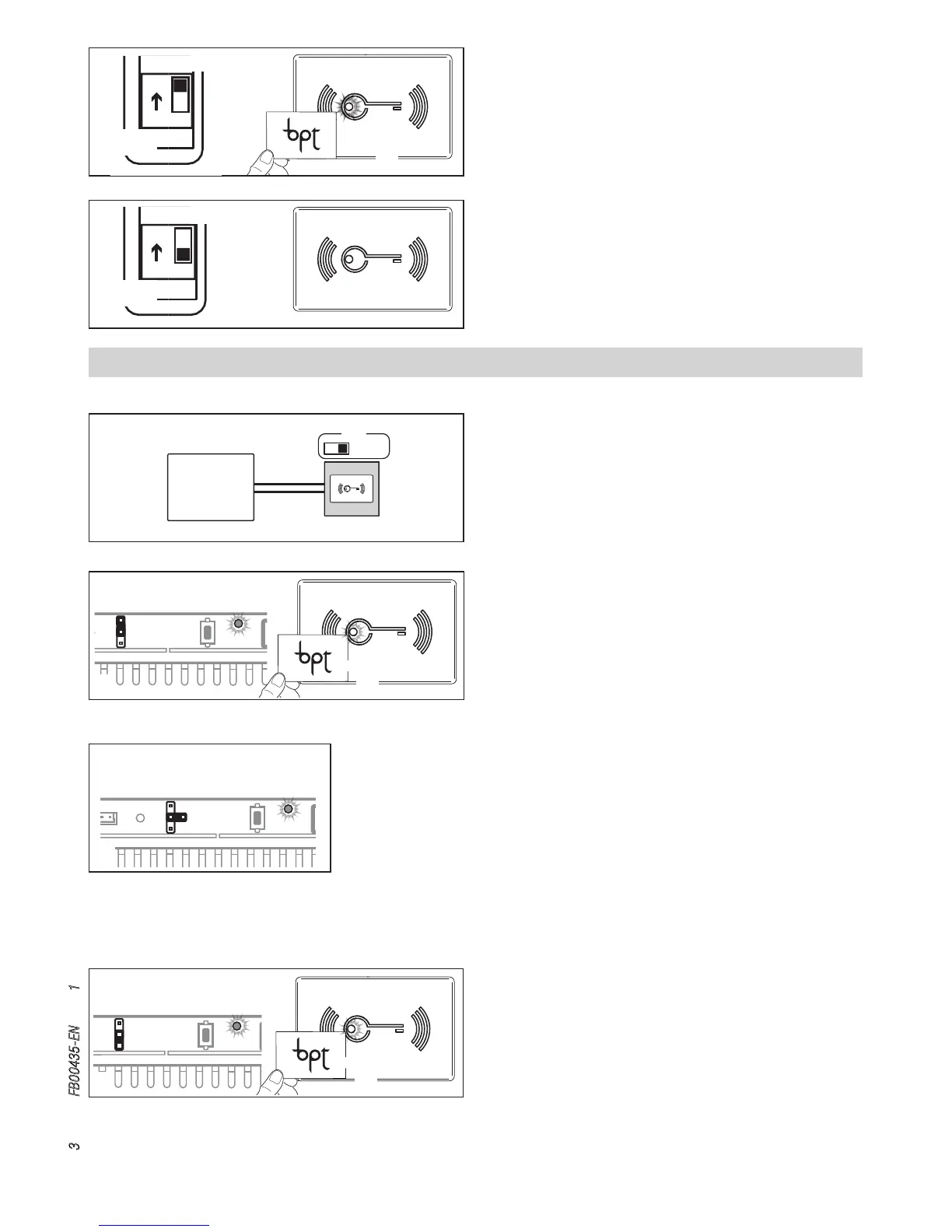
To remove lost badges, set DIP4 to ON C❶, The red LED will
remain on and steady C❷.
Pass all the badges previously acquired close to the reader C❸.
At the end, set DIP4 back to OFF: the red LED will go o D.
A tone will confirm the removal of the badges programmed previ-
ously but not acquired in the phase, otherwise 3 quick tones will
indicate an error condition.
N.B.
- In order for the procedure to be valid, you must pass at
least one previously acquired badge.
Stand-alone programming in SLAVE mode
Adding badges with VA/08
Set the RFID PROG jumper on the power supply to “+” A❶.
The red LED on the RFID will flash quickly A❷.
Swipe the badges to be associated. A tone will confirm that the association has taken
place A❸; 3 quick tones will indicate an error condition.
At the end, reposition the RFID PROG jumper in the rest position. The PROG LED on the
power supply and the red LED on the reader go o B.
Removing badges with VA/08
Set the RFID PROG jumper on the power supply to “-” C❶. The
red LED on the RFID will flash slowly C❷.
Swipe the badges to be removed twice. A tone will confirm that
the removal has taken place C❸; 3 quick tones will indicate
an error condition.
At the end, reposition the RFID PROG jumper in the rest position.
The PROG LED on the power supply and the red LED on the
reader go o B.


 To Next Page