User Manual 12
Audible Tone
User Option 8
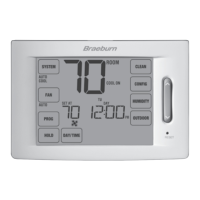
The Audible Tone feature enables or disables a tone you will hear when you touch any of the TouchPads
™
or
press the SpeedBar
®
. Select between on and off.
Setting the Time and Day
1. In normal operating mode, touch the DAY/TIME TouchPad.
The display will switch to the day/time setting mode and the
hour will be ashing.
2. Press the SpeedBar up or down to adjust the hour,
touch NEXT.
3. Press the SpeedBar up or down to adjust the minute,
touch NEXT.
4.
Press the SpeedBar up or down to adjust the day of the week.
5. Touch RETURN to exit.
3
Setting Your Program Schedule


 To Next Page