EasyManua.ls Logo

Bragi Dash Pro - Basic Controls; Eartouch

Default Icon
5 pages
Print Icon
To Previous Page IconTo Previous Page
Loading...
The Dash
PRO
Quick Start Guide
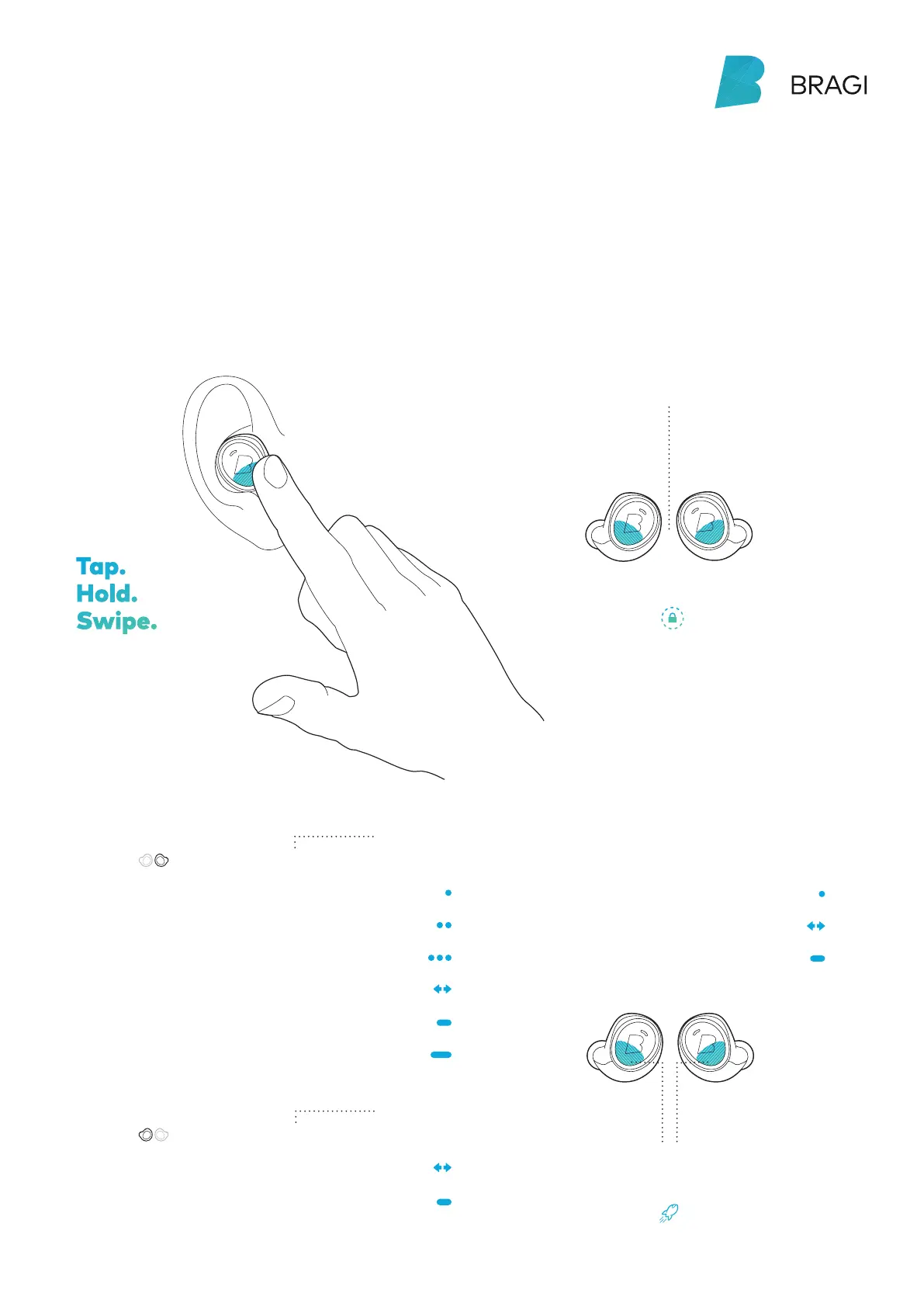
Control your Dash with tap, hold and swipe
gestures using the EarTouch Interface.
EarTouch
The EarTouch Interface
is located on the lower
half of each Dash.
Hold on both Dash simultaneously
to turn TouchLock on
Tap.
Hold.
Swipe.
Basic Controls
Activate more features
in the Bragi App
Select
Next / Previous menu item
Close menu
Menu navigation
Connect Bluetoot
Right Menu
Left Menu
Next song
Previous song
Play/Pause
Volume Up/Down
Audio Transparency
Tap
Tap
2× Tap
3× Tap
Swipe
Swipe
Swipe
Long Hold 5  sec
Hold 1  sec
Hold 1  sec
Hold 1  sec
Right Dash
Left Dash
Hold 1  sec to
open Right Menu
Hold 1  sec to
open Left Menu
Listen &
Communicate
Control
Applications

Related product manuals