9 Betjeningspanelet USA.fm • Page 17Baler
9 The Operating Panel
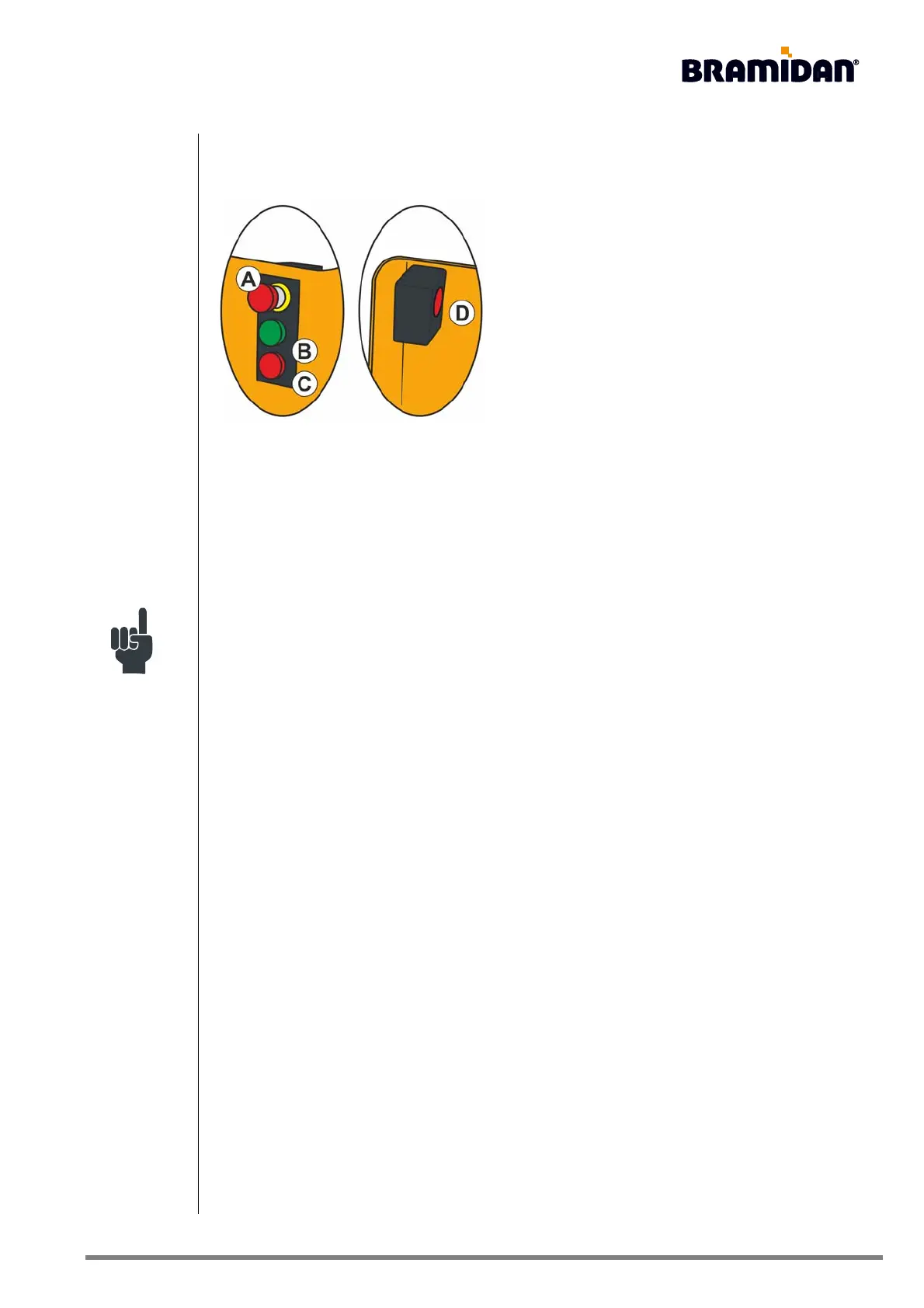
Description:
A) Emergency stop
B) Start button (green)
C) Finish indicator button (orange)
D) Finish indicator button (orange)
The two orange finish indicator buttons (C and D)
together constitute the two-hand control.
Push buttons with light signal:
The light in the operating panel's buttons guides the operator through the different phases of the
compression. This means that the operator should only concentrate on the button(s) that are lit/
blinking:
• A green-lit start button indicates that the baler is ready.
• A green flashing start button indicates that the baler is awaiting action from the operator. See
chapter 15, Troubleshooting.
• An orange-lit button indicates that the baler is ready to eject the bale.
• An orange flashing button indicates that the baler is ready to eject the bale, but is awaiting
action from the operator.


 To Next Page