EasyManua.ls Logo

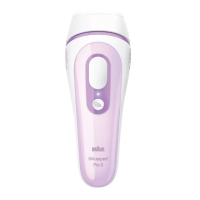
Braun Silk expert Pro 3 - User Manual

Braun Silk expert Pro 3
29 pages
Print Icon
To Next Page IconTo Next Page
Loading...
90691577/V-19
90691577_Victoria_Pro3_JP.indd 190691577_Victoria_Pro3_JP.indd 1 06.06.19 12:1806.06.19 12:18
Stapled booklet, 148 x 210 mm, 32 pages (incl. 4 pages cover),
Cover 4/4c, Content 4/4c
Business Use - P&G AUTHORIZED POA-00139951 Rev 001 Effective Date 2019-06-19 Printed 2019-12-06 Page 1 of 32

Questions and Answers

  • K
    Kevin PrattAug 15, 2025
    How to fix Braun Epilator if power bars do not light up?
    • D
      donna22Aug 15, 2025
      If the power bars on your Braun Epilator don't light up when you place the treatment window on your skin, ensure the device is properly connected to an electrical outlet. Then, activate the device by pressing the gentle mode button. Also, make sure that both skin tone sensors are in full contact with your skin. Try slightly adjusting the device's position to ensure both sensors make good skin contact.
  • S
    Sean MurphyAug 18, 2025
    What to do if Braun Silk expert Pro 3 doesn’t work on small areas?
    • K
      Kyle CarneyAug 18, 2025
      If your Braun Epilator isn’t working well on small areas, try using the precision head (if available). Ensure that both skin tone sensors are making contact with your skin during use.
  • J
    jonesmeganAug 21, 2025
    Why does my Braun Epilator flashing sequence slow down?
    • P
      Peggy KellyAug 21, 2025
      If the flashing sequence on your Braun Epilator slows down, it likely means the device is in heat-protection mode. To restore the normal flashing speed, simply allow the device to cool down.
  • J
    Jonathan PerryAug 25, 2025
    Why does only the first LED illuminate red on my Braun Epilator?
    • J
      Jason LambAug 26, 2025
      If only the first LED illuminates red on the power bar of your Braun Epilator, it indicates an invalid skin tone reading. This means your skin may be either too light or too dark for the device to operate. As a result, the device will not flash.
  • T
    Terry ReynoldsAug 28, 2025
    What to do if my Braun Silk expert Pro 3 is broken?
    • W
      Wanda CrawfordAug 28, 2025
      If your Braun Epilator is broken, cracked, or appears defective, do not use it, especially if the handle, base station, or main cord is damaged. If you have any doubts about its safety or suspect damage, refrain from using the device.
  • J
    Johnny LopezAug 31, 2025
    What to do if gentle mode indicator is flashing on Braun Epilator?
    • D
      David BurgessAug 31, 2025
      If the gentle mode indicator is flashing on your Braun Epilator, press the gentle mode button again to reactivate the mode.
  • B
    Brianna LucasSep 4, 2025
    Why is the first LED flashing red on my Braun Epilator?
    • J
      Jermaine SantiagoSep 4, 2025
      If the first LED on the power bars of your Braun Epilator flashes red, it means the head has been taken off. Re-attach the head to resolve this issue.
  • R
    rodrigueznancySep 7, 2025
    What does it mean if power bars show unfamiliar pattern on Braun Silk expert Pro 3 Epilator?
    • K
      Kristen GillSep 7, 2025
      If the power bars on your Braun Epilator display an unfamiliar pattern of one red LED shining along with individual white LEDs, it indicates a device error. Try unplugging the device and then reconnecting it. If the error continues, you will need to contact a Braun Service Centre for repair.
  • A
    April VillarrealSep 12, 2025
    Why are all white LEDs flashing on my Braun Epilator?
    • S
      Suzanne DiazSep 12, 2025
      When all the white LEDs on your Braun Epilator flash, it signals the end of the product's lifetime. This occurs when the maximum number of flashes (300,000) has been reached.

Summary

Safety Precautions

Danger and Critical Warnings

Details critical dangers and warnings for device usage.

Usage Warnings and Cautions

Lists cautionary advice and specific usage restrictions.

Device Operation Safety

Covers safety regarding device operation, modification, and maintenance.

Operational Handling Safety

Outlines safety measures for operation and handling of the device.

Skin Tone and Hair Color Guide

How to Operate the Device

Power On and Skin Tone Detection

Instructions for turning on the device and automatic skin tone detection.

Hair Removal Treatment Methods

Continuous and Spot Treatment Modes

Details methods for continuous and spot hair removal.

Facial Hair Removal (For Women Only)

Treatment Plan and Maintenance

Understanding Possible Side Effects

Troubleshooting and Support

English User Guide: Safety and Usage

Contraindications and Prohibitions

Lists conditions and situations where the device should not be used.

Usage Warnings and Precautions

Important warnings and precautions for device usage.

Electrical and Fire Safety

Precautions for electrical and fire safety.

English User Guide: How to Use

Automatic Light Adaptation

Explains how the device adjusts light intensity based on skin tone.

English User Guide: Treatment Methods

Gliding and Stamping Techniques

Details methods for continuous and spot hair removal.

English User Guide: Treatment Plan and Care

English User Guide: Troubleshooting and Side Effects

Understanding Possible Side Effects

Details common and rare side effects and how to react.

Device Troubleshooting Guide

Solutions for common problems encountered with the device.

Braun Silk expert Pro 3 Specifications

General IconGeneral
Skin Tone SensorYes
Energy Levels3
Number of Flashes300, 000
UsageBody and face
Power SourceMains powered
Treatment Window Size3 cm²
ModesNormal, Gentle
AttachmentsPrecision head
TechnologyIPL (Intense Pulsed Light)

Related product manuals