34
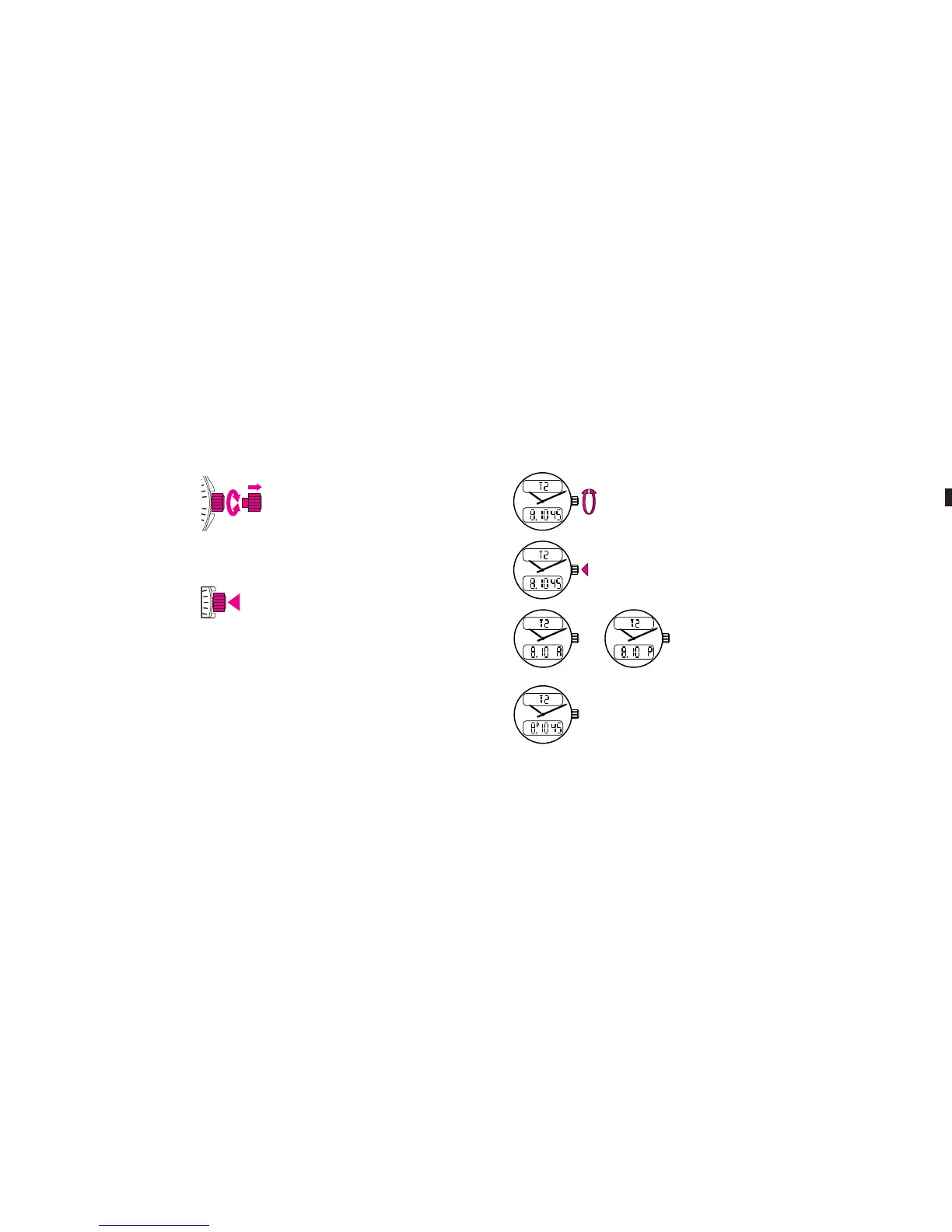
In the second position, rotating the crown enables you to set the functions.
A brief push in neutral position (1) actions the functions.
2. SELECTING AND SETTING FUNCTIONS
2.1 12H/24H display
You can choose between two display modes for the time of day:
– 24H: military style
– 2x12H periods: a.m. and p.m.
45
12
ME Aerospace Evo 16.04.13 11:54 Page34
C064 Aerospace Evo - Breitling - 264p_2rbt_Breitling - FB 002 - Verso - 2
C064 Aerospace Evo - Breitling - 264p_2rbt_Breitling - FB 002 - Verso - 2
Data sortie: 14.01.2015 - 08:35:08 - BlackData sortie: 14.01.2015 - 08:35:08 - Magenta
C064 Aerospace Evo - Breitling - 264p_2rbt_Breitling - FB 002 - Verso - 2
Plate Control Strip
© Heidelberger Druckmaschinen AG 2013
V15.0i (pdf)
Topsetter
Agfa
Azura TS
4/22
0.5 P
Times
1 P
Times
2 P
Times
4 P
Times
Times
4P
Times
2P
Times
1P
Times
0.5P
0/100% 1% 2% 3% 5% 10% 20% 25% 30% 40% 50% 60% 70% 75% 80% 90% 95% 97% 98% 99%
Lin+
Process
Selecting and correcting:
Select the T2 (2nd timezone) function by rotating the
crown.
Press once on the crown: if the letter A or P is displayed,
the time readout is in the 2x12H mode, as for example:
Note: when the timer readout is in the 2x12H mode, a
small P appears next to the hour figure between noon and
midnight.
If no letter is visible, the time readout is in the 24H mode, as for example:
35
before noon after noon
ME Aerospace Evo 16.04.13 13:52 Page35
C064 Aerospace Evo - Breitling - 264p_2rbt_Breitling - FB 002 - Verso - 2
C064 Aerospace Evo - Breitling - 264p_2rbt_Breitling - FB 002 - Verso - 2
Data sortie: 14.01.2015 - 08:35:08 - BlackData sortie: 14.01.2015 - 08:35:08 - Magenta
C064 Aerospace Evo - Breitling - 264p_2rbt_Breitling - FB 002 - Verso - 2
Plate Control Strip
© Heidelberger Druckmaschinen AG 2013
V15.0i (pdf)
Topsetter
Agfa
Azura TS
4/22
0.5 P
Times
1 P
Times
2 P
Times
4 P
Times
Times
4P
Times
2P
Times
1P
Times
0.5P
0/100% 1% 2% 3% 5% 10% 20% 25% 30% 40% 50% 60% 70% 75% 80% 90% 95% 97% 98% 99%
Lin+
Process








 To Next Page