36
2.2 SETTING THE WATCH TO THE CORRECT TIME
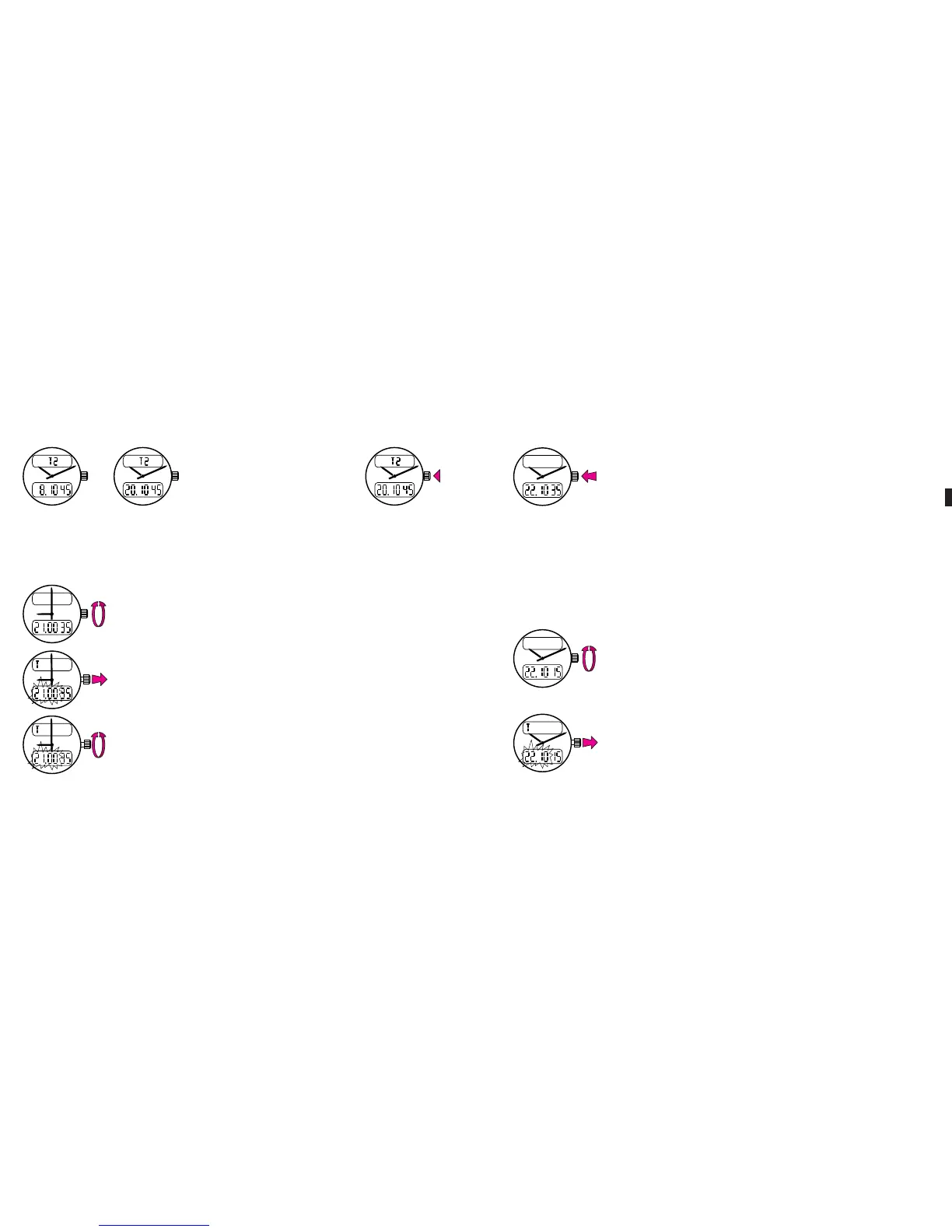
Put the watch in the 24H time readout mode (see 2.1).
Select and display local time.
Pull the crown out: the hour and minute digits flash on and
off.
Set the watch to the correct time by rotating the crown:
rapid rotation moves the hands forward or backward by a
full hour while slow rotation moves them in either direc-
tion by one minute.
before noon after noon
To change the time display
mode, press on the crown
twice.
ME Aerospace Evo 16.04.13 11:54 Page36
C064 Aerospace Evo - Breitling - 264p_2rbt_Breitling - FB 002 - Recto - 2
C064 Aerospace Evo - Breitling - 264p_2rbt_Breitling - FB 002 - Recto - 2
Data sortie: 14.01.2015 - 08:35:08 - BlackData sortie: 14.01.2015 - 08:35:08 - Magenta
C064 Aerospace Evo - Breitling - 264p_2rbt_Breitling - FB 002 - Recto - 2
Plate Control Strip
© Heidelberger Druckmaschinen AG 2013
V15.0i (pdf)
Topsetter
Agfa
Azura TS
4/22
0.5 P
Times
1 P
Times
2 P
Times
4 P
Times
Times
4P
Times
2P
Times
1P
Times
0.5P
0/100% 1% 2% 3% 5% 10% 20% 25% 30% 40% 50% 60% 70% 75% 80% 90% 95% 97% 98% 99%
Lin+
Process
Push the crown back against the case.
If desired, return the watch to the 2x12H mode (see 2.1).
2.3 ADJUSTING THE SECONDS
If the watch loses or gains a few seconds, after some time on the wrist for
instance or following setting operations, it is easily reset to the exact
second.
Select and display local time.
Pull the crown out: the hour and minute digits flash on and
off.
37
ME Aerospace Evo 16.04.13 11:54 Page37
C064 Aerospace Evo - Breitling - 264p_2rbt_Breitling - FB 003 - Recto - 3
C064 Aerospace Evo - Breitling - 264p_2rbt_Breitling - FB 003 - Recto - 3
Data sortie: 14.01.2015 - 08:35:09 - BlackData sortie: 14.01.2015 - 08:35:09 - Magenta
C064 Aerospace Evo - Breitling - 264p_2rbt_Breitling - FB 003 - Recto - 3
Plate Control Strip
© Heidelberger Druckmaschinen AG 2013
V15.0i (pdf)
Topsetter
Agfa
Azura TS
4/22
0.5 P
Times
1 P
Times
2 P
Times
4 P
Times
Times
4P
Times
2P
Times
1P
Times
0.5P
0/100% 1% 2% 3% 5% 10% 20% 25% 30% 40% 50% 60% 70% 75% 80% 90% 95% 97% 98% 99%
Lin+
Process












 To Next Page