44
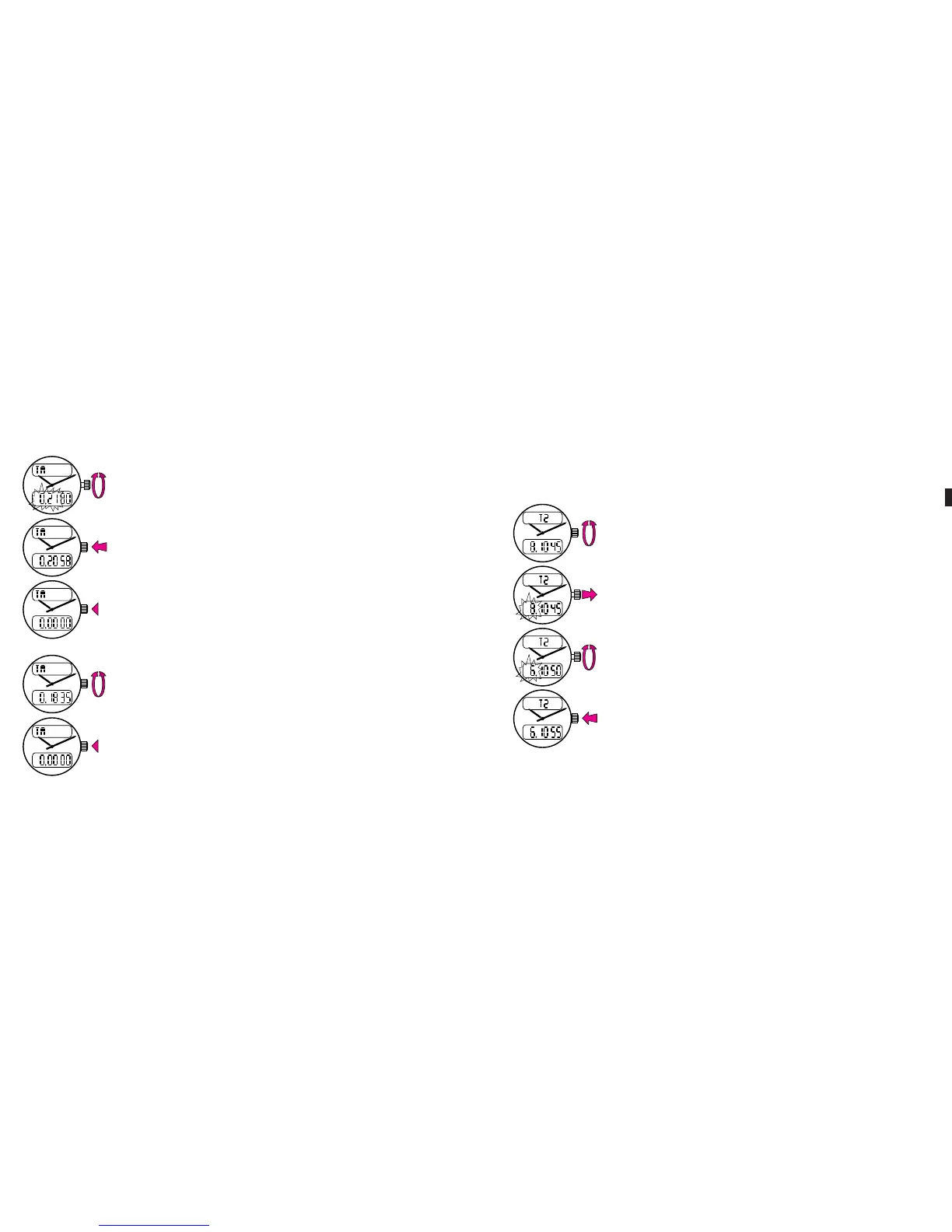
Set the desired time span by rotating the crown forward or
backward (rapid rotation changes the hour readout, slow
rotation changes the minute readout).
Push the crown back in: counting down begins and the
watch will buzz at the end of the preset time span.
Press on the crown to end the buzzing.
To cancel an ongoing countdown operation:
Select the TM (timer) function.
Press on the crown during more than two seconds: the
timer will return to zero.
ME Aerospace Evo 16.04.13 11:54 Page44
C064 Aerospace Evo - Breitling - 264p_2rbt_Breitling - FB 003 - Recto - 3
C064 Aerospace Evo - Breitling - 264p_2rbt_Breitling - FB 003 - Recto - 3
Data sortie: 14.01.2015 - 08:35:09 - BlackData sortie: 14.01.2015 - 08:35:09 - Magenta
C064 Aerospace Evo - Breitling - 264p_2rbt_Breitling - FB 003 - Recto - 3
Plate Control Strip
© Heidelberger Druckmaschinen AG 2013
V15.0i (pdf)
Topsetter
Agfa
Azura TS
4/22
0.5 P
Times
1 P
Times
2 P
Times
4 P
Times
Times
4P
Times
2P
Times
1P
Times
0.5P
0/100% 1% 2% 3% 5% 10% 20% 25% 30% 40% 50% 60% 70% 75% 80% 90% 95% 97% 98% 99%
Lin+
Process
3.2 DISPLAYING A SECOND TIMEZONE
This watch is designed to display, if desired, another timezone in addition
to local time.
Select the T2 (2nd timezone) function.
Pull the crown out: the digits corresponding to the 2nd
timezone begin flashing.
Rotate the crown forward or backward.
Push the crown back in.
Note: the minute and the seconds readouts cannot be changed and always
remain on local time.
45
ME Aerospace Evo 16.04.13 11:54 Page45
C064 Aerospace Evo - Breitling - 264p_2rbt_Breitling - FB 003 - Recto - 3
C064 Aerospace Evo - Breitling - 264p_2rbt_Breitling - FB 003 - Recto - 3
Data sortie: 14.01.2015 - 08:35:09 - BlackData sortie: 14.01.2015 - 08:35:09 - Magenta
C064 Aerospace Evo - Breitling - 264p_2rbt_Breitling - FB 003 - Recto - 3
Plate Control Strip
© Heidelberger Druckmaschinen AG 2013
V15.0i (pdf)
Topsetter
Agfa
Azura TS
4/22
0.5 P
Times
1 P
Times
2 P
Times
4 P
Times
Times
4P
Times
2P
Times
1P
Times
0.5P
0/100% 1% 2% 3% 5% 10% 20% 25% 30% 40% 50% 60% 70% 75% 80% 90% 95% 97% 98% 99%
Lin+
Process













 To Next Page