9
1
1
1 2 3 4
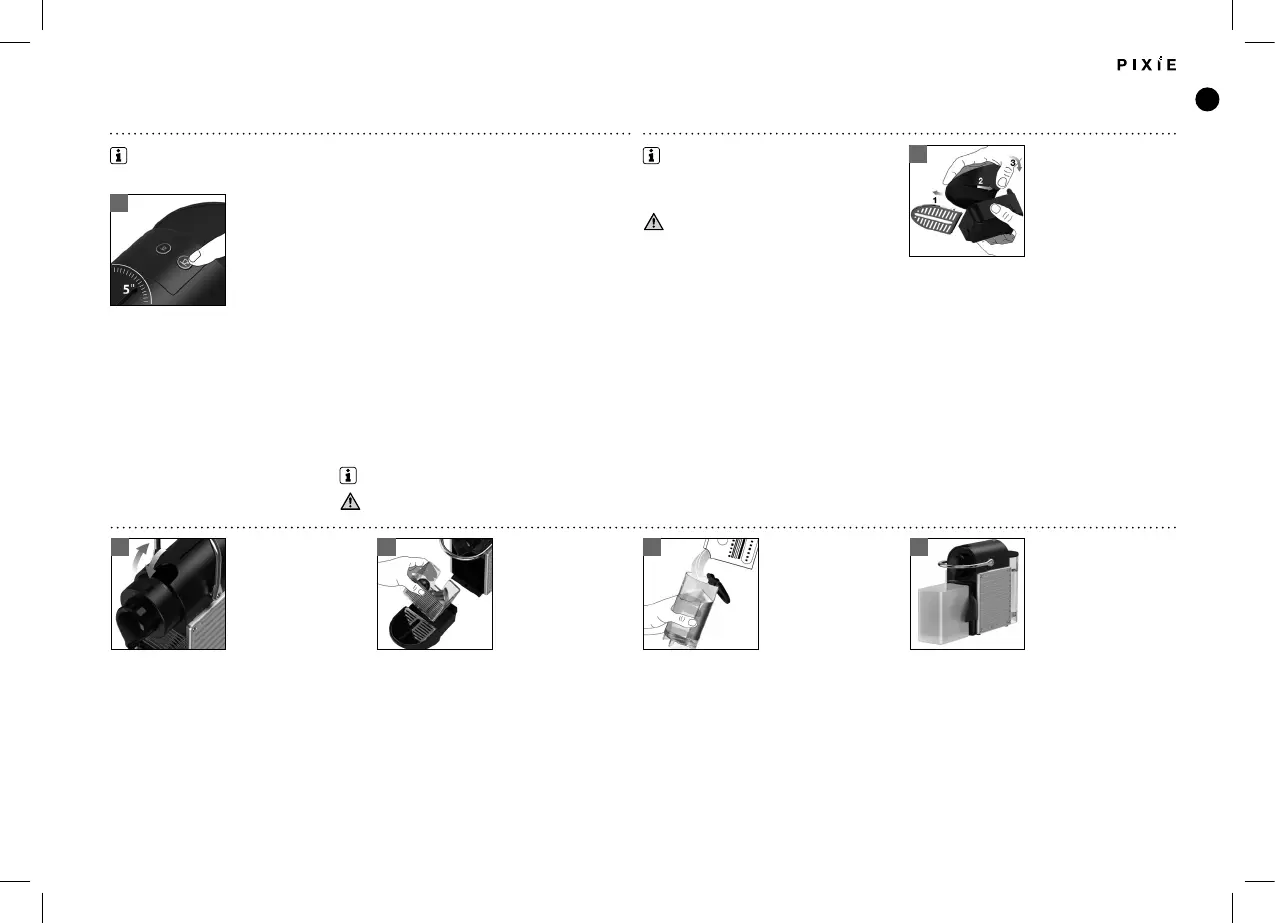
CLEANINGRESET TO FACTORY SETTINGS
With machine turned o, press
and hold down the Lungo
button for 5 seconds.
LEDs will blink fast 3 times to conrm machine has been reset
to factory settings.
LEDs will then continue to blink normally, as heating up, until ready.
- Steady Lights: ready
To assemble the cup support and the drip tray:
take o the grid, place them side by side and clip
the drip tray to the cup support.
Clean the coee outlet regularly with a damp
cloth.
Factory settings: Espresso cup: 40 ml, Lungo cup: 110 ml; Auto O mode: 9 mins. Do not use any strong cleaning agent or
solvent cleaner. Do not put in a dishwasher.
DESCALING
Empty the drip tray and the used capsule
container.
Fill the water tank with 0.5 L of water and add
the Nespresso descaling liquid.
Place a container (minimum volume: 0.6 L) under
the coee outlet.
Remove the capsule and close the lever.
Never immerse the appliance or
part of it in water
Duration approximately 15 minutes
Read the safety precautions on the descaling package and refer to the table for the frequency of use (see page 10)
www.nespresso.com/descaling
UM_PIXIE_BREVILLE.indb 9 13.11.18 10:13




 To Next Page