25
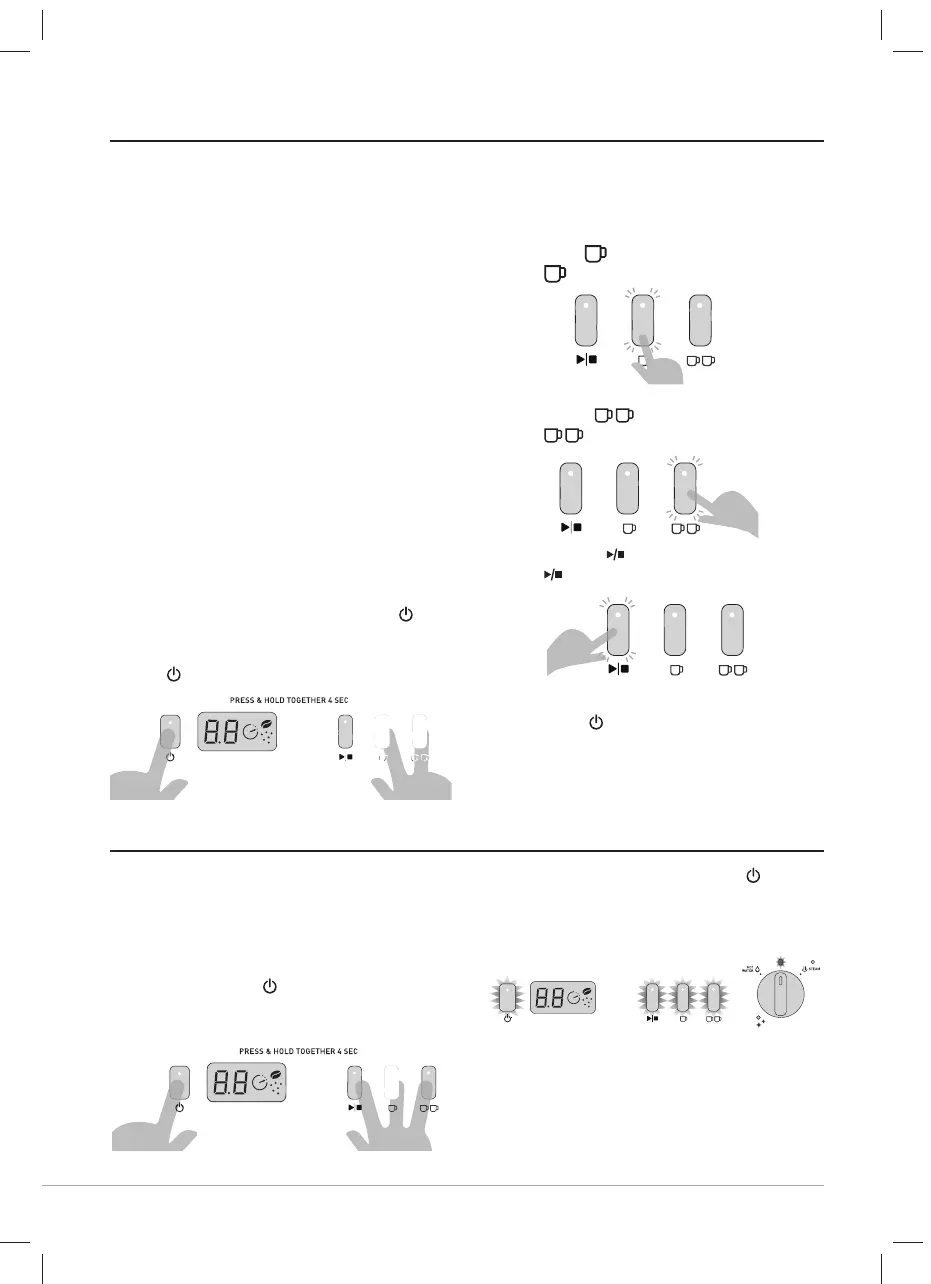
You can easily reset all settings to the
factory defaults.
Restore All Default Settings
- The machine is on and in the READY
state.
- Press & hold the
& all 3 EXTRACTION
BUTTONS at the same time for 4
seconds.
- The machine will beep and the
,
EXTRACTION BUTTONS & DIAL
LIGHTS will all flash together three
times.
- All default settings have been restored.
- The machine will return to the READY
state.
CUSTOMISABLE - EXTRACTION PRE-INFUSION PROFILE
RESTORE ALL DEFAULT SETTINGS
You can select from three Pre-infusion
Profiles to cater for personal preferences.
- Gentle Pre-infusion: Small defined
amounts of water are introduced into
the tamped coffee grinds, gently adding
moisture to bloom the coffee grinds in
preparation for a steady water flow. For
a balanced tasting espresso.This is the
default profile setting.
- Distinct Pre-infusion: A single distinct
dose of water is released into the
tamped coffee grinds, followed by a brief
rest period, then a steady water flow. For
a more bright tasting espresso.
- Constant Pre-infusion: Delivers a
constant, steady water flow from start
to finish. For a more sharp tasting
espresso.
• Access Pre-infusion Custom Mode
- The machine is ON and in the READY
state.
- Simultaneously press & hold the
,
ONE & TWO CUP BUTTONS for 4
seconds. The machine will beep and
the
LIGHT begins to flash.
• Selecting Pre-infusion Profiles
The EXTRACTION LIGHT illuminated
signals the Pre-infusion Profile selected.
The default setting is:
- Gentle =
BUTTON.
The
LIGHT is illuminated.
- To select a Pre-infusion Profile press:
- Distinct =
BUTTON.
The
LIGHT will illuminate.
- Constant =
BUTTON.
The
LIGHT will illuminate.
• Confirm Pre-infusion Profile
- Press the
BUTTON to save your
selection. The machine will beep & exit
the custom mode.
- The machine will return to the READY
state.
VCF152X_VCF153X_21MLM1 (EMEA).indd 25VCF152X_VCF153X_21MLM1 (EMEA).indd 25 5/14/21 15:525/14/21 15:52



 To Next Page