31
WARNING: Do not pour water or any other
liquid into the Grind Chamber.
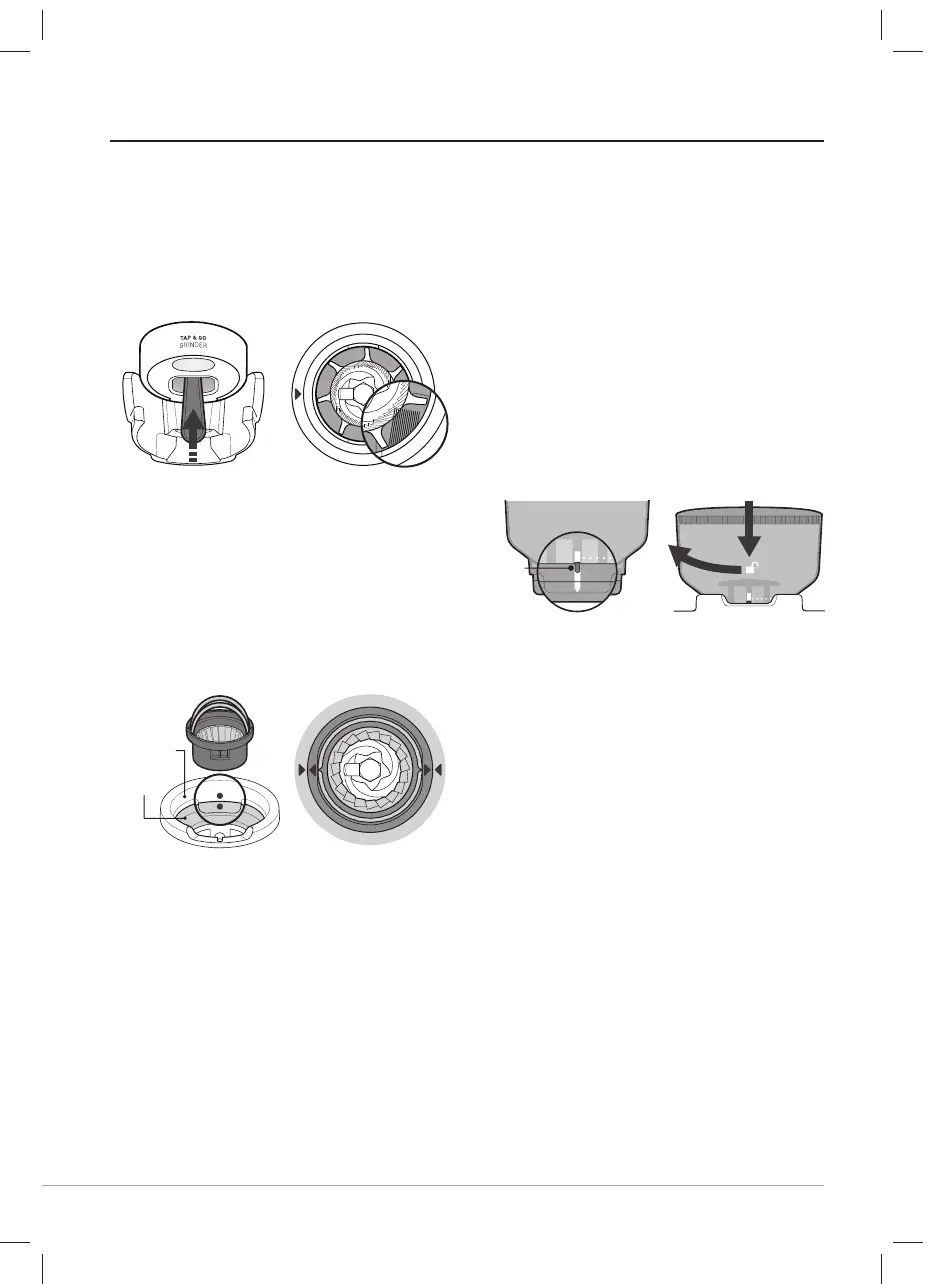
• Cleaning & Unblocking Grind Outlet
- Feed the Cleaning Brush up into the
Grind Outlet from below, wiping &
brushing the inside surfaces.
- If the Grind Outlet is clear the bristles will
be visible inside the Grind Chamber.
• Replace Top Burr
- Ensure the dot on the Top Cover
aligns with the dot on the Grinder
Collar.
- Using the two handles insert the Top
Burr into the Grinder Collar.
- The arrows on the Top Burr should
align to arrows on the Grinder Collar.
- When correctly seated, the Top Burr
will be fl ush with the surface of the
Grinder Collar.
- Place handles down, one on each
side.
• Replace Bean Hopper
- Ensure the Hopper Guide is aligned
with the vertical white lines on the
Hopper base.
- Align & insert the Bean Hopper into
the Grinder Collar and fi rmly pushing
down turn clockwise to lock into place
and open the Hopper Guide.
- Reset to the Grinder Setting noted
prior to cleaning.
- Refi ll the Bean Hopper with coff ee
beans.
Note: After cleaning, the optimum Grind
Setting may have changed. To find the
optimum Grind Setting use the information
on pages 14-15.
CARE & CLEANING - GRINDER
TOP COVER
GRINDER
COLLAR
1. ALIGN & INSERT ALIGN HOPPER GUIDE
2.TURN
HOPPER
GUIDE
VCF152X_VCF153X_21MLM1 (EMEA).indd 31VCF152X_VCF153X_21MLM1 (EMEA).indd 31 5/14/21 15:525/14/21 15:52



 To Next Page