EasyManua.ls Logo

BRINKS BHS-4000A - 4.2 Advanced Programming

BRINKS BHS-4000A
24 pages
Print Icon
To Next Page IconTo Next Page
To Previous Page IconTo Previous Page
Loading...
BHS-4000A
Installation
and
Programming
Instructions
4.2
Advanced
Programming
Additional
programming
options
not
found
in
the
Standard
Programming
section
are
available
through
the
Advanced
Programming
Menu.
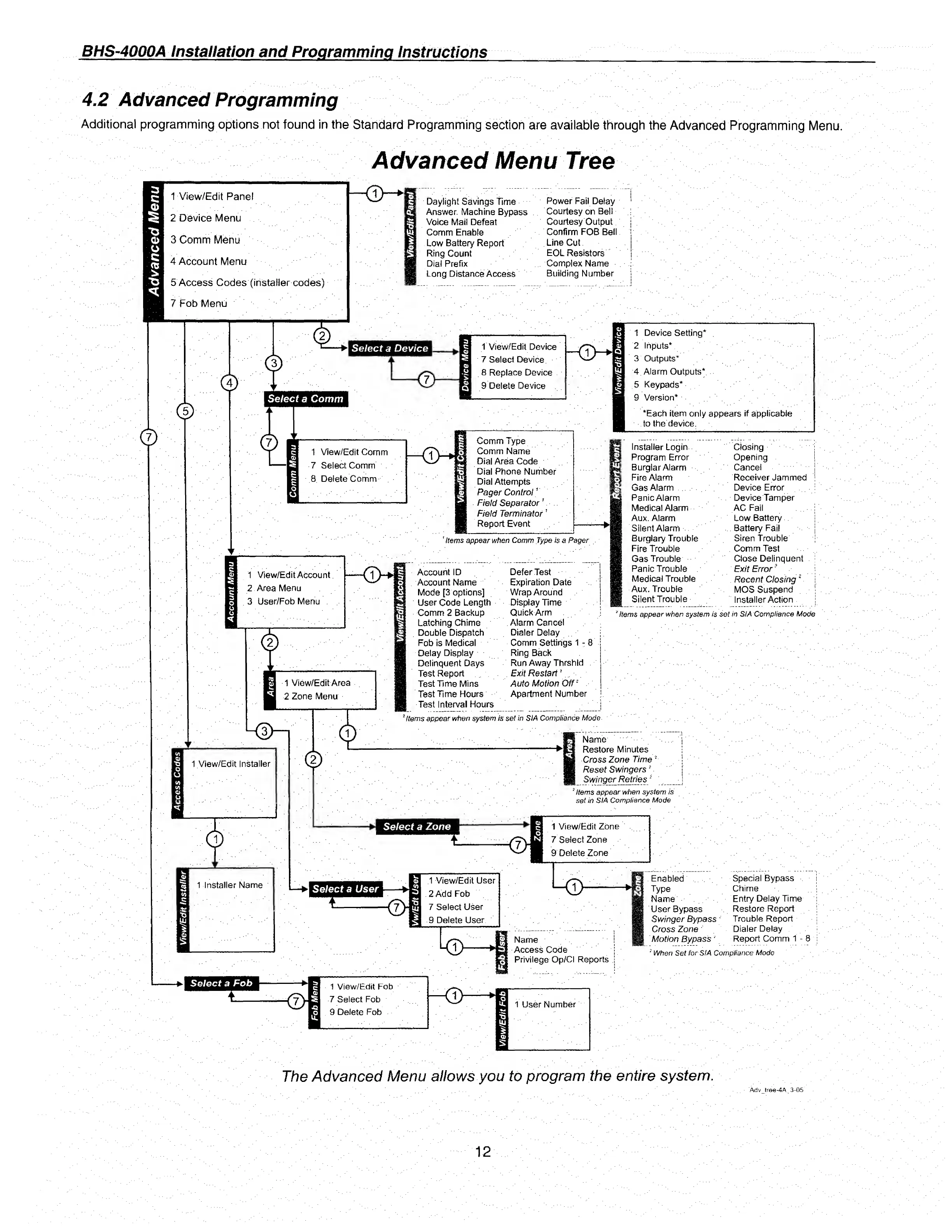
Advanced
Menu
Tree
1-View/Edit
Panel
2
Device
Menu
3
Comm
Menu
4
Account
Menu
5
Access
Codes
(instaiier
codes)
7
Fob
Menu
C
m
m
Daylight
Savings
Time
Answer.
Machine
Bypass
Voice
Mail
Defeat
Comm
Enable
Low
Battery
Report
Ring
Count
Dial
Prefix
Long
Distance
Access
Power
Fail
Delay
Courtesy
on
Bell
Courtesy
Output
Confirm
FOB
Bell
Line
Cut
EOL
Resistors
Complex
Name
Building
Number
Select
a
Device
<*>
i
k
<D
QD
©
Select
a
Comm
1
»
T
View/Edit
Device
1
7
Select
Device
V
8
Replace
Device
)
9
Delete
Device
-gm
VI
1
Device
Setting*
2
Inputs*
3
Outputs*
4
Alarm
Outputs*
5
Keypads*
9
Version*
‘Each
item
only
appears
if
applicable
to
the
device.
1
View/Edit
Comm
7
Select
Comm
8
Delete
Comm
Comm
Type
Comm
Name
Dial
Area
Code
Dial
Phone
Number
Dial
Attempts
Pager
Control
1
Field
Separator
1
Field
Terminator
1
Report
Event
'
Items
appear
when
Comm
Type
is
a
Pager
1
View/Edit
Account
2
Area
Menu
3
User/Fob
Menu
1
View/Edit
Area
2
Zone
Menu
KaH
1
View/Edit
Installer
1
Installer
Name
Account
ID
Account
Name
Mode
[3
options]
User
Code
Length
Comm
2
Backup
Latching
Chime
Double
Dispatch
Fob
is
Medical
Deiay
Display
Delinquent
Days
Test
Report
Test
Time
Mins
Test
Time
Hours
Test
Interval
Hours
Defer
Test
Expiration
Date
Wrap
Around
Display
Time
Quick
Arm
Alarm
Cancel
Dialer
Delay
Comm
Settings
1-8
Ring
Back
Run
Away
Thrshid
Exit
Restart
?
Auto
Motion
Off
2
Apartment
Number
Installer
Login
Program
Error
Burglar
Alarm
Fire
Alarm
Gas
Alarm
Panic
Alarm
Medical
Alarm
Aux.
Alarm
Silent
Alarm
Burglary
Trouble
Fire
Trouble
Gas
Trouble
Panic
Trouble
Medical
Trouble
Aux.
Trouble
Silent
Trouble
Closing
Opening
Cancel
Receiver
Jammed
Device
Error
Device
Tamper
AC
Fail
Low
Battery
Battery
Fail
Siren
Trouble
Comm
Test
Close
Delinquent
Exit
Error
"
Recent
Closing
MOS
Suspend
Installer
Action
'Hems
appear
when
system
is
set
in
SI
A
Compliance
Mode
2
Items
appear
when
system
is
set
in
SIA
Compliance
Mode
Name
Restore
Minutes
Cross
Zone
Time
2
Reset
Swingers
2
Swinger
Retries
2
!
Items
appear
when
system
is
set
in
SIA
Compliance
Mode
Select
a
Zone
<EH
1
View/Edit
Zone
7
Select
Zone
9
Delete
Zone
Select
a
User
1
View/Edit
User
2
Add
Fob
7
Select
User
9
Delete
User
ki>
Name
I
Access
Code
j
Privilege
Op/Cl
Reports
!
Enabled
Type
Name
User
Bypass
Swinger
Bypass
2
Cross
Zone
Motion
Bypass'
Special
Bypass
Chime
Entry
Delay
Time
Restore
Report
Trouble
Report
Dialer
Delay
Report
Comm
1
-
8
;
When
Set
for
SIA
Compliance
Mode
Select
a
Fob
<ZH
1
View/Edit
Fob
7
Select
Fob
9
Delete
Fob
The
Advanced
Menu
allows
you
to
program
the
entire
system.
Adv
tree-4A
3-05
12

Related product manuals