5
10. The door has closed or opened at an unexpected time:
The ChickSafe Advance operates on the 24-hour clock system. Make sure the current,
opening and closing times are correctly set according to the 24-hour times.
If using Light setting for open or close modes see the tips in 7 and 9 above.
11. The door doesn’t automatically open or close itself at all:
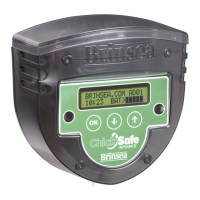
Make sure the Manual Override Mode has not been switched on in error. Press any button
briefly to wake the display. If the display states “Manual Mode Is On!” the automatic system
is currently disabled. To reenable automatic opening and closing, Manual Override Mode
must be switched off:
From a blank display (sleeping) press and hold the OK button. After a few seconds the
display will state “Manual Mode Is On!”.
Keep holding the OK button and a few seconds later the display will change to “Manual
Mode Is Off”. Release the button.
To verify the setting, from a blank display (sleeping) briefly press any button. The display will
show the time and battery status if normal automatic operation is enabled and the manual
override is off.
Brinsea Products Inc. 704 N Dixie Ave, Titusville FL 32796-2017 USA.
Phone (321) 267-7009 Toll Free 1-888-667-7009 Fax (321) 267-6090
Email
Sales@Brinsea.com Website www.Brinsea.com



 To Previous Page