© 2022 Brivo Systems LLC. All rights reserved. PUB-Brivo ACS6100 Installation Manual
22
Brivo ACS6100 Installation Manual
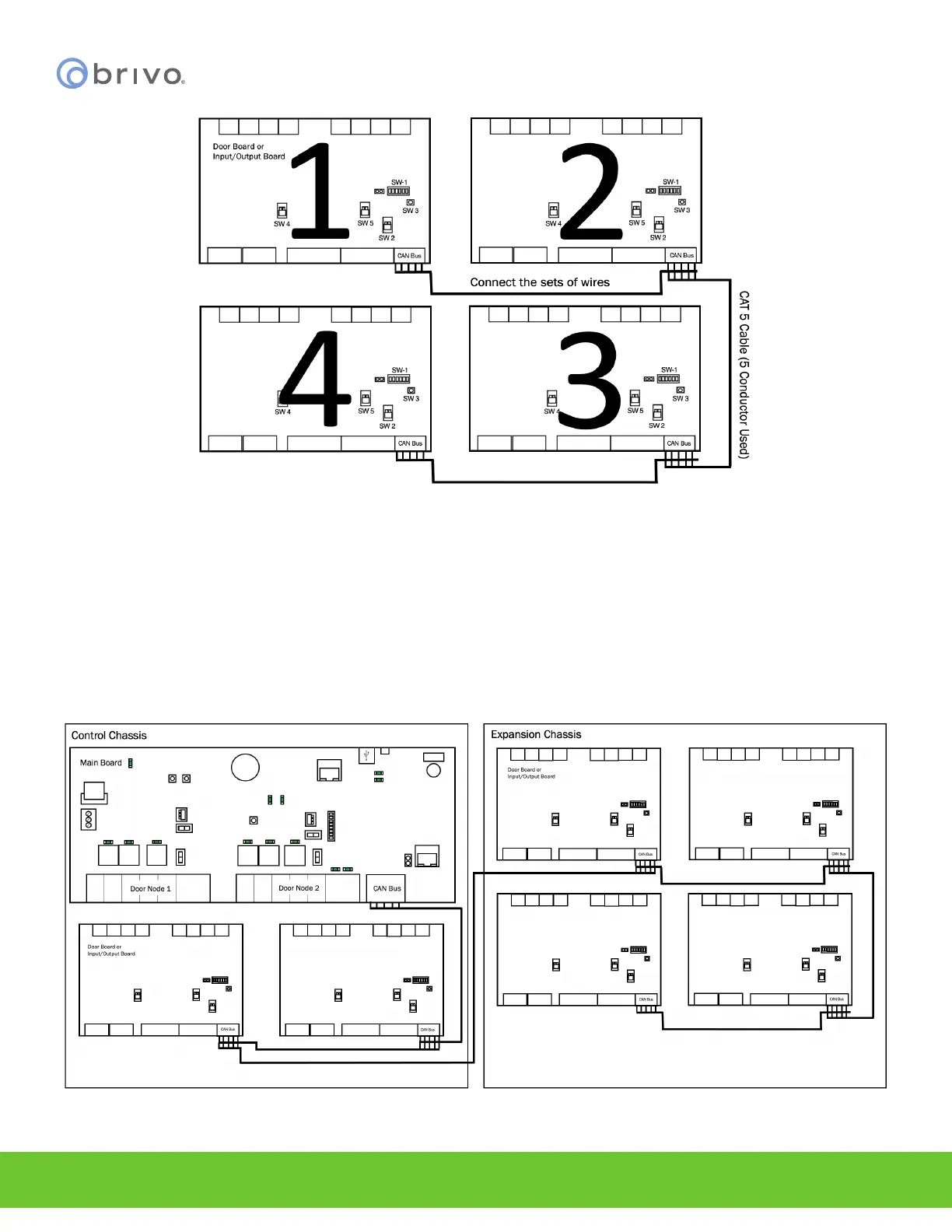
Figure 14 - Connect Expansion Boards in Expansion Chassis
3. If you have multiple chassis, daisy-chain the complete set of chassis together.
a) For example, if there are seven boards in the control panel, there would be a MAIN
CONTROL BOARD and two expansion boards (E1, E2) in the rst chassis and then an
expansion chassis with four expansion boards (E3, E4, E5, and E6). Each expansion board
could be either a DOOR BOARD or an INPUT OUTPUT BOARD.
b) To daisy-chain the boards together: (See Figure 12 below)
• Wire E3, E4, E5, and E6 together as described above in Figure 11.
• Wire E1 in the Control Chassis to E3 in the expansion chassis.
• Wire E2 to the MAIN CONTROL BOARD.
Figure 15 - CAN Bus Conguration



 To Next Page