© 2022 Brivo Systems LLC. All rights reserved. PUB-Brivo ACS6100 Installation Manual
23
Brivo ACS6100 Installation Manual
4. Use standard CAT5 or CAT6 (unshielded twisted pair) cabling to connect the CAN Bus across multiple
chassis.
5. Always connect like terminals to one another (i.e., A to A, B to B, and so on.).
6. Follow the color coding shown on the wiring diagram on the inside of the chassis door.
WARNING: CAN BUS Wiring
THE A/B CIRCUITS MUST SHARE A TWISTED PAIR, AND THE C/D CIRCUITS MUST SHARE A TWISTED PAIR. Otherwise,
the distance and data integrity of the communications channel will be compromised.
WHEN USING JUST A MAIN CONTROL BOARD, SWITCH SW 7-2 TO THE ON POSITION WHICH ENABLES CAN TERMI-
NATION ON THE MAIN CONTROL BOARD. If expansion boards are used, the can termination jumper remains at-
tached on the rst and last board(s) in the daisy chain; i.e. It must be removed from all boards except the endpoint
of the daisy chain. (NOTE: The MAIN CONTROL BOARD does not have to be an endpoint in the control panel; the
control panel may be in the middle of the chain with expansion boards branching out in either direction.)
7. On the rst board, connect the wires of the CAT5/CAT6 cable to the CAN BUS terminal block as follows:
a) Connect the green wire to the A terminal.
b) Connect the green and white wire to the B terminal.
c) Connect the blue wire to the G (ground) terminal.
d) Connect the orange wire to the C terminal.
e) Connect the orange and white wire to the D terminal.
8. After all the wires of the CAT5/CAT6 cable are connected to the rst board, connect the wires to the second
board in the same manner.
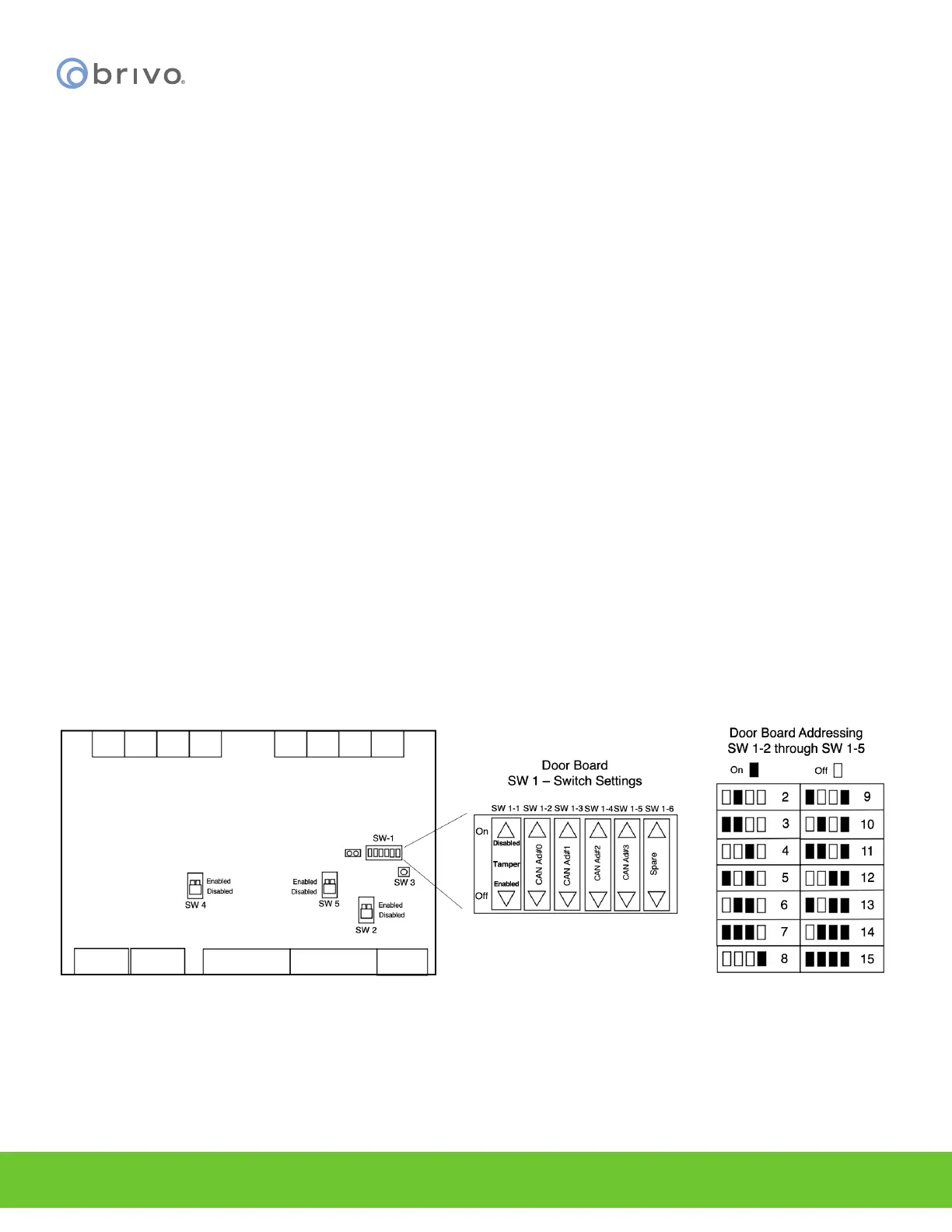
9. Address the CAN BUS ADDRESS switch (SW1). The silkscreen next to SW1 shows how to position the
switches appropriately.
10. Switch positions for all address values are shown in the diagram below.
Figure 16 - CAN BUS ADDRESS Switches



 To Next Page