5. OPERATION
5.1 OPERATING INSTRUCTIONS
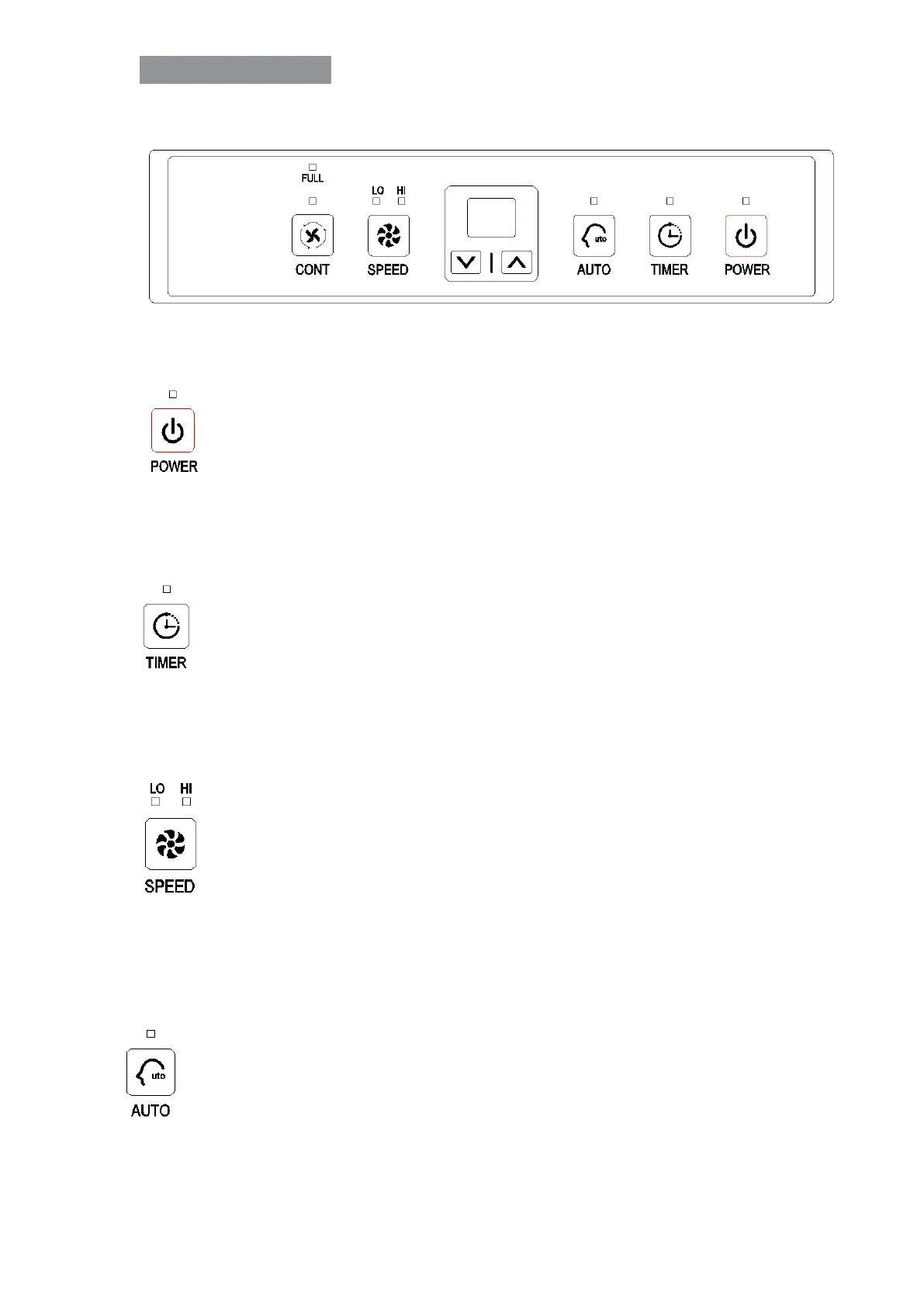
Button Function & Indication Lights
Power button and indication light
When the unit is plugged in, a buzzer will beep, the power indicator light
turns on and shows green. The default setting humidity is 50% with low
fan speed. Press the power button to start or stop the dehumidification.
Timer button and indication light
Press this button to program the time when the unit turns on and turns off. If you
want to cancel the timer programming, press the button to adjust the time at
“00”.
Fan speed button and indication light
The left fan speed indication light “LO” will turn on in green when you program
the unit to run in the low fan speed.
The right fan indication light “HI” will turn on in red when you program the unit to
run in the high fan speed.
Automatically dehumidifying button and indication light
Press this button to program the unit to automatically dehumidifying mode, the
humidity can be adjusted manually, and the fan speed will be adjusted
automatically.


 To Next Page