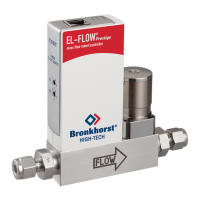
Fluid line connection
CAUTION
Risk of personal injury due to uid leakage!
Unsuitable piping material and loose connectors can
lead to fluid leakage and severe injury.
▶ Use piping and tubing that are suitable for the
operating conditions of the application.
▶ Check all connections for fluid leakage before and
after applying fluid pressure.
▶ Cut the pipes/tubing squarely.
▶ Make sure that the pipes are clean and deburred before mounting.
▶ Connect the piping without stress to the product fluid inlet
and fluid outlet.
▶ Tighten fluid connections according to the manufacturer’s
instructions.
▶ Clean all connectors and tubing from dirt and debris.
Electrical connection
For basic setup, it is recommended to use Bronkhorst®
accessories (not included) as described in this manual.
▶ Ensure all address selectors on the product are set to ‘0’ (zero).
▶ Connect the product to the PC by using a RS232 T-part DB9
cable and USB converter.
▶ Use a PiPS-EL-DSUB power supply to power the product.
▶ Turn on power.
24 V
When using third-party power supply and cables:
▶ Make sure that the maximum power of the power supply is
sufficient to power the product.
▶ Check the pinout diagram for the correct pin layout.

 To Next Page
 Loading...