EasyManua.ls Logo

Brook WINGMAN CONVERTER - LED Display

Default Icon
10 pages
Print Icon
To Next Page IconTo Next Page
To Previous Page IconTo Previous Page
Loading...
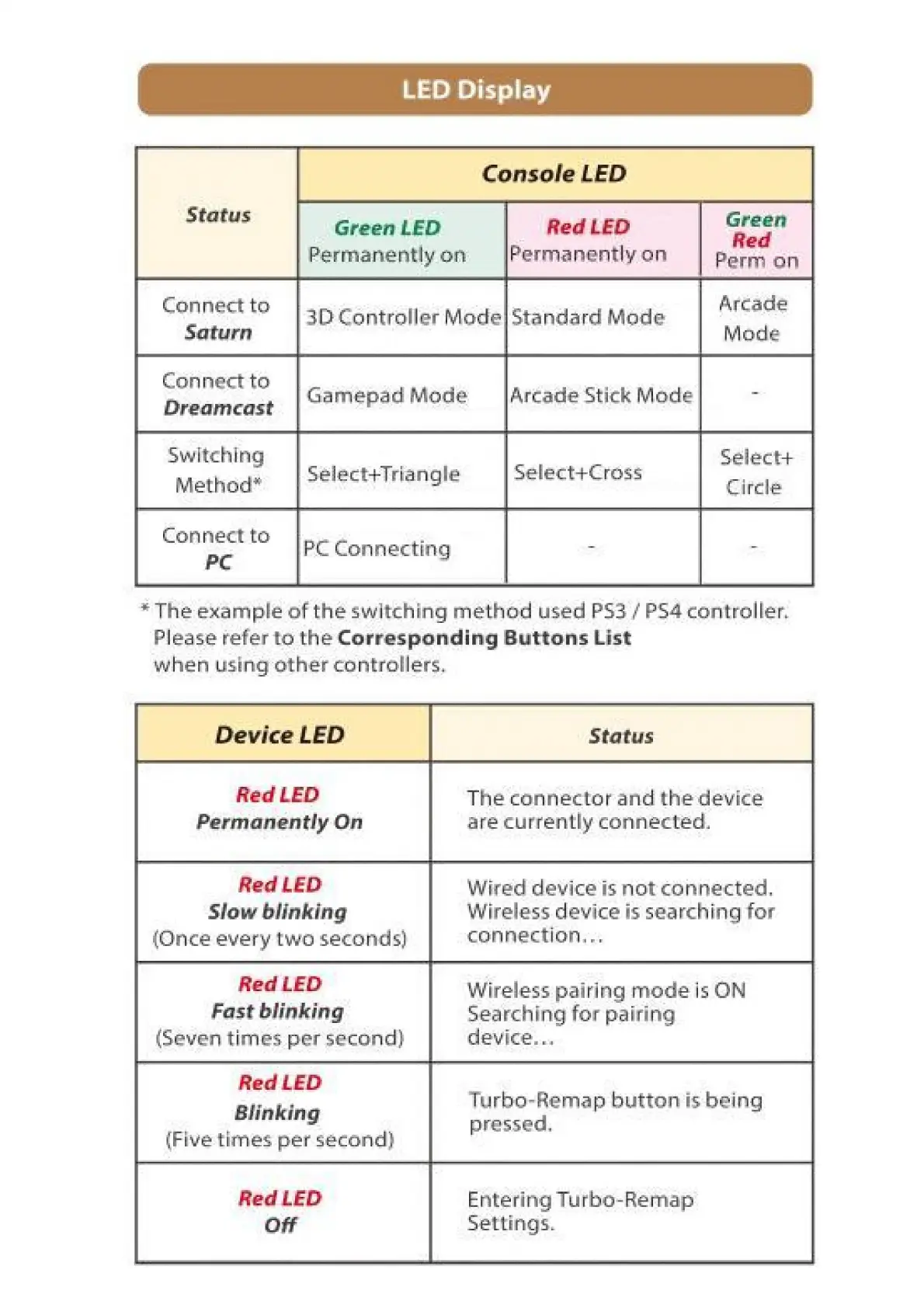
LED
Display
Status
Connect
to
Saturn
Switching
Method*
Select+
Circle
*
The
example
of
the
switching
method
used
PS3
/
РБА
controller.
Please
refer
to
the
Corresponding
Buttons
List
when
using other
controllers.
Red
LED
Permanently
On
Red LED
Slow
blinking
(Once
every
two
seconds)
Red
LED
Fast
blinking
(Seven
times
per
second)
Red
LED
Blinking
(Five
times
per
second)
Red
LED
Off
The
connector and
the
device
are
currently
connected.
Wired
device
is
not
connected.
Wireless
device
is
searching
for
connection...
Wireless
pairing
mode
is
ON
Searching
for
pairing
device...
Turbo-Remap
button
is
being
pressed,
Entering
Turbo-Remap
Settings.

Related product manuals