5
blUeTooTh
®
coMPaTIbIlITY
Our Bluetooth
®
Headphones support hands-free profile (HFP), headset profile
(HSP), advance audio distribution profile (A2DP), and audio/video remote control
profile (AVRCP). The Bluetooth
®
Headphones are compatible with most MP3
players, personal computers or mobile devices that support the same profile.
To stream music from any audio device to the Bluetooth
®
Headphones, the audio
device must support A2DP profile. Please refer to the owner’s manual of your audio
device or consult the manufacturer of your audio device for further assistance.
InsTallInG The baTTeRIes
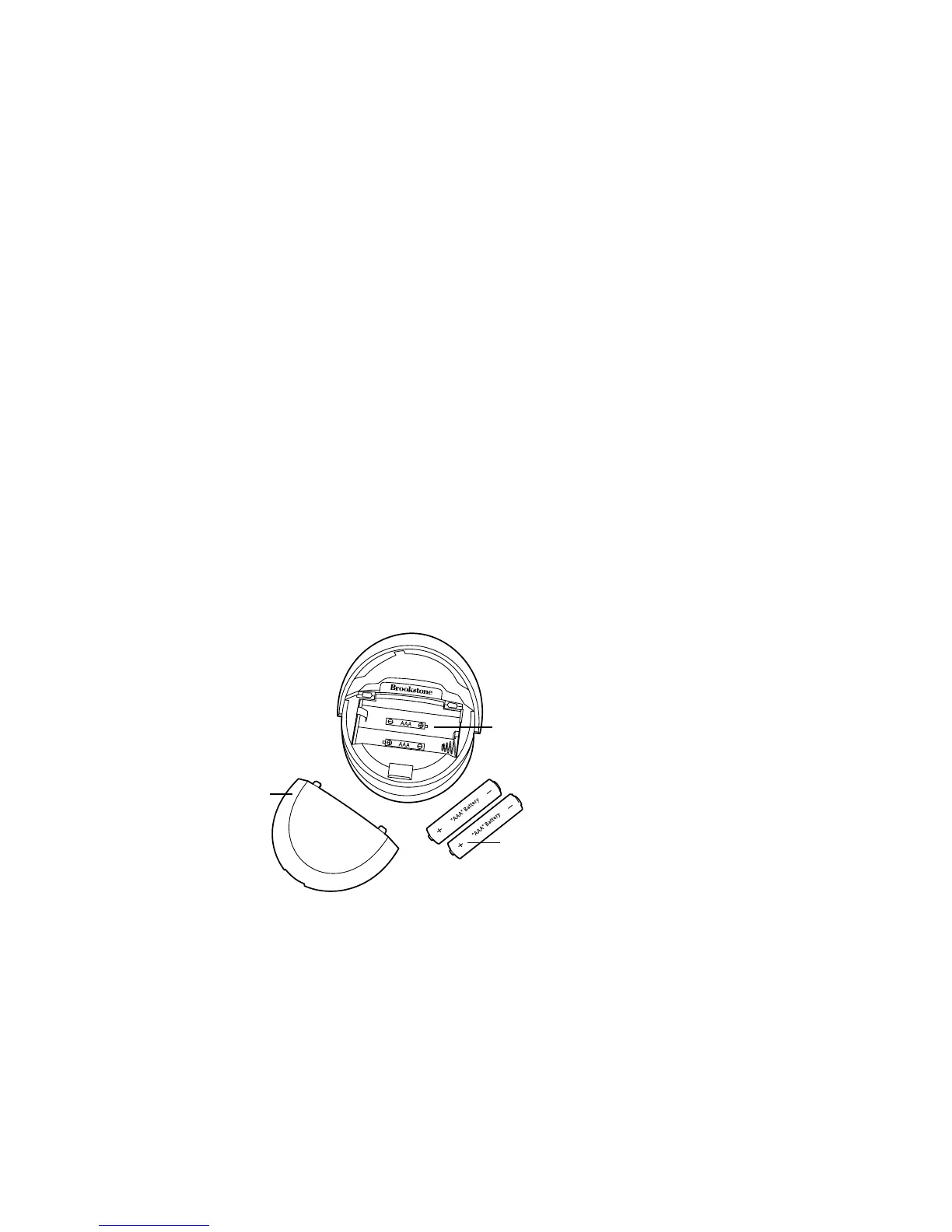
1. Open the BATTERY COMPARTMENT cover on the LEFT EARCUP by using
a coin or your fingernail to carefully pry the cover off.
2. Install 2 AAA batteries according to the polarity indicators inside the compartment.
3. Reseat and snap the BATTERY COMPARTMENT cover closed to secure.
Cover
2 AAA Batteries
Polarity indicators
inside the compartment










 To Next Page