
 Need help?
Do you have a question about the Brookstone BSNCH102 and is the answer not in the manual?
Details device evaluation for general RF exposure requirements in portable conditions.
Lists all items included with the wireless headphones for setup and use.
Instructions for charging the headphones using the provided USB cable.
Steps to turn the headphones on and off.
Guide to activating and deactivating the Active Noise Cancellation feature.
Steps to connect the headphones to a Bluetooth-enabled device.
How to control music playback and manage phone calls using the headphones.
Instructions for connecting the headphones to devices using the 3.5mm AUX cable.
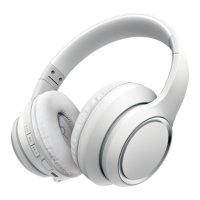
The Brookstone ISOLATENX are active noise-cancelling headphones designed to provide an immersive audio experience by reducing unwanted ambient noise. These wireless headphones offer a range of features for both audio playback and phone calls, with the added flexibility of a wired connection.
The primary function of the ISOLATENX headphones is to deliver high-quality audio while actively cancelling out external noise. This is achieved through an Active Noise Control (ANC) feature that can be toggled on or off independently of audio playback. The headphones support wireless audio streaming via Bluetooth, allowing users to connect to a variety of Bluetooth-enabled devices such as smartphones, tablets, and computers. For situations where Bluetooth is not available or preferred, the headphones can also be connected via a 3.5mm AUX cable, transforming them into a passive audio device. Beyond music playback, the headphones are equipped with a microphone and controls to manage phone calls, including answering, ending, rejecting, and redialing the last outgoing number.
To power the headphones on or off, users simply press and hold the Play/Pause button for 3 seconds. When powered on, the headphones will automatically attempt to reconnect to a previously paired Bluetooth device. If a new pairing is desired or to disconnect from an existing device, pressing and holding the Play/Pause button for 5 seconds will put the headphones into Bluetooth pairing mode.
Initiating Bluetooth pairing is straightforward. After powering on the headphones, a voice prompt will indicate that they are in pairing mode, and the LED indicator will flash blue and red. Users then search for Bluetooth devices on their mobile device and select "BSNCH102" from the list. Upon successful pairing, a voice confirmation will be heard, and the LED will slowly flash blue, continuing to flash blue during music playback.
The ANC feature is a key highlight of the ISOLATENX. It can be activated by pressing the dedicated ANC Power button. A voice prompt will confirm that ANC is on, and the LED indicator will light up green. To turn ANC off, the ANC Power button is pressed again, accompanied by another voice prompt and the LED turning off. This feature can be used with or without audio playback, providing a quiet environment when desired.
In Bluetooth mode, users have full control over their music directly from the headphones. The Play/Pause button allows for pausing and resuming playback. Volume adjustments are made using the Volume Up (+) and Volume Down (-) buttons. To skip tracks, users can press and hold the Volume Up (+) button for the next track or the Volume Down (-) button for the previous track.
When connected via Bluetooth, the headphones facilitate hands-free calling. Incoming calls can be answered or ended by pressing the Play/Pause button. During a call, audio playback will automatically pause and resume once the call is finished. To reject an incoming call, the Play/Pause button is pressed and held for 2 seconds. For convenience, double-pressing the Play/Pause button will redial the last outgoing phone number.
For a wired connection, a 3.5mm AUX cable is included. One end of the cable plugs into the 3.5mm AUX input port on the bottom of the right earcup, and the other end connects to the audio output port of the media-playing device. When the AUX cable is inserted, the headphones will automatically power off. In auxiliary mode, all playback and volume adjustments are managed directly from the connected device, as the headphone controls are inactive.
The headphones are charged using the included Micro-USB charging cable. The small connector of the cable plugs into the Micro-USB charging port located on the headphones, while the large connector connects to a USB power source, such as a computer's USB port or a 5V USB wall adapter (not included). During charging, the LED indicator will glow red, and it will turn blue once charging is complete, signaling that the headphones are ready for use.
The ISOLATENX headphones contain a non-removable Lithium-Polymer battery. Users are advised to ensure proper recycling or disposal of the battery by contacting their local waste management office. It is crucial not to overcharge the battery to maintain its longevity and safety.
To ensure the device's longevity and safe operation, users are instructed to read the manual carefully. The headphones are not a toy and should not be used by children or pets. Disassembly, modification, or repair of the device is prohibited. It should not be exposed to extreme temperatures (heat or cold), open flames, humid, or wet conditions, and must not be submerged in water. Low power can lead to poor Bluetooth connection or sound distortion. The ANC function may reduce battery life more quickly. When using a USB adapter, it should be ensured that the adapter is not damaged. The USB port and connectors of the USB cable should be protected from dust, water, or conductive materials. Finally, users are reminded to always be aware of their surroundings when using the headphones and never use them while driving, riding a bicycle, or operating machinery that requires undivided attention.
 General
| Brand | Brookstone |
|---|---|
| Model | BSNCH102 |
| Category | Headphone |
| Language | English |









 To Next Page