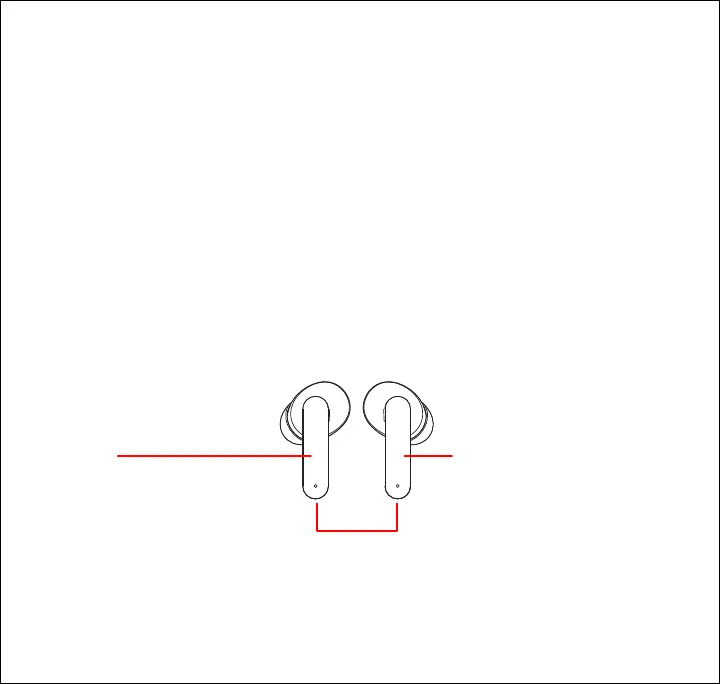
Controlling Playback
• 1x Press the [Multi] button on either earbud to pause and resume audio playback.
• 2x Press the [Multi] button on the left earbud to skip to the previous track.
• 2x Press the [Multi] button on the right earbud to skip to the next track.
Adjusting the Volume
• 3x Press the [Multi] button on the right earbud to increase volume.
• 3x Press the [Multi] button on the left earbud to decrease volume.
Phone Calls
• 1x Press the [Multi] button on either earbud to answer an incoming phone call. Press
again to end the phone call.
• Press + hold (2s.) the [Multi] button on either earbud for 2 seconds to reject an incoming
phone call.
Left Earbud
3x Press: Decrease volume
2x Press: Skip to previous track
Right Earbud
3x Press: Increase volume
2x Press: Skip to next track
Either Earbud
1x Press: Pause/resume playback
1x Press: Answer/end phone call
Press + hold (2s): Reject incoming call
Press + hold (2s): Activate voice assistant
8













 To Next Page