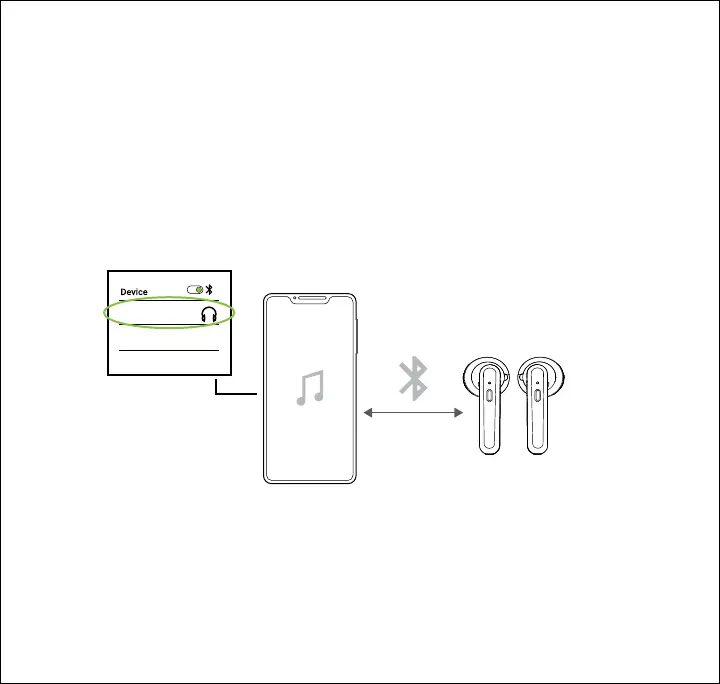
Bluetooth Pairing
1. Power the earbuds ON at the same time. The LED indicators on both earbuds will flash
RED and BLUE. After a few seconds, a tone should be heard, and one of the earbuds’ LED
indicators will slowly flash BLUE while the other continues to flash RED and BLUE,
indicating that the earbuds have connected to each other. If the earbuds don’t connect to
each other, see the troubleshooting section at the bottom of this page.
2. Open your device’s Bluetooth menu and select BSTWS32 when it appears.
3. Another tone will be heard, indicating that the earbuds are successfully connected to your
device. The LED indicators on both earbuds will slowly flash BLUE.
BSTWS32
Trouble Pairing the Earbuds to Each Other? Try these steps:
1. Place both earbuds back into the case to power them OFF.
2. You may need to go into your device’s Bluetooth settings and manually “Forget” one or both
of the earbuds, and turn your device’s Bluetooth OFF while the earbuds pair to each other.
3. Turn your device’s Bluetooth back ON if necessary, and follow the Bluetooth Pairing steps
above again.
7










 To Next Page