39
2
——————————————————————————————————————————————————————————————————————————————————————————————————————————————————————
Selecting a stitch
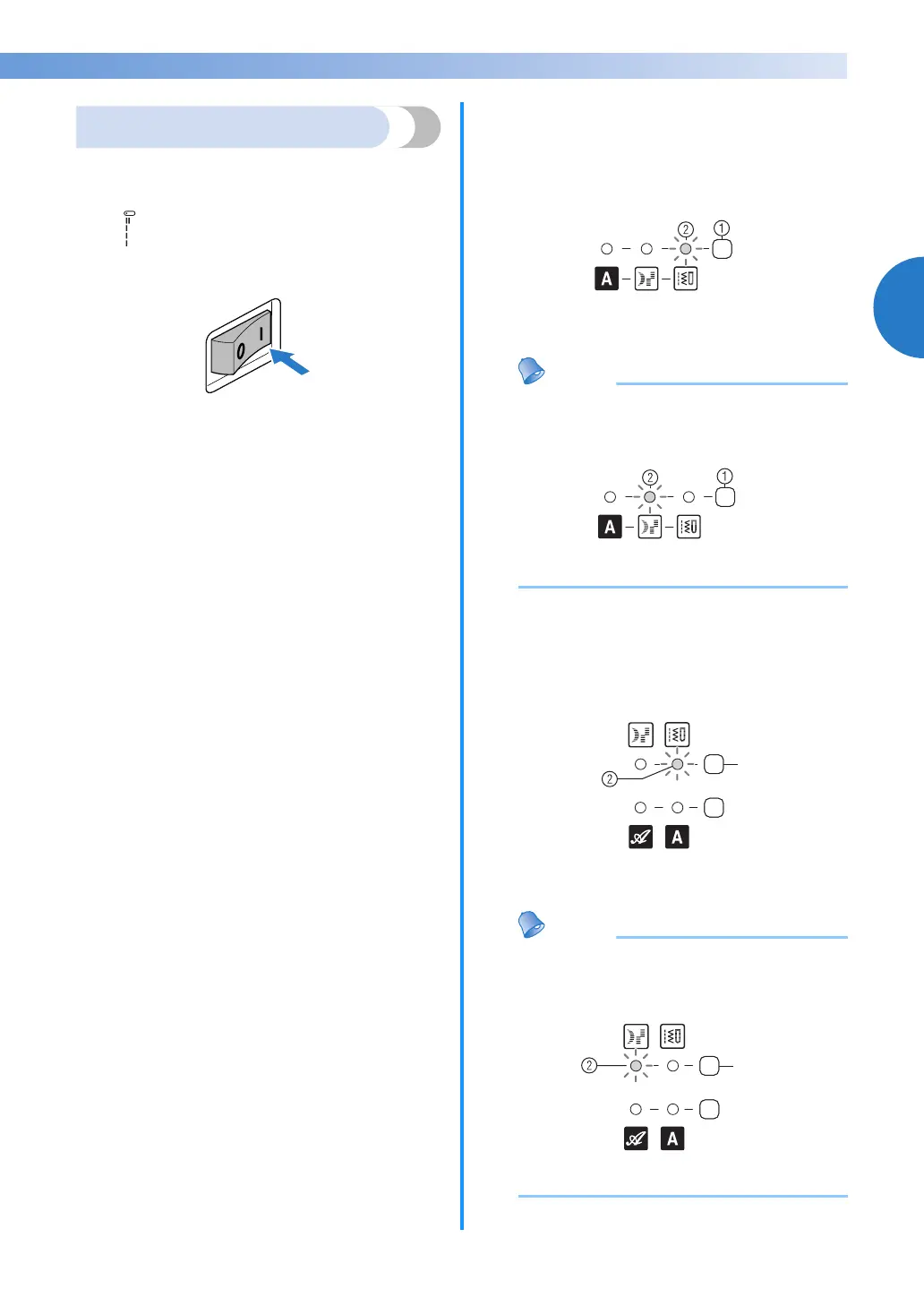
Using the stitch selection keys, select the desired
stitch.
When the sewing machine is turned on, the straight
stitch ( left needle position) is selected.
a
Turn on the sewing machine.
b
<For models equipped with satin stitches and
1 font type of character stitches>
Confirm that the utility stitch indicator is lit. If
it is not lit, press the stitch category selection
key once or more until the utility stitch
indicator is lit.
a Stitch category selection key
b Utility stitch indicator
Memo
● When you want to select the satin stitch,
press the stitch category selection key once
or more until the satin stitch indicator is lit.
a Stitch category selection key
b Satin stitch indicator
<For models equipped with
satin stitches and 2
font types of character stitches
>
Confirm that the utility stitch indicator is lit. If
it is not lit, press the utility stitch key once or
more until the utility stitch indicator is lit.
a Utility stitch key
b Utility stitch indicator
Memo
● When you want to select the satin stitch,
press the utility stitch key once or more until
the satin stitch indicator is lit.
a Utility stitch key
b Satin stitch indicator
a
a



 To Next Page