l\
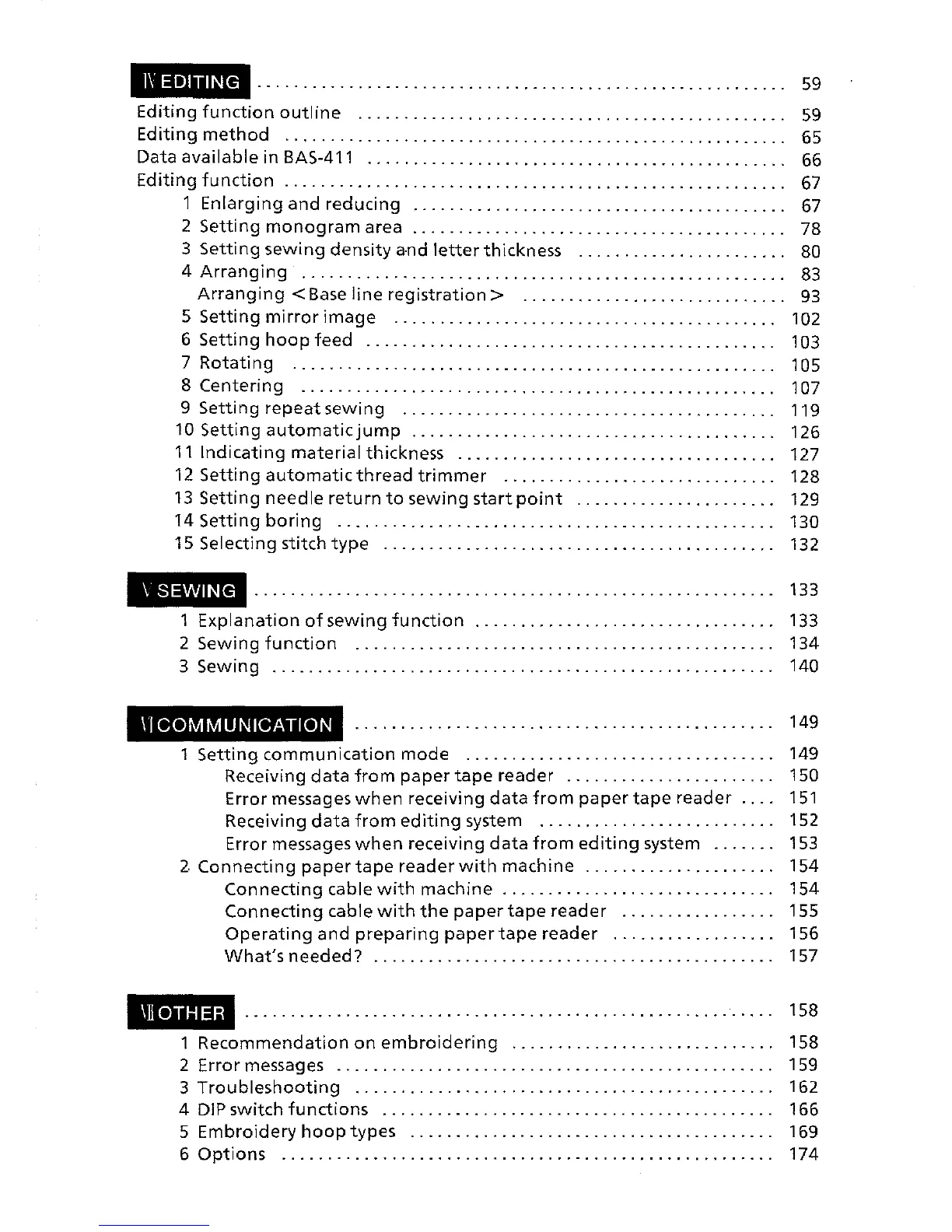
EDITING
..........................................................
59
Editing
function
outline
. . . . . . . . . . . . . . . . . . . . . . . . . . . . . . . . . . . . . . . . . . . . . . .
59
Editing
method
. . . . . . . . . . . . . . . . . . . . . . . . . . . . . . . . . . . . . . . . . . . . . . . . . . . . . . . 65
Data
available
in BAS-411 . . . . . . . . . . . . . . . . . . . . . . . . . . . . . . . . . . . . . . . . . . . . . . 66
Editing
function
. . . . . . . . . . . . . . . . . . . . . . . . . . . . . . . . . . . . . . . . . . . . . . . . . . . . . . .
67
1
Enlarging
and
reducing
. . . . . . . . . . . . . . . . . . . . . . . . . . . . . . . . . . . . . . . . . 67
2
Setting
monogram
area . . . . . . . . . . . . . . . . . . . . . . . . . . . . . . . . . . . . . . . . . 78
3
Setting
sewing
density
a-nd
letter
thickness . . . . . . . . . . . . . . . . . . . . . . . 80
4
Arranging
. . . . . . . . . . . . . . . . . . . . . . . . . . . . . . . . . . . . . . . . . . . . . . . . . . . . . 83
Arranging
<Base
line
registration>
. . . . . . . . . . . . . . . . . . . . . . . . . . . . .
93
5 s tt" . .
e
mg
m1rror 1mage
..........................................
102
6
Setting
hoop
feed
. . . . . . . . . . . . . . . . . . . . . . . . . . . . . . . . . . . . . . . . . . . . . 103
7
Rotating
. . . . . . . . . . . . . . . . . . . . . . . . . . . . . . . . . . . . . . . . . . . . . . . . . . . . . 1
05
8
Centering
. . . . . . . . . . . . . . . . . . . . . . . . . . . . . . . . . . . . . . . . . . . . . . . . . . . . 107
9
Setting
repeat
sewing
.........................................
119
10 s
tt"
t . .
e
mg
au omat1c JUmp . . . . . . . . . . . . . . . . . . . . . . . . . . . . . . . . . . . . . . . . 126
11
Indicating
material
thickness . . . . . . . . . . . . . . . . . . . . . . . . . . . . . . . . . . . 127
12
Setting
automatic
thread
trimmer
..............................
128
13
Setting
needle
return
to
sewing
start
point
......................
129
14
Setting
boring
. . . . . . . . . . . . . . . . . . . . . . . . . . . . . . . . . . . . . . . . . . . . . . . . 130
15 Selecting stitch
type
...........................................
132
\SEWING
1
Explanation
of
sewing
function
................................
.
2 Sewing
function
.............................................
.
3 Sewing
......................................................
.
\1
COMMUNICATION
1
Setting
communication
mode
.................................
.
Receiving
data
from
paper
tape
reader
......................
.
Error messages
when
receiving
data
from
paper
tape
reader
...
.
Receiving
data
from
editing
system
.........................
.
Error messages
when
receiving
data
from
editing
system
......
.
2.
Connecting
paper
tape
reader
with
machine
....................
.
Connecting
cable
with
machine
.............................
.
Connecting
cable
with
the
paper
tape
reader
................
.
Operating
and
preparing
paper
tape
reader
.................
.
What's
needed?
...........................................
.
\llOTHER
133
133
134
140
149
149
150
151
152
153
154
154
155
156
157
158
1
Recommendation
on
embroidering
. . . . . . . . . . . . . . . . . . . . . . . . . . . . . 158
2 Error messages . . . . . . . . . . . . . . . . . . . . . . . . . . . . . . . . . . . . . . . . . . . . . . . . 159
3
Troubleshooting
. . . . . . . . . . . . . . . . . . . . . . . . . . . . . . . . . . . . . . . . . . . . . . 162
4
DIP
switch
functions
. . . . . . . . . . . . . . . . . . . . . . . . . . . . . . . . . . . . . . . . . . . 166
5
Embroidery
hoop
types . . . . . . . . . . . . . . . . . . . . . . . . . . . . . . . . . . . . . . . . 169
6
Options
. . . . . . . . . . . . . . . . . . . . . . . . . . . . . . . . . . . . . . . . . . . . . . . . . . . . . . 174


 To Next Page
 Loading...