EasyManua.ls Logo

Brother EF4-V41 - Disassembly); Covers

Brother EF4-V41
97 pages
Print Icon
To Next Page IconTo Next Page
To Previous Page IconTo Previous Page
Loading...
c
DISASSEMBLY)
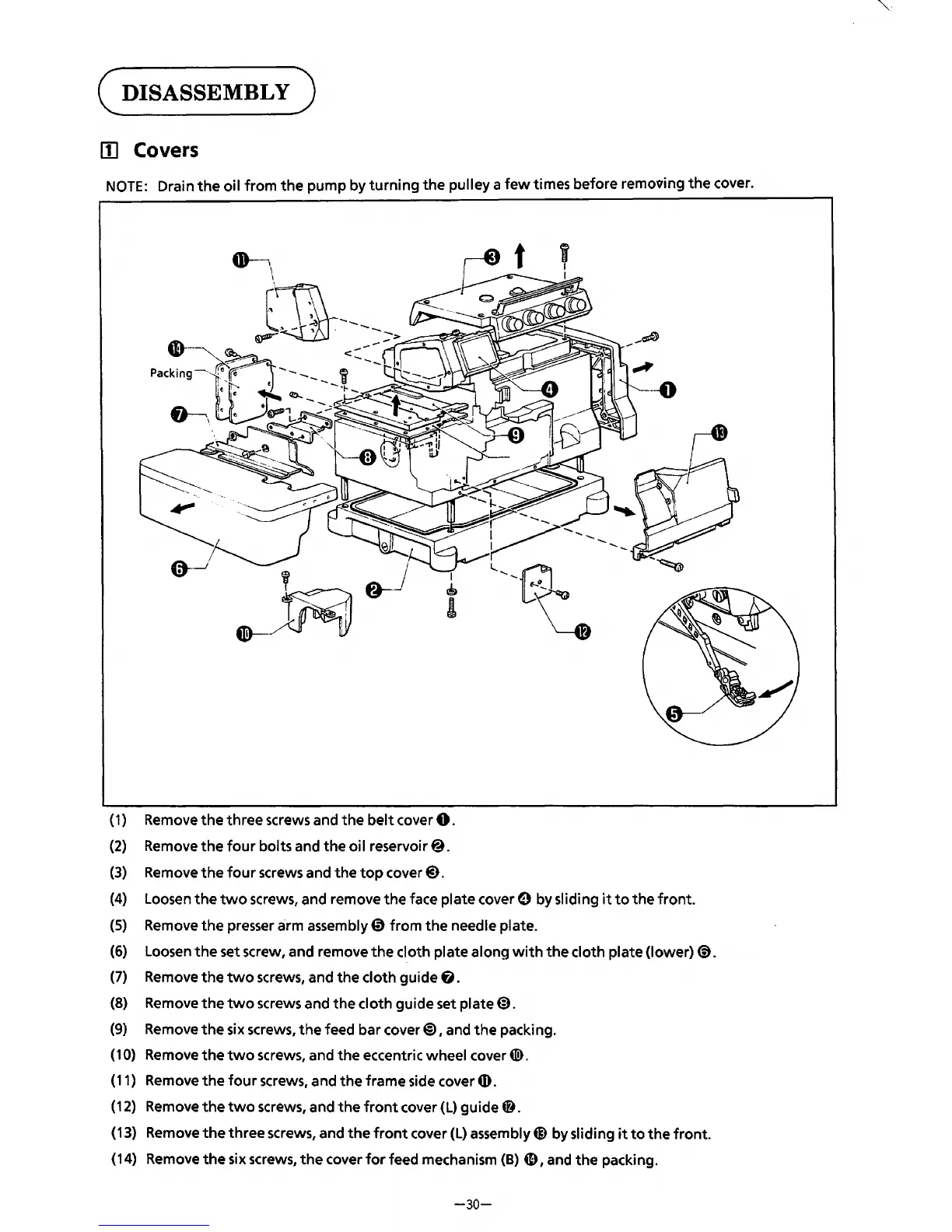
[II Covers
NOTE:
Drain
the
oil
from
the
pump by
turning
the
pulley a
few
times before
remo-ooing
the
cover.
I
®
I
(
1)
Remove
the
three screws and
the
belt
cover
0.
(2)
Remove
the
four
bolts and
the
oi I reservoir@.
(3)
Remove
the
four
screws and
the
top
cover@).
--~
(4)
Loosen
the
two
screws, and remove
the
face plate cover e by sliding
it
to
the
front.
(5)
Remove
the
presser arm assembly 0 from
the
needle plate.
(6)
Loosen
the
set screw, and remove
the
cloth plate along
with
the
cloth plate (lower)@).
(7)
Remove
the
two
screws, and
the
cloth guide
6.
(8)
Remove
the
two
screws and
the
cloth guide set plate@).
(9)
Remove
the
six screws,
the
feed bar cover@), and
the
packing.
(1
0)
Remove
the
two
screws, and
the
eccentric wheel cover
4Il>.
(11) Remove
the
four
screws, and
the
frame side cover G).
(12)
Remove
the
two
screws, and
the
front
cover
(L)
guide~.
(13) Remove
the
three
screws, and
the
front
cover
(L)
assembly@) by sliding
it
to
the
front.
(14) Remove
the
six screws,
the
cover
for
feed mechanism
(B)
4D,
and
the
packing.
-30-
From the library of: Superior Sewing Machine & Supply LLC

Table of Contents

Related product manuals