16
—————————————————————————————————————————————————————————————————————————
————————————————————————————————————————————————————————————————————————————————————————————————————————————————————————————————————————————————————————————————————————————————————————————————————
1
Lower threading (for
models equipped with a
quick-set bobbin)
Install the bobbin wound with thread.
This feature is only available on certain models.
a
Follow steps a to d from “Lower
threading” on page 15.
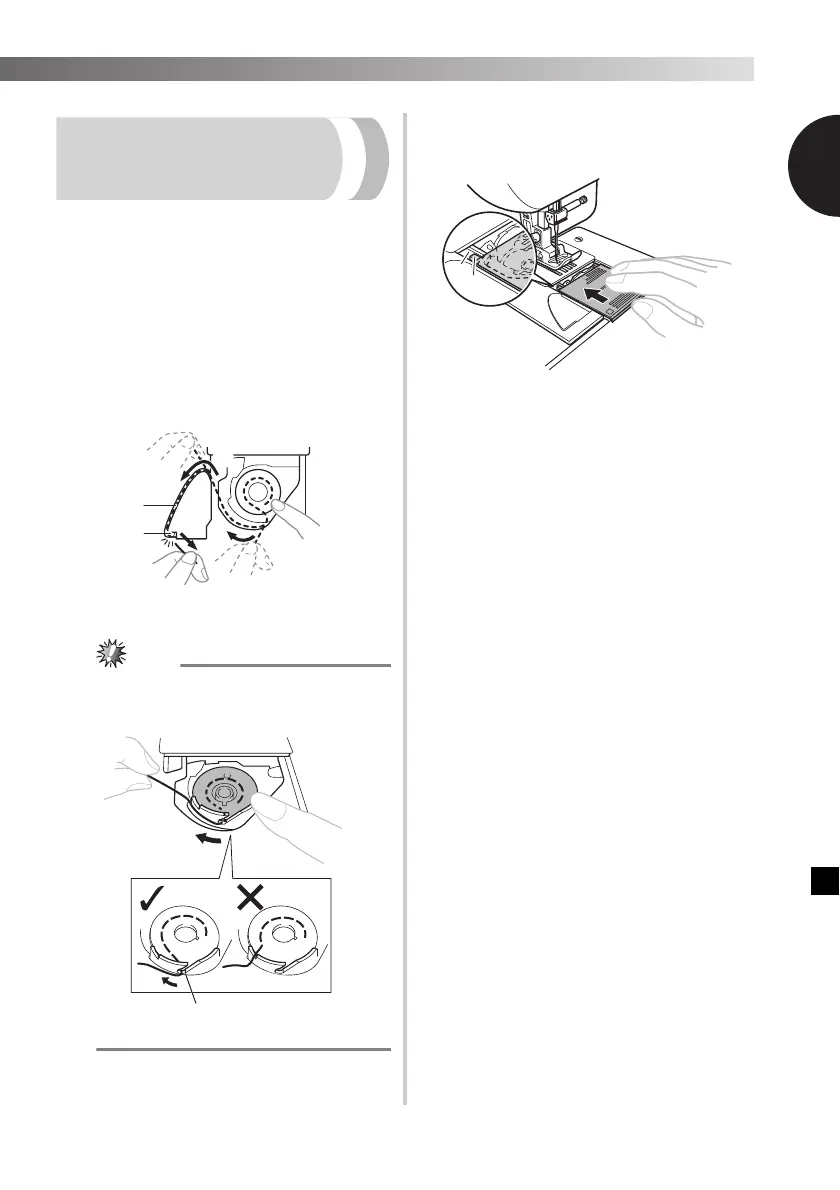
b
While lightly holding down the bobbin
with your right hand as shown, guide the
thread through the slit (1 and 2). Then,
pull the thread toward you to cut it with
the cutter (3).
• At this time, check that the bobbin easily
rotates counterclockwise.
1 Slit
2 Cutter (Cut the thread with the cutter.)
● If the thread is not correctly inserted through
the tension-adjusting spring of the bobbin
case, it may cause incorrect thread tension.
1 Tension-adjusting spring
c
Replace the bobbin cover. Put the
projection into the race retainer groove
and push closed.
1 Groove
2 Projection
• Start sewing after threading the lower and
upper thread. When sewing gathers or darts,
you can draw up the lower thread by hand so
that some thread will be left over. Refer to the
steps in “Drawing up the lower thread”
(page 21).


 To Next Page