SEWING BUTTONHOLES ————————————————————————————————————————————————————————————————————————————————————————————————————————————————————————————————
—————————————————————————————————————————————————————————————————————————————
33
4 SEWING BUTTONHOLES
Making a buttonhole
■ Making a buttonhole
● It is recommended to practice making a
buttonhole on a scrap piece of fabric before
attempting it on your project.
● Using tailor’s chalk to mark the position and
length of the buttonhole on the fabric is also
recommended.
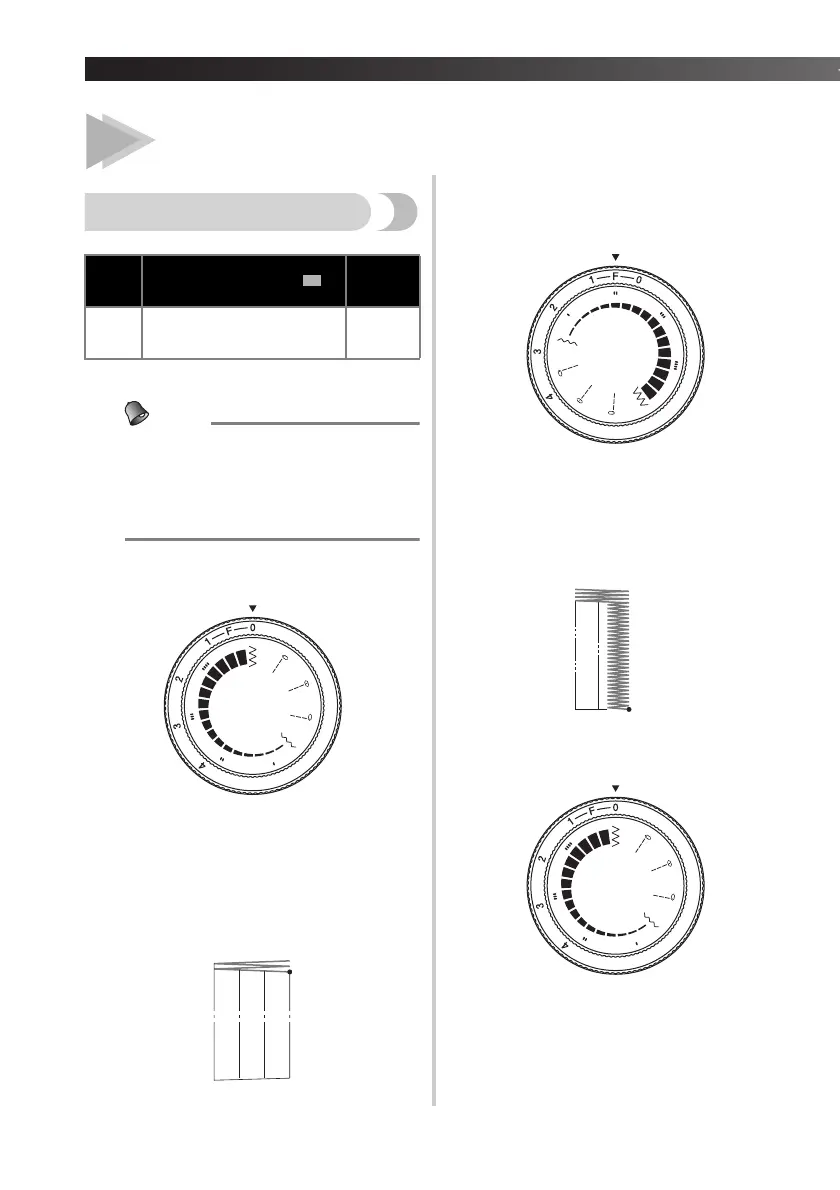
Step A: Bar Tack
a
Set the stitch length to 0, stitch width to 5.
b
Lower the presser foot over the top right
corner of the buttonhole mark and sew 3-
5 stitches.
c
Stop the machine when the needle is not
in the fabric, or when the needle is in the
fabric on the right edge of the stitch
(position A). (Turn the handwheel
counterclockwise if necessary.)
Step B: Right Row
a
Set the stitch length to between 0 and 1
(F), stitch width to 2.
b
Sew the predetermined length of the
buttonhole to the other end.
c
S
top the machine when the needle is not in
the fabric, or when the needle is in the fabric
on the right edge of the stitch (position B).
(Turn the handwheel counterclockwise if
necessary.)
Step C: Final Bar Tack
a
Set the stitch length to 0, stitch width to 5.
b
Sew 3-5 stitches.
Needle
Available stitch width ( )
Available
stitch
length
Single See the instructions below.
Set
between 0
and 1 (F).


 To Next Page