42
——————————————————————————————————————————————————————————————————————————————————————————————————————————————————————————————————————————————————————————————————————————————————————————————————————————————————————————————————————————————————————————————————————————————
6
f
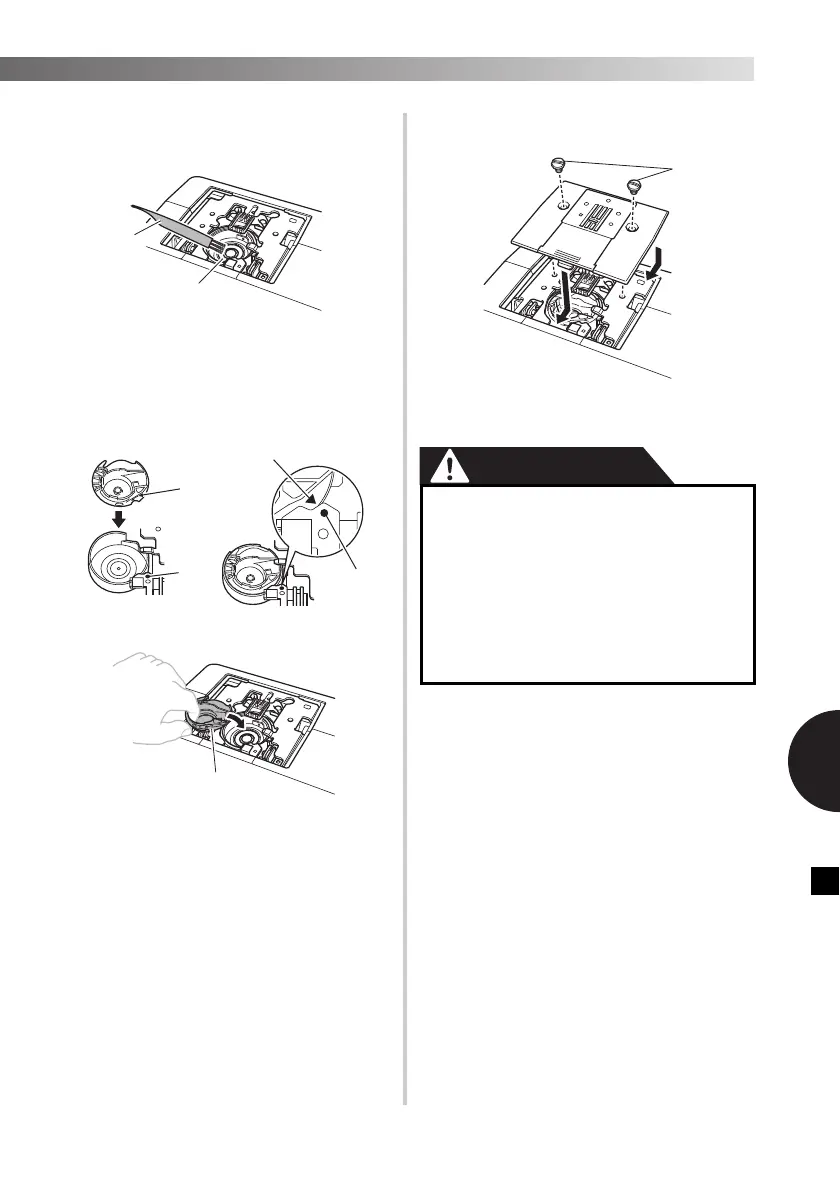
Use the cleaning brush or a vacuum
cleaner to remove any dust from the
bobbin race and its surrounding area.
1 Cleaning brush
2 Race
• Do not apply oil to the bobbin case.
g
Insert the bobbin case so that the ▲ mark
on the bobbin case aligns with the ● mark
on machine as shown below.
• Align the ▲ and ● marks.
1 ▲ mark
2 ● mark
3 Bobbin case
• Make sure that the indicated points are
aligned before installing the bobbin case.
h
Install the needle plate, and then tighten
the screws.
1 Screws
• Make sure that you install the needle plate
securely.
1
2
3
● Never use a bobbin case that is
scratched; otherwise the upper thread
may become tangled, the needle may
break, or sewing performance may
suffer. For a new bobbin case (part code:
XE9326-001), contact your nearest
authorized Brother Service Center.
● Make sure that you fit the bobbin case
properly, otherwise the needle may
break.


 To Next Page