
 Need help?
Do you have a question about the Brother P-Touch H107 and is the answer not in the manual?
Warnings to prevent injury and damage during P-touch operation.
Specific warnings regarding fire, heat, electric shock, and environmental conditions.
Important guidelines and precautions for proper handling and care of the P-touch.
Instructions for powering the P-touch and inserting the tape cassette.
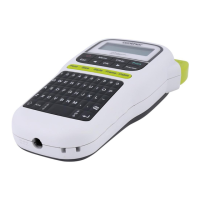
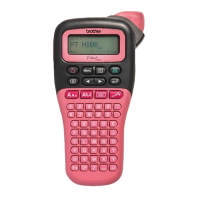
Explanation of the LCD display and keyboard layout.
Steps for initial setup including language and measurement unit configuration.
Guide to entering text, including uppercase/lowercase and character limits.
Instructions for inputting accented characters and symbols.
How to adjust the length of the printed label.
Procedures for saving custom labels and recalling them later.
Guide to using built-in templates for various label designs.
Instructions for using DECO MODE to create unique labels with templates.
Options for text formatting including size, style, and alignment.
How to insert various symbols and icons into labels.
Using frames and specific functions for cable labels.
Solutions for common error messages like 'No Text', 'Line Limit', and 'Cutter Error'.
Guidance for specific situations such as blank printing or text alignment issues.
Instructions on how to reset the P-touch to factory settings.
The Brother P-touch H107/H108 is a portable label printer designed for creating custom labels for various applications. It offers a range of features for designing labels with different frames, character sizes, and styles, utilizing a variety of tape cassette widths and colors.
The primary function of the P-touch H107/H108 is to print self-adhesive labels. Users can input text, apply various formatting options, and then print the labels for organization, identification, or decorative purposes. The device supports different tape widths, allowing for flexibility in label size.
To begin, the cassette cover is opened by pressing the indicated area at the top. If a tape cassette or batteries are already installed, they should be removed. The device requires six new AAA alkaline batteries (LR03) or fully charged Ni-MH batteries (HR03), ensuring correct pole orientation. For alkaline batteries, all six must be replaced simultaneously with new ones. For Ni-MH batteries, all six must be replaced simultaneously with fully charged ones. Once batteries are in place, a Brother TZe tape cassette is inserted, ensuring it snaps into place and the tape end feeds under the tape guides. The cassette cover is then securely closed. It's crucial to ensure the power is off when replacing batteries or tape cassettes.
Text is entered using the character keys on the keyboard. The LCD displays one row of 12 characters, but up to 80 characters can be entered. The Caps key toggles between uppercase and lowercase. The Size key allows adjustment of character size, offering options like Auto, Small, Medium, and Large. The Style key provides various text styles such as Normal, Bold, Italic, Outline, Shadow, Vertical, and combinations thereof. The Underline/Frame key enables adding an underline or a frame around the text. The Width key adjusts character width, with options like Auto, Half, and Narrow. The Space key inserts a space and can also be used to return to the default item when selecting settings. The Backspace key deletes the character to the left of the cursor. The Clear key clears text, format settings, or all data.
Before printing, users can preview the label to check its appearance. The Print key initiates the printing process. The device offers several printing options:
Auto for automatic length adjustment based on text.Auto, Half, and Narrow.The P-touch H107/H108 includes built-in templates to create unique labels.
Flower, Heart, Star, Animal, Food, Sport, and Holiday. Users select a design, input text, and the device automatically adjusts the text size and length to fit the chosen design.Brother Brother, Happy Birthday, Thank You, and Good Luck. Similar to Auto Designs, text and format settings are automatically adjusted to fit the selected pattern. Deco Mode is only available with 12mm tape cassettes.This function is specifically designed for creating labels to wrap around cables. It provides options for Wrap (for horizontal text) and Flag (for vertical text). Users input text, and the device formats it appropriately for cable identification.
The device allows users to save frequently used labels for later retrieval. Up to nine text files can be stored in memory.
Upon starting the P-touch, users need to set the language and the unit of measurement.
Menu key allows access to language settings, offering a wide range of options including English, Spanish, French, German, and more.inch or mm. The default setting is mm.
The P-touch automatically turns off if no keys are pressed within five minutes to conserve battery life.If a blank horizontal line appears through the printed label, it indicates dust on the print head. To clean it, remove the tape cassette and gently wipe the print head with a dry cotton swab in an up-and-down motion. An optional print head cleaning cassette (TZe-CL3) can also be used for easier cleaning.
The manual provides a comprehensive troubleshooting section for common issues:
Print or Text Preview key is pressed without any text entered.Chain Print is selected, indicating tape feeding after printing.Half or Narrow.Clear key and select Text&Format.If the P-touch malfunctions or "locks up," it can be reset. To do this, turn off the P-touch, hold down the Shift and R keys, and then press the Power key. Release the Shift and R keys, and then release the Power key. This action clears all text, format settings, and stored files.
 General
| Model | P-Touch H107 |
|---|---|
| Device Category | Label Maker |
| Print Technology | Thermal Transfer |
| Max Resolution | 180 dpi |
| Max Print Height | 9.0 mm |
| Tape Width | 3.5 mm, 6 mm, 9 mm, 12 mm |
| Keyboard Type | QWERTY |
| Cutter Type | Manual |
| Print Speed | 20 mm/sec |
| Display | 12 characters x 1 line |
| Tape Cartridge | TZe Tape |
| Connectivity | Not applicable |
| Dimensions | 110 mm x 207 mm x 59 mm |
| Power Source | 6 x AAA batteries (LR03/HR03) (not included) |









 To Next Page