Need help?
Do you have a question about the Brother p950nw and is the answer not in the manual?
Instructions for initial setup of the labelling machine, including hardware connections.
Guide to installing drivers and printing labels from a computer.
Instructions for connecting and printing labels from mobile devices.
Connecting and using serial or Bluetooth interfaces for data transfer.
How to modify machine settings via software tools like Printer Setting Tool.
Using templates for label printing with advanced features like barcode scanning.
Various additional machine functions, including Mass Storage Mode and Distributed Printing.
Guide for using the Cable Label Tool software for creating cable labels.
Instructions for using the P-touch Editor software for label design and creation.
Using software for managing templates, data, and libraries for the machine.
Method for transferring templates to the machine using specific distribution software.
Steps to update machine software and applications to the latest versions.
Overview of the machine's network capabilities and features.
Configuring network settings like IP address, subnet mask, and gateway.
Using a web browser to manage and configure machine settings remotely.
Procedures for resetting machine settings to factory defaults.
Cleaning and upkeep procedures to maintain machine performance.
Solutions for common machine problems and error conditions.
Detailed technical specifications and features of the labelling machine.
Barcode information for utilizing the P-touch Template function effectively.
Instructions for installing, removing, and charging the optional battery.
Guide for operating and configuring the optional touch panel display.
 General
| Print Technology | Thermal transfer |
|---|---|
| Resolution | 360 dpi |
| Device Category | Label Maker |
| Connectivity | USB, Wireless, Ethernet |
| Cutter | Automatic |
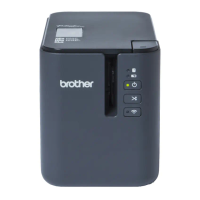
| Model | Brother P950NW |
| Tape Sizes | 3.5mm, 6mm, 9mm, 12mm, 18mm, 24mm |
| Tape Type | TZe |
| Operating System Compatibility | Windows, Mac |
| Label Width | 3.5 mm - 24 mm |

 To Next Page