615AHAQ: Owner’s Manual
Manufacturer reserves the right to change, at any time, specifications and designs without notice and without obligations.
12
ADDITIONAL FEATURES
NOTE: Every time the air conditioner is powered on, the unit emits a
buzzing sound to indicate that the product has been
powered on normally. If there is no sound, it is possible that
the unit has malfunctioned. Power on again or check the
circuit. The actual functions are subject to the product you
purchased, please check the indoor display and remote
control of your unit. Review the Remote Controller Manual
for more features.
Active Clean Function
The Active Clean Technology washes away dust when it adheres to the
heat exchanger by automatically freezing and then rapidly thawing
the frost. The Active Clean operation is used to produce more condensed
water to improve the cleaning effect, and the cold air blows out. After
cleaning, the internal wind wheel then keeps operating with hot air to
blow-dry the evaporator, thus keeping the inside clean. When this
function is turned on, the indoor unit display window appears “CL”, after
20 to 45 minutes, the unit turns off automatically and cancel the Active
Clean function.
ECO Intelligent eye (Applicable to units with Intelligent eye
function only)
The system is controlled intelligently under Intelligent Eye mode. It can
detect the people’s activities in the room. In cooling/heating mode, when
you are away for 30 minutes, the unit automatically lowers the frequency
to save energy. And the unit automatically starts and resumes operation if
sensing human activity again.
AUTO LEAK DETECTION
LEAK DETECTION SYSTEM installed. Unit must be powered except
for service.For the unit with refrigerant sensor, when the refrigerant
sensor detects refrigerant leakage, the indoor unit displays an error code
and emits a buzzing sound, the compressor of outdoor unit immediately
stops, and the indoor fan starts running. The service life of the refrigerant
sensor is 15 years. When the refrigerant sensor malfunctions, the indoor
unit displays the error code FHCC. Refer to the error code table in the
unit’s service manual for details. The refrigerant sensor can not be
repaired and can only be replaced by the manufacture. It shall only be
replaced with the sensor specified by the manufacture.
NOTE: The buzzer will continue to “beep” for 5 minutes before
stopping. You can also press any button on the remote
controller to stop the buzzer.
Auto-Restart
If the unit loses power, the unit automatically restarts with the prior
settings once power has been restored.
Louver Angle Memory
When turning on your unit, the louver resumes its former angle.
Breeze Away
This feature avoids direct air flow blowing on the body.
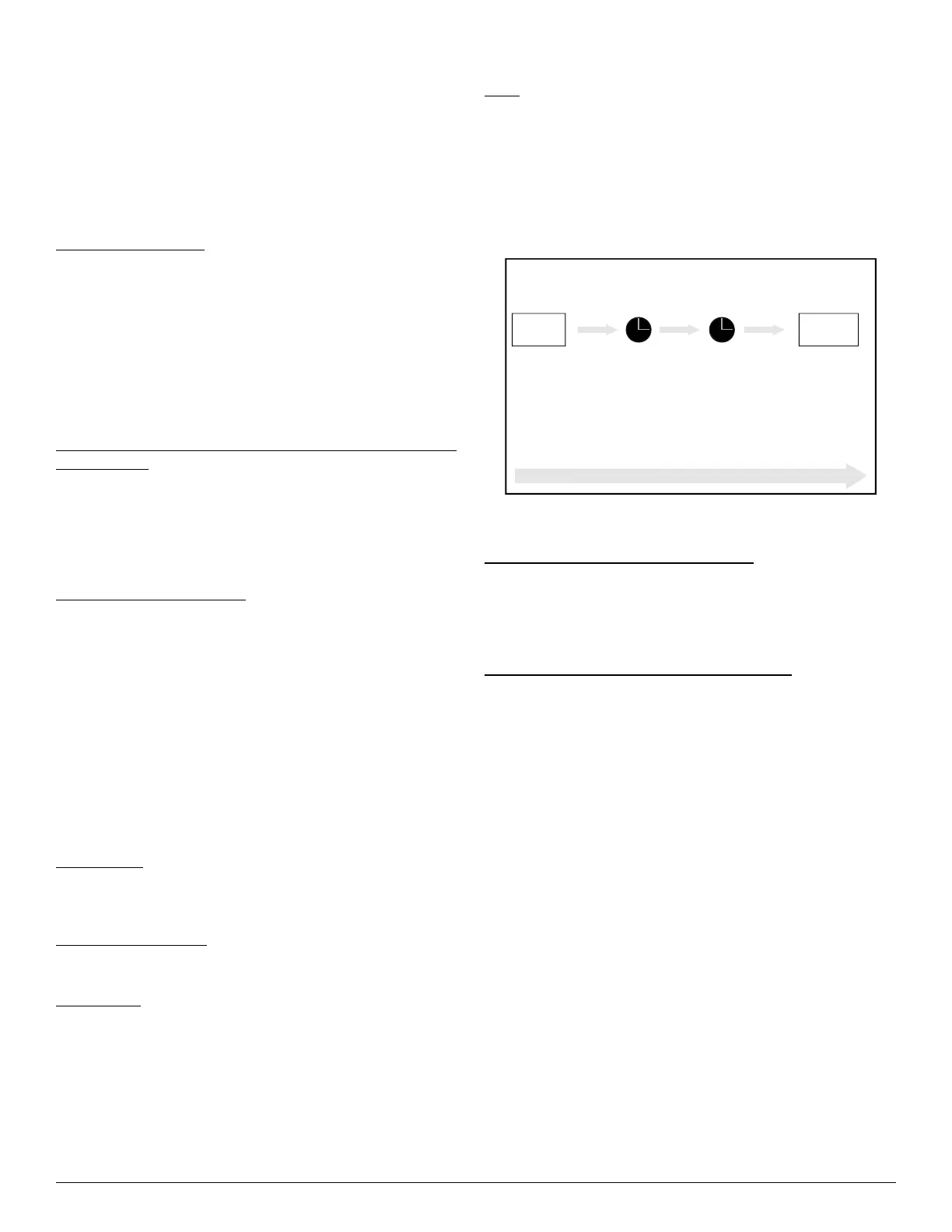
Sleep
Use SLEEP to decrease energy use while you sleep. Press SLEEP on the
remote control when in the COOL mode, the unit increases the
temperature by 2°F (1°C) after 1 hour, and increases an additional 2°F
(1°C) after another hour. When in HEAT mode, the unit decrease
the temperature by 2°F (1°C) after 1 hour, and decreases an additional 2°F
(1°C) after another hour. SLEEP stops after 8 hours and the system
continues to run with final situation.
Fig. 11 — SLEEP Operation
Wireless Control (For App control units)
Wireless control allows you to control the air conditioner with a smart
phone and a wireless connection. For the USB device access,
replacement, maintenance operations must be carried out by professional
staff.
Outdoor Unit Reverse Fan Operation function
This feature helps keep the outdoor coil cleaner and may extend the
duration between regular maintenance intervals depending on local
conditions. When the unit is turned off, a 10 second delay occurs then the
outdoor fan runs in reverse rotation for 70 seconds to blow off
loose accumulated dust and debris.
SETTING AIR FLOW
NOTE: Setting vertical angle of air flow (remote control). While the
unit is on, use SWING to set the direction (vertical/
horizontal angle) of airflow. Refer to the Remote Control
Manual for details.
NOTE: Do not set louver at too vertical an angle for long periods of
time. When using COOL or DRY mode, water could
condense on the louver blade and drop on your floor or
furnishings.
NOTE: Setting the louver at too small an angle when using COOL or
HEAT mode, can reduce the AC performance due to
restricted air flow.
NOTE: According to the relative standards requirement, set the
vertical air flow louver to its maximum angle under heating
capacity test.
NOTE: Do not adjust the louver by hand. You can turn off the unit
and unplug it for a few seconds to restart the unit. The unit
resets the louver.
Set
temperature
1hr 1hr
Keep
running
SLEEP Operation
Saving energy during sleep
Heat mode(2°F/-1°C) per hour for the first two hours
Cool mode (+2°F/1°C) per hour for the first two hours




 To Next Page