EasyManua.ls Logo

Bryant Evolution SYSTXBBUID01--D - User Manual

Bryant Evolution SYSTXBBUID01--D
18 pages
Print Icon
To Next Page IconTo Next Page
Loading...
Installation Instructions
SYSTXBBUID01--D
EVOLUTIONt CONTROL
Deluxe
User Interface
®
A09436
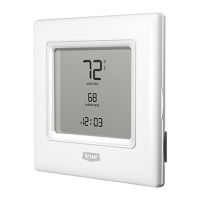
Fig. 1 -- Evolutiont Control
NOTE: Read the entire instruction manual before starting the
installation.
TABLE OF CONTENTS
PAGE
SAFETY CONSIDERATIONS 1.........................
INTRODUCTION 1...................................
INSTALLATION AND START-- UP OVERVIEW 2..........
INSTALLATION 2....................................
INSTALLING EVOLUTION CONTROL 3.................
INITIAL POWER--UP 5................................
QUICK START 7.....................................
INSTALL / SERVICE MENUS 8.........................
EQUIPMENT S UMMARY MENU 8......................
INSTALL MENU 8....................................
SETUP MENU 8......................................
CHECKOUT MENUS 13...............................
SERVICE MENUS 14..................................
OPERATIONAL INFORMATION 15.....................
TROUBLESHOOTING 17..............................
SYSTEM MALFUNCTION SCREEN 18..................
SAFETY CONSIDERATIONS
Improper installation, adjustment, alteration, service, maintenance,
or use can cause explosion, fire, electrical shock, or other
conditions which may cause death, personal injury or property
damage. Consult a qualified installer, service agency or your
distributor or branch for information or assistance. The qualified
installer or agency must use factory--authorized kits or accessories
when modifying this product. Refer to the individual instructions
packaged with the kits or accessories when installing.
Follow all safety codes. Wear safety glasses, protective clothing,
and work gloves. Have a fire extinguisher available. Read these
instructions thoroughly and follow all warnings and cautions
included in literature and attached to the unit. Consult local
building codes and the current edition of the National Electrical
Code (NEC) NFPA 70.
In Canada, refer to the current editions of the Canadian Electrical
Code CSA C22.1.
Recognize safety information. When you see this symbol
on
the unit and in instructions or manuals, be alert to the potential for
personal injury. Understand the signal words DANGER,
WARNING,andCAUTION. These words are used with the
safety--alert symbol. DANGER identifies the most serious hazards,
which will result in severe personal injury or death. WARNING
signifies hazards, which could result in personal injury or death.
CAUTION is used to identify unsafe practices, which may result
in minor personal injury or product and property damage. NOTE
is used to highlight suggestions which will result in enhanced
installation, reliability, or operation.
INTRODUCTION
The Evolution System consists of several intelligent
communicating components which includes the Evolution Control
(or User Interface), variable speed furnace or FE fan coil, 2--stage
AC or HP and Evolution Packaged Products, which continually
communicate with each other via a four--wire connection called the
ABCD bus. Commands, operating conditions, and other data are
passed continually between components over the ABCD bus. The
result is a new level of comfort, versatility, and simplicity.
All Evolution furnaces or fan coils are variable--speed and multi
stage for maximum flexibility, efficiency, and comfort. They
support controlled ventilation, humidification, dehumidification,
and air quality control. Either an Evolution (communicating), or a
standard 24VAC controlled outdoor unit may be used.
When using conventional outdoor units, the Evolution furnace or
fan coil provides the 24 volt signals needed to control them. Also,
the Evolution Network Interface Module (P/N SYSTXBBNIM01)
allows connection of a Bryant HRV or ERV without the need for a
separate wall control.
All system components are controlled through the wall mounted
Evolution Control, which replaces the conventional thermostat and
provides the homeowner with a single wall control for all features
of the system.

Other manuals for Bryant Evolution SYSTXBBUID01--D

Question and Answer IconNeed help?

Do you have a question about the Bryant Evolution SYSTXBBUID01--D and is the answer not in the manual?

Summary

Safety Considerations

Safety Information and Signal Words

Alerts users to potential personal injury with signal words DANGER, WARNING, CAUTION.

System Introduction

Evolution System Overview

Describes the Evolution System, components, and communication.

Installation and Start-Up Overview

Equipment Inspection and Job Site Preparation

Instructions for inspecting equipment upon arrival and filing claims for damage.

Control Location and Wiring Guidelines

Guidelines for selecting a suitable location and wiring the control.

Remote Room Sensor Installation

Explains the use and wiring of remote room sensors.

Evolution Control Mounting

Installing the Evolution Control Unit

Steps for removing existing controls and mounting the new Evolution Control.

Optional Decorative Backplate

Information on the optional decorative backplate for aesthetics.

Wiring Diagrams and Connections

Universal Four-Wire Connection Diagram

Shows typical wiring for various Evolution System components.

Furnace;Fan Coil with 1-Stage AC Wiring

Specific wiring for furnace/fan coil with 1-stage AC.

Fan Coil with Non-Communicating HP Wiring

Specific wiring for fan coil with non-communicating 1-stage HP.

ABCD Connector Details

Details the ABCD connector and its pin assignments.

Initial System Power-Up

Power-Up Sequence and Communication

Describes the initial power-up sequence and communication checks.

Outdoor Unit Configuration

Guides the installer through selecting the outdoor unit type and size.

Electric Heater Configuration

Instructions for identifying and configuring the electric heater size.

System Accessory Configuration

Air Filter Type Selection

Allows selection of the air filter type installed in the system.

Humidifier Installation Status

Enables configuration for humidifier installation.

UV Light Installation Status

Allows selection of UV light installation status.

Equipment Summary Review

Displays a summary of all detected and selected system equipment.

Static Pressure Check Procedure

Details the static pressure check performed after setup.

Install and Service Menu Access

Equipment Summary Menu Options

Shows a summary of all detected system equipment.

Install Menu Functions

Used for adding, changing, or uninstalling equipment.

Setup Menu Configuration

Thermostat Setup Options

Configures thermostat settings like auto mode, deadband, offsets, and elevation.

Furnace Setup Parameters

Configures furnace settings for airflow, staging, and operation.

Furnace Setup Details

Dehumidification Airflow Settings

Adjusts airflow for dehumidification mode.

Low Heat Rise Configuration

Enables or disables increased furnace airflow for bypass humidifiers.

Furnace Staging Control

Controls furnace staging behavior based on demand and capability.

G Terminal Operation Settings

Configures G terminal operation for fan control or shutdown.

Fan Coil Setup Options

Heat Pump Heating Airflow Configuration

Configures fan coil airflow for heat pump heating.

Heat Pump Cooling Airflow Configuration

Configures fan coil airflow for heat pump cooling.

Fan Coil Dehumidification Airflow

Adjusts airflow for dehumidification mode.

Electric Heater Size Setting

Sets the size of the electric heater for the fan coil.

Electric Heat Lockout Temperature

Prevents electric heat operation above a set outdoor temperature.

Fan Coil G Terminal Functions

Configures G terminal operation for fan control or shutdown.

Hybrid Heat System Configuration

Hybrid Heat Setup Parameters

Configures lockout temperatures and staging times for hybrid heat.

Furnace Operation During Defrost

Determines if the furnace operates during defrost cycles.

Heat Pump to Furnace Staging Timer

Sets time before furnace runs after heat pump demand.

Hydronic Heat System Configuration

Hydronic Heat Setup Parameters

Configures lockout temperatures and airflow for hydronic heat.

Water Coil Operation During Defrost

Determines if the water coil operates during defrost cycles with water.

Hydronic Heating Airflow Selection

Selects desired airflow during hydronic heating.

Equipment Checkout Procedures

Furnace or Gas PAC Checkout

Exercises the furnace or gas packaged unit.

Electric Heat Checkout

Exercises the electric heat stages of the fan coil.

Heat Pump Heating Checkout

Exercises the heat pump in heating mode.

Heat Pump Cooling Checkout

Exercises the heat pump or AC in cooling mode.

Service Menu Diagnostics

Furnace;Gas PAC Status Display

Displays current operating parameters of furnace/PAC.

Fan Coil Status Display

Displays current operating parameters of fan coil.

Heat Pump;AC Status Display

Displays current operating parameters of heat pump/AC.

Last 10 System Events Log

Shows the last 10 system events and faults.

Operational Information and Controls

Continuous Fan Operation Modes

Explains the different fan operation modes.

Compressor Timeguard Function

Prevents compressor from starting too soon after shutdown.

Heat Source Override

Allows manual override of heat source selection.

Keypad Lockout Feature

Describes how to lock and unlock the keypad.

Auto Changeover Operation

Explains the auto mode transition between heating and cooling.

Smart Recovery Functionality

Describes the smart recovery feature for temperature transitions.

Dehumidification Operation Details

Cooling Airflow and Dehumidify Settings

How cooling airflow settings affect dehumidification.

Dehumidify Mode Activation

Controls over-cooling for humidity removal.

Hybrid Heat Operational Logic

Furnace Lockout Temperature Setting

Sets outdoor temperature above which furnace operates.

Heat Pump Lockout Temperature Setting

Sets outdoor temperature below which heat pump operates.

Hybrid Heat Defrost Operation

Manages furnace operation during defrost cycles.

Troubleshooting Common Issues

Control Unit Power Issues

Steps to resolve power issues with the Evolution Control.

Indoor Unit Communication Errors

Troubleshooting steps for indoor unit communication loss.

Outdoor Unit Communication Errors

Troubleshooting steps for outdoor unit communication loss.

Re-entering Start-Up Sequence

Guide to re-entering the start-up sequence.

Checking Current System Status

Steps to view current system status and faults.

System Malfunction Codes

Fan Coil Malfunction Code Reference

Lists system malfunction codes for fan coil units.

Furnace Malfunction Code Reference

Lists system malfunction codes for furnaces.

Outdoor Unit Malfunction Code Reference

Lists system malfunction codes for outdoor units.

User Interface Malfunction Code Reference

Lists system malfunction codes for the user interface.

Overview

The Bryant SYSTXBBUID01-D Evolution™ Control is an intelligent communicating thermostat designed to manage a complete HVAC system, offering advanced comfort, versatility, and simplicity. It serves as the central command center for the Evolution System, replacing conventional thermostats and providing a single wall control for all system features.

Function Description:

The Evolution Control is the user interface for the Evolution System, which comprises several intelligent communicating components, including variable-speed furnaces or FE fan coils, 2-stage AC or heat pumps, and Evolution Packaged Products. These components continuously communicate via a four-wire ABCD bus, exchanging commands, operating conditions, and other data to optimize system performance.

The control supports various system configurations, including communicating indoor and outdoor units, or communicating indoor units with standard 24VAC controlled outdoor units. It also integrates with accessories such as humidifiers, ventilators, and UV lights. When conventional outdoor units are used, the Evolution furnace or fan coil provides the necessary 24-volt signals for control. Additionally, the Evolution Network Interface Module (NIM) allows for the connection of a Bryant HRV or ERV without requiring a separate wall control.

The system offers precise temperature and humidity control, with advanced features like variable-speed operation for furnaces and fan coils, multi-stage heating and cooling, controlled ventilation, humidification, dehumidification, and air quality management.

Usage Features:

The Evolution Control is designed for user-friendly operation, providing homeowners with comprehensive control over their HVAC system.

  • Temperature and Humidity Control: Users can set desired heating and cooling temperatures, as well as humidity levels. The system can automatically adjust airflow for dehumidification based on demand, and even overcool the space if necessary to meet humidity targets.
  • Programming: The control allows for programmable schedules, enabling users to set different temperatures and fan operations for various periods of the day (e.g., WAKE, DAY, EVENING, SLEEP) and for specific days or the entire week. A "Quick Start" option facilitates initial setup of day, time, and desired humidity.
  • Auto Mode: An Auto Changeover mode automatically switches between heating and cooling as needed, with an adjustable time delay to prevent rapid cycling.
  • Smart Recovery: When enabled, Smart Recovery gradually adjusts the room temperature to reach the desired setpoint by the scheduled time, starting the recovery process up to 1.5 hours in advance.
  • Fan Operation: Users can select continuous fan operation at different speeds (Low, Med, High) or set it to Auto, where the fan runs only during equipment operation.
  • Override Functions: The system allows for temporary overrides of the temperature schedule, with adjustable override times or an indefinite hold.
  • Heat Source Selection: For hybrid heat or hydronic heat applications, users can manually select the desired heat source or allow the system to automatically manage it.
  • Keypad Lockout: A keypad lockout feature prevents unauthorized changes to settings.
  • Display: The user interface features a clear display that shows current operating status, system messages, and allows for navigation through various menus. It can display temperatures in either Fahrenheit or Celsius.
  • Remote Room Sensor: An optional remote room sensor can be used to provide temperature readings, allowing the main control to be mounted in less optimal airflow areas.
  • G Terminal Functionality: The G terminal can be configured for various operations, including enabling the fan for fresh air supply products, running the fan at a selected speed, or initiating a system shutdown in response to an external device (e.g., a float switch).
  • Dehum Drain: This feature turns off the continuous fan for five minutes at the end of a cooling cycle to drain water from the indoor coil, improving dehumidification effectiveness.
  • Reheat Dehum: Available with fan coil systems, this function enables electric heat to be used during "Cool to Dehumidify" operation, significantly improving humidity control in cooling mode.

Maintenance Features:

The Evolution Control provides several features to assist with system maintenance and troubleshooting.

  • Filter and UV Light Notifications: The system can be configured to remind the homeowner when it's time to clean or change the air filter, humidifier pad, ventilator pre-filter, or UV lights, based on adjustable time intervals or actual operation time.
  • Static Pressure Check: During initial installation or when the INSTALL menu is run, the system performs a static pressure check to ensure proper airflow. It also monitors static pressure every 24 hours to detect filter accumulation (TrueSense™ Dirty Filter Detection).
  • Frozen Coil Detection: The user interface monitors system static pressure during cooling operation. If a dramatic increase is detected, it will temporarily turn off cooling, record a fault, and run the fan at a reduced airflow to prevent coil freezing.
  • System Malfunction Screen: In case of a system fault, the control displays a "SYSTEM MALFUNCTION" message on the main screen, along with a code number corresponding to the fault on the circuit board of the affected component (fan coil, furnace, or outdoor unit).
  • Last 10 System Events: The "Service Info" menu provides a history of the last 10 system events, including the time and date of each incident, helping technicians diagnose issues.
  • Run/Fault History: The system tracks resettable fault counters, cycle counters (number of heat/cool/power cycles), lifetime hours of operation, and kilowatt-hours used for electric reheat.
  • Model/Serial Numbers: The "Service Info" menu allows installers to view the model and serial numbers of communicating equipment in the system.
  • Service Phone Number: Installers can enter a name and phone number for service, which will appear on pop-up messages for homeowners.
  • Installer/Service Menus: These menus provide vital information for installers and service personnel, including equipment summaries, setup options, checkout procedures for testing equipment operation, and service information like fault history.
  • Reset Factory Defaults: Options are available to reset program schedules, user settings, and installation settings to their factory defaults.
  • Service Tool Mode: A -D model user interface can be used as a service tool, taking over system control and allowing technicians to diagnose and configure the system without affecting the regular user interface settings.

Bryant Evolution SYSTXBBUID01--D Specifications

General IconGeneral
Product TypeThermostat
SeriesEvolution
CompatibilityBryant Evolution System
ConnectivityWi-Fi
DisplayYes
Mobile AppYes
Remote AccessYes
Energy Saving FeaturesYes
Voice ControlNo
ProgrammableYes
Humidity ControlYes
DehumidificationYes
Indoor Temperature SensorYes
Outdoor Temperature SensorYes
TypeSmart Thermostat
Power Source24VAC
Display TypeTouchscreen

Related product manuals