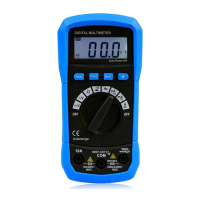
④ Set the rotary switch to the ‡ TEMP· range. In this
time, The environment temperature value displayed
⑤ Insert the K-type probe to the two ‡ COM· and
‡ TEMP· terminals. The two ‡ +· and ‡ -‡ pins of
temperature probe(P3400) must be direct at the
‡ COM· & ‡ ₤ · terminal respectively.
⑥ The measured temperature value will be displayed on
6-1. Replacing the battery
When meter display the battery must be replace
to maintain normal operation.
④ Disconnect and remove all test probes from any live
⑤ Open the battery cover on the bottom case by
⑥ Remove old battery and snap new one into battery
Replacing the defective fuse should the done
according to the following procedure.
④ To avoid electrical shock, remove the test lead and
any input signal before opening the bottom case.
⑤ Open the button case and then remove the
defective fuse and insert a new fuse of the same size
⑥ Replace the bottom case and reinstall all the screw.
6-3.Cleaning and Decontamination
The meter can be cleaned with soft clean cloth to remove


 To Next Page