12
Glass Oven B-5855 Operation
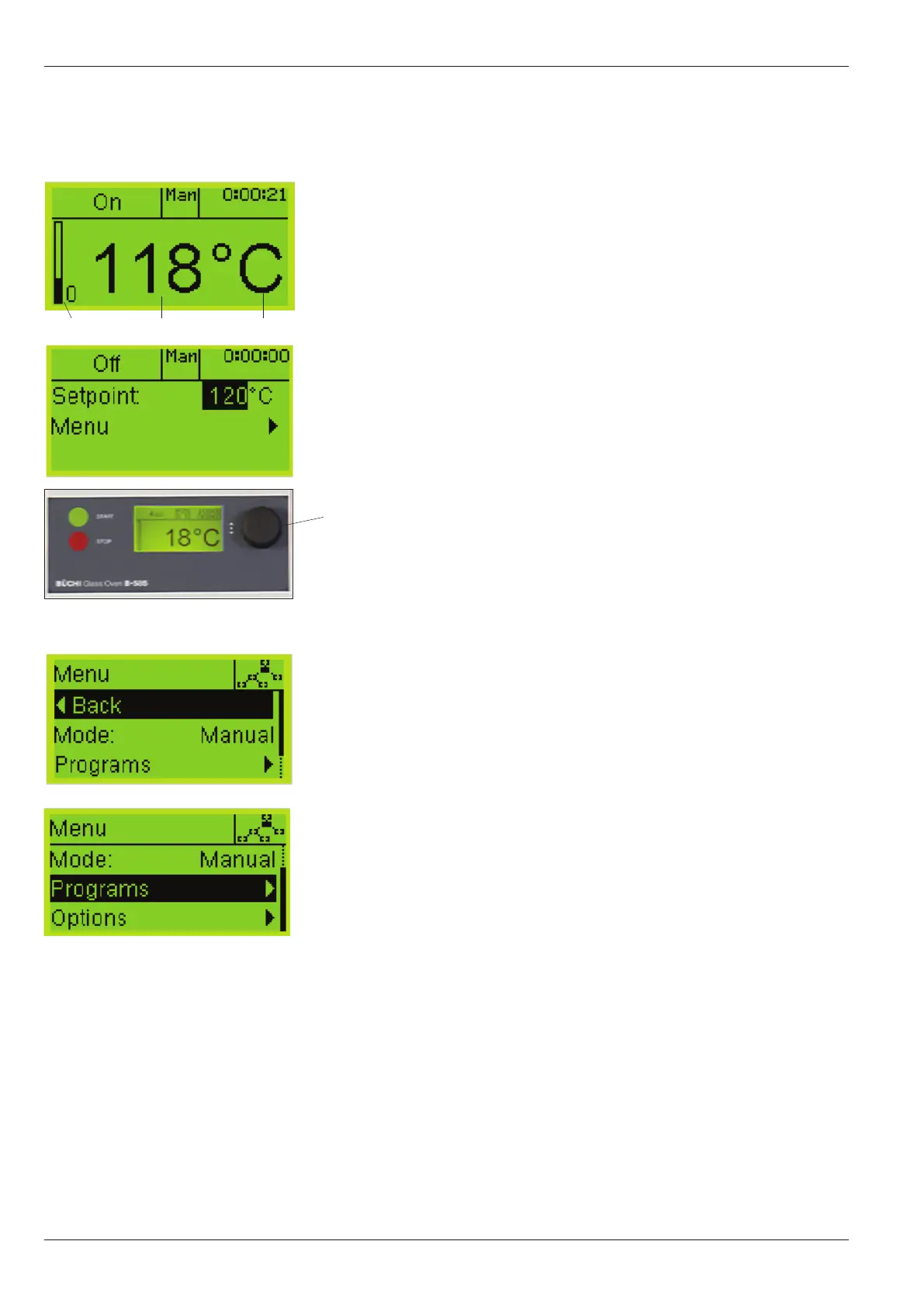
5.2. Basic display arrangement
a
Active mode information
b
Operating condition
c
Actual temperature
d
Temperature unit of measurement
e
Graphic display of heating intensity
f
Display of the elapsed time
g
Set point adjustment
h Menu adjustment
i
Graphical display, shows level indication of the user
j
Multifunction button
By pressing and turning the Multifunction botton allows
access to the working menu where changes and modifica-
tions can be made. Pressing the Multifunction botton again
activates the set point. An existing value can be modified
by turning the Multifunction botton and is stored by press-
ing the botton again. The cursor will jump forward to the
display menu.
By turning the Multifunction botton you get back
to the actual working menu or access another
control mode. It is possible to change/create,
delete, read or load a program profile in the menu
program or change the main settings.
b
c
e
d
f
i
h
a
g
a)
j


 To Next Page