6 Operation
26 K-425 / K-436 Operation Manual, Version B
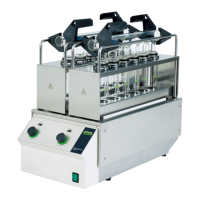
6.1.3 SpeedDigester K-436 — front side
Heating chambers
Heating indicators
Thermostat knobs
Mains switch
• The mains switch is illuminated green when the system is switched on
• Thermostats
➥ Turn the thermostat knob(s) clockwise to increase the digestion temperature (heating level
1 – 10)
➥ Turn the thermostat knob(s) anticlockwise to decrease the digestion temperature or even deac-
tivate the corresponding heating chamber ('OFF' position)
• The signal lamp ‘Heating indicator’ will light up every time heat is generated in the corresponding
heating chamber











 To Next Page