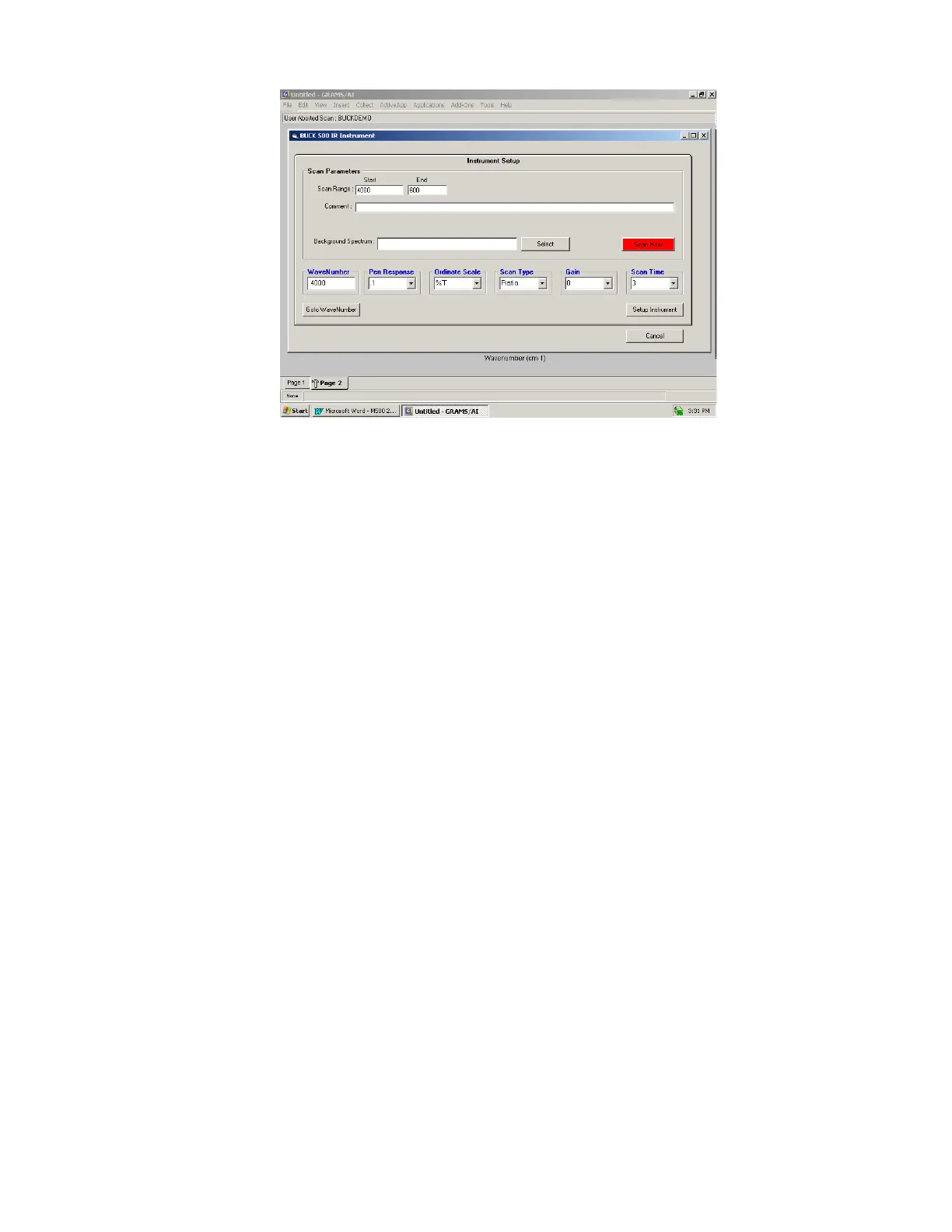
4.2.1 Instrument Setup
Ordinate Scale
Ordinate Scale determines whether the spectrum is collected in Absorbance or
Transmission. If this option is selected, the collected spectrum will be
automatically ratioed to a background spectrum after a reference scan is saved and
assigned. A filename for a valid background spectrum must be entered into the
“Background Spectrum” text box.
Goto WaveNumber
The Instrument Setup dialog displays the current wavenumber position of the
instrument in the WaveNumber text box. If a new wavenumber position is entered
in the WaveNumber text box and the Goto WaveNumber button is selected, the
monochromator in the instrument will move to the entered wavenumber.
Setup Instrument
The Setup Instrument button sets the instrument to the currently selected
instrument parameters.
Scan Time
Scan Time determines the rate at which data will be collected from the instrument.
It also determines the data interval for the collected spectrum.
Scan Range
This specifies the abscissa limits for acquired spectra. The range should be
compatible with the operating ranges of the optical components selected. The scan
range limits will be set to the maximum scan range of your instrument. The Model
500 IR has a maximum scan range of 4000cm-1 to 600 cm-1.



 To Next Page