Changing Parameters
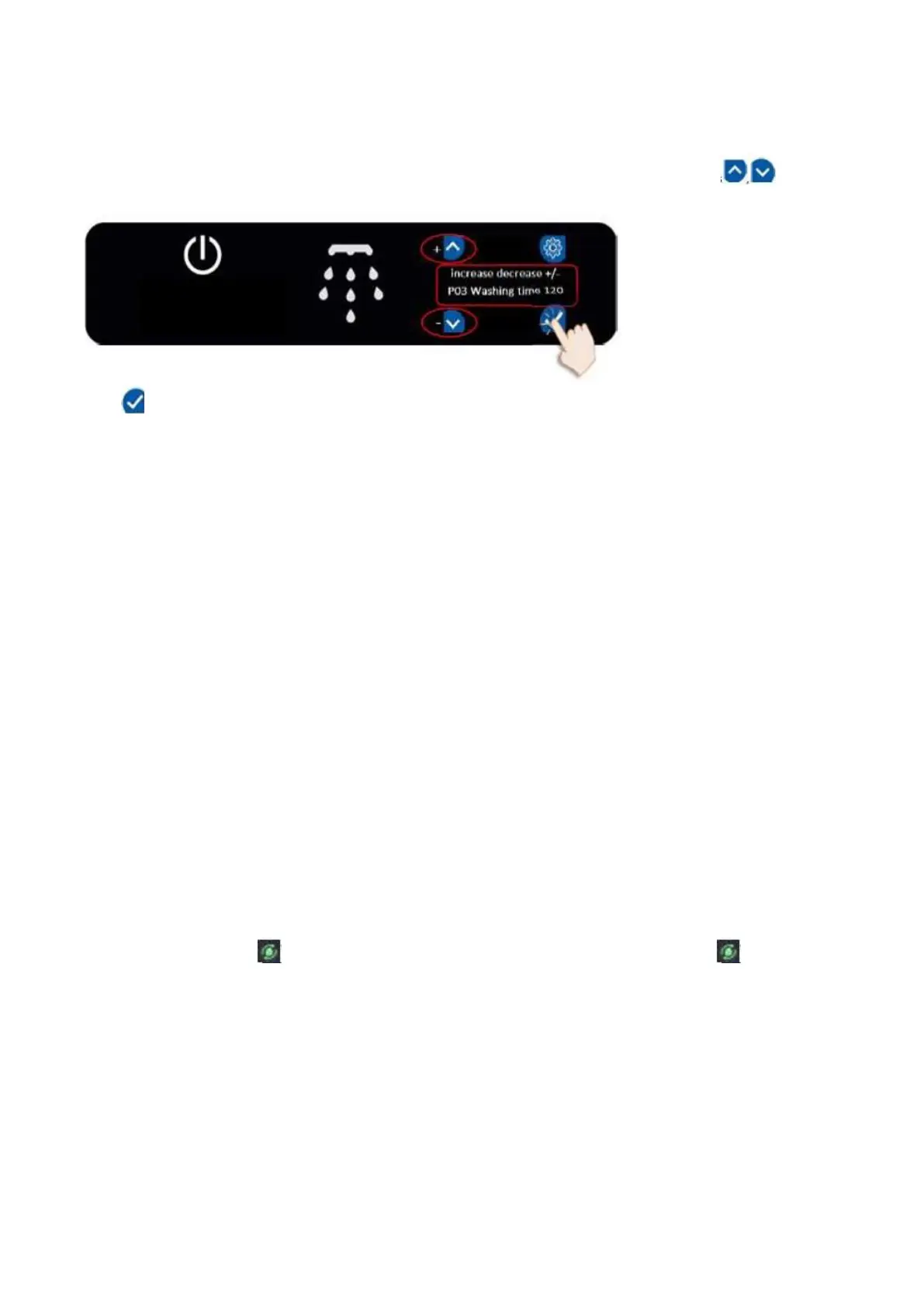
Access the settings Menu. Choose the program that you want to change Use settings icons to
change the parameters
Hold for 3 seconds to confirm changes
Note: If the changes made are to be valid in all programs, the same setting values must be entered for each
program
By using the settings menu you can change the following –
P01 Tank Temperature. Wash Tank temperature can be adjusted. The setting is made separately for each
program
P02 Boiler Temperature. Boiler Tank temperature can be adjusted. The setting is made separately for
each program
P03 Washing Time. Washing time can be adjusted. The setting is made separately for each program
P05 Waiting Time after Washing. Waiting time after washing can be adjusted. The setting is made
separately for each program. This is the waiting period after washing but before rinsing to prevent droplets
from the washing process falling on the glasses after the rinsing process has started.
P08 Getting Detergent Time. Detergent time can be adjusted. The setting is made separately for each
program. The Detergent pump is on a timer. The longer the time set the more Detergent will enter the
machine
P09 Getting Rinse Aid Time. Rinse Aid time can be adjusted. The setting is made separately for each
program. The Rinse Aid pump is on a timer. The longer the time set the more Rinse Aid will enter the
machine
P11 Dirtiness Counter. Counts the number of washes until the washing tank water should be changed.
When count reached the icon will appear on screen. When the water has been drained will disappear
from screen
P15 Tank Preheating. Set to 0 washing cycle can be started without the boiler and wash temperatures
being at the set temperature. Set to 1 and the washing cycle will only start when pre set boiler and wash
temperatures are reached.
P17 Start by Door. Set to 0 to start touch the drop icon on the control screen. Set to 1 and the washing
cycle will start when the door is closed


 To Next Page