13
Lane Departure Warning
F
The Lane Departure Warning indicator on the instrument cluster is green when a lane
marking is detected. If a detected lane marking is crossed without using a turn signal in that
direction,thesystemashesanamber indicator and 3 beeps sound on the side of the
departure direction.
To turn the system Off or On, press the
Lane Departure Warning button on the
center of the instrument panel.
Forward Collision Alert
F
The
Vehicle Ahead indicator is green on the instrument cluster when a vehicle is detected
and is amber when following a vehicle ahead too closely. When approaching a vehicle
directlyaheadtoorapidly,aredalertashesonthewindshieldandrapidbeepssound.
Press the
Forward Collision Alert button on the steering wheel to select a follow
gap setting of Far, Medium, Near, or Off.
Side Blind Zone Alert
F
While driving, the system displays a warningsymbolontheleorrightsidemirror
whenavehicleisdetectedinthatsideblindzonearea.Thewarningsymbolashesifa
turn signal is activated when a vehicle has been detected on the same side.
To turn the system Off or On, go to Settings > Vehicle > Collision/Detection Systems >
Side Blind Zone Alert.
DRIVER ASSISTANCE SYSTEMS
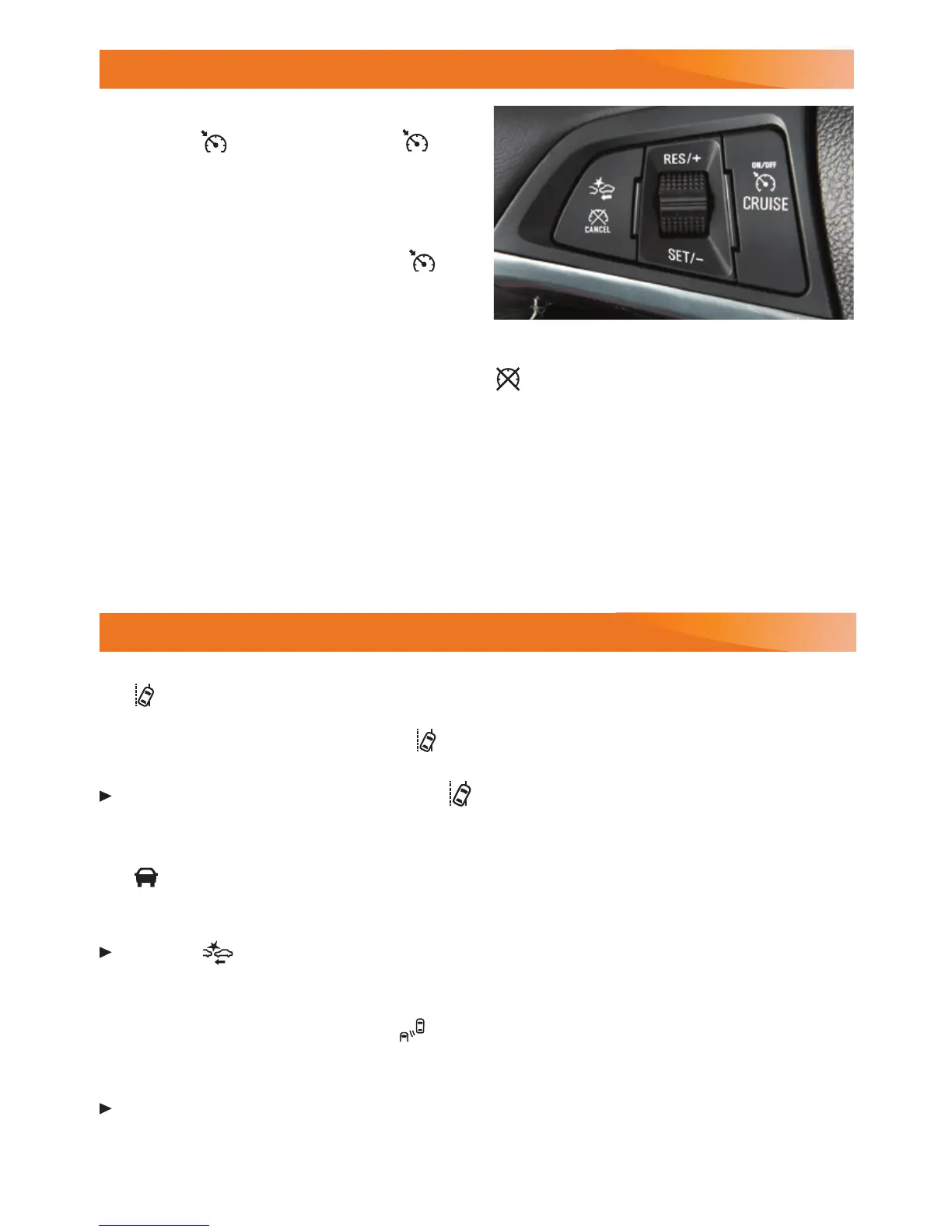
CRUISE CONTROL
Setting Cruise Control
1. Press the On/Off button. The
Cruise Control symbol will illuminate in
white on the instrument cluster.
2. When traveling at the desired speed,
rotate the thumbwheel down to the
SET position to set the speed. The
symbol will illuminate in green on the
instrument cluster.
See Driving and Operating in your Owner's Manual.
F
Optional equipment
Cancel
Press to cancel the cruise control but retain
the set speed in memory.
Pressing the brake pedal also will cancel
the cruise control.
Turn off cruise control or the vehicle ignition
to erase the cruise control set speed.
Adjusting Cruise Control
RES/+ Resume/Accelerate
Rotate the thumbwheel up to resume a set
speed. When the system is active, rotate
the thumbwheel up to increase speed.
SET/– Set/Coast
When the system is active, rotate the thumb-
wheel down to decrease speed.
See Driving and Operating in your Owner's Manual.










 To Next Page