Buick Encore Owner Manual (GMNA-Localizing-U.S./Canada-15498924) -
2022 - CRC - 5/27/21
Instruments and Controls 85
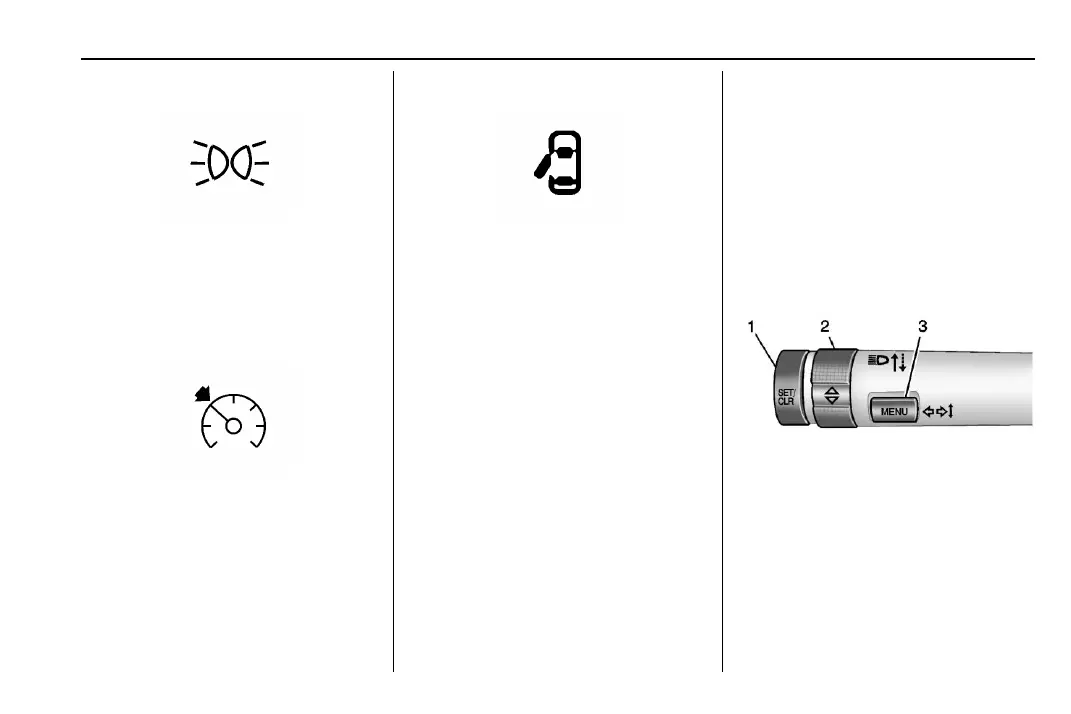
Lamps On Reminder
This light comes on when the exterior lamps
are in use, except when only the Daytime
Running Lamps (DRL) are active. See Exterior
Lamp Controls 0 91.
Cruise Control Light
The cruise control light is white when the
cruise control is on and ready, and turns
green when the cruise control is set and
active.
See Cruise Control 0 147.
Door Ajar Light
This light comes on when a door is open or
not securely latched. Before driving, check
that all doors are properly closed.
Information Displays
Driver Information Center (DIC)
The Driver Information Center (DIC) displays
information about the vehicle. It also
displays warning messages if a system
problem is detected. See Vehicle Messages
0 87. All messages appear in the DIC display
in the center of the instrument cluster.
The vehicle may also have features that can
be customized through the controls on the
radio. See Vehicle Personalization 0 88.
DIC Operation and Displays
The DIC has different displays which can be
accessed by using the DIC buttons on the
turn signal lever. The DIC displays trip, fuel,
and vehicle system information, and
warning messages if a system problem is
detected.
The bottom of the DIC display shows the
position of the shift lever and the odometer.
It may also show the direction the vehicle is
driving.
In cold weather the DIC display may change
slowly. This is normal and will move more
quickly as the vehicle's interior temperature
rises.
Use the controls to open and scroll through
the different items and displays.
SET/CLR : Press to set or clear the menu
item displayed.
\ : Turn the band to scroll through the
items in each menu.
MENU : Press to display the Trip/Fuel Menu
and the Vehicle Information Menu. This
button is also used to return to or exit the
last screen displayed on the DIC.











 To Next Page