Power Windows
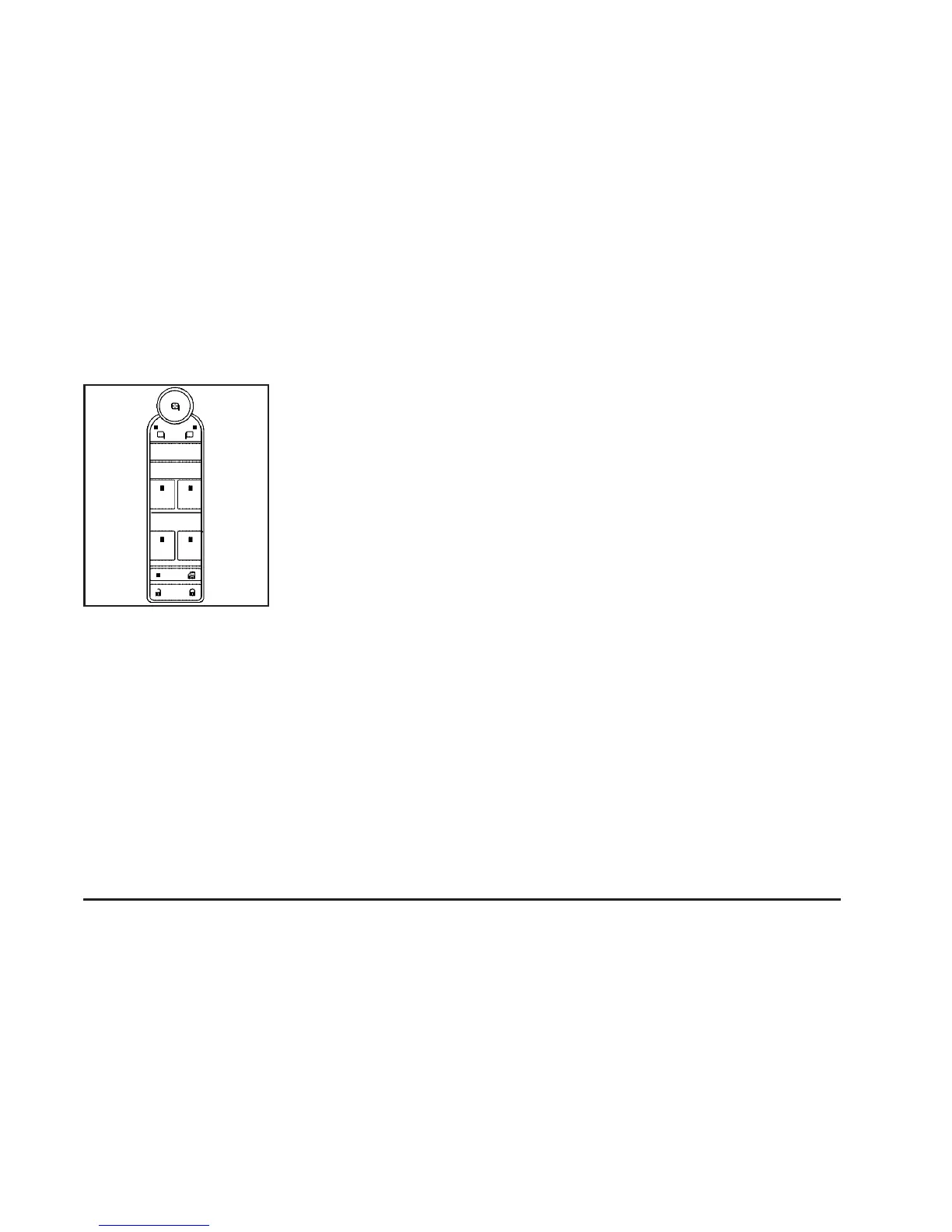
The power window
switches are located on
the driver’s door
armrest. In addition,
each door has a switch
for its own window.
The front power window switches operate with
one position for up and two positions for down
movement and the rear power window switches
operate with one position for up and one for down
movement.
Your vehicle has Retained Accessory Power (RAP)
that allows you to use the power windows once the
ignition has been turned off. For more information,
see Retained Accessory Power (RAP) on
page 116.
Express-Down Window
This feature is on the front windows. Press the
switch to the second position to activate the
express-down feature. To stop the window as it is
lowering, press down briefly on the switch again.
Window Lockout
o
(Window Lockout): The rear window lockout
button is located on the driver’s door armrest
near the window switches.
Press the right side of this button to disable the
rear window controls. The light on the button
will come on, indicating the feature is in use.
The rear windows still can be raised or lowered
using the driver’s window switches when the
lockout feature is active.
To restore power to the rear windows, press the
button again. The light on the button will go out.
Driver’s Side shown
109










 To Next Page