Page 17
PROGRAMMING THE BREWER (cont.)
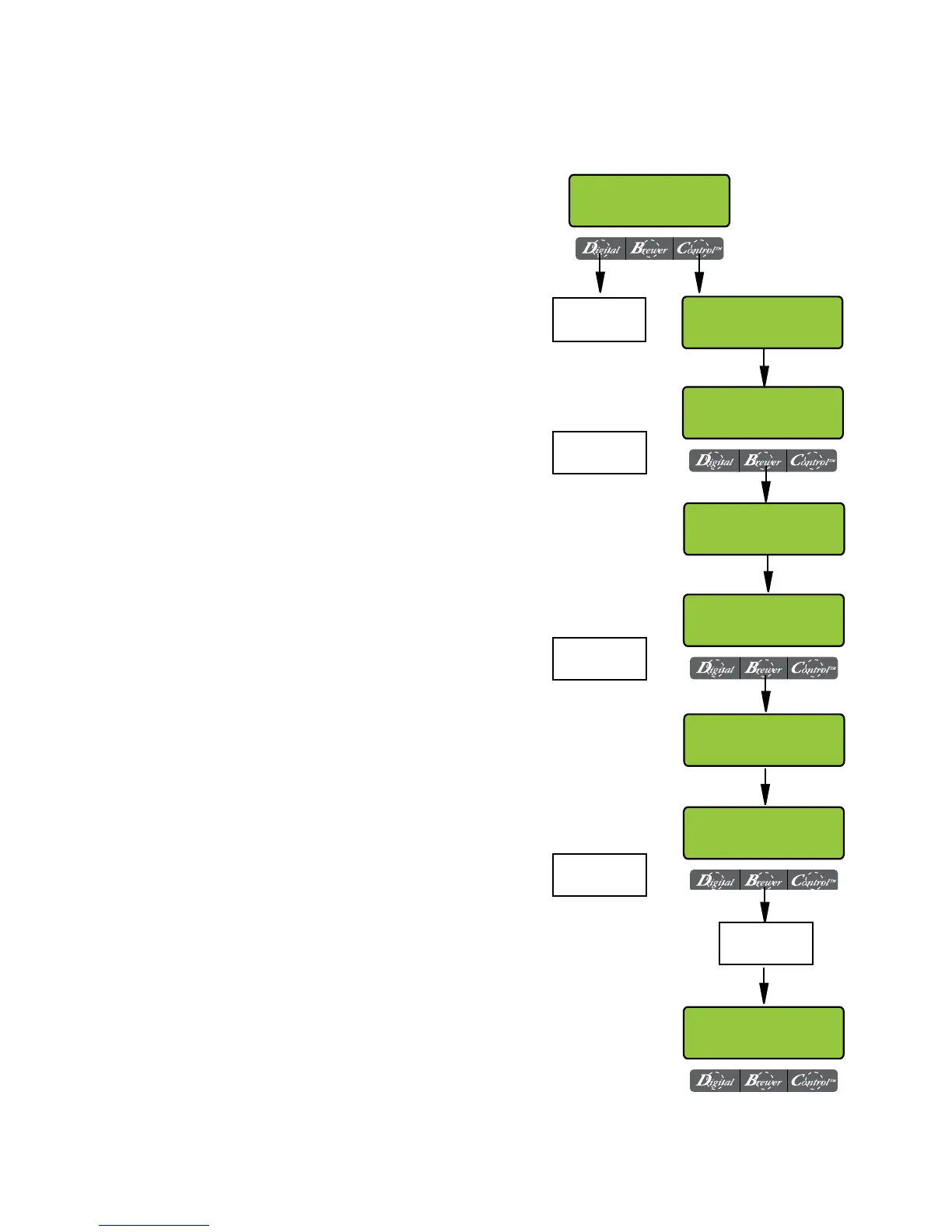
* ASSIGN RECIPE to or disable BREW SWITCH(S)
This function allows the operator to assign a recipe to
(or disable) each of the 3 brew switches (A, B, C). Any
saved recipes listed under "REVIEW RECIPES" can be
assigned to a brew switch. Only one recipe per brew
switch is allowed.
Procedure to select switch recipes
1. Press and hold the right hidden switch until the
display reads SET LANGUAGE. Press the right hid-
den switch until the display reads ASSIGN RECIPE?
Press YES.
2. The display should now read SELECT RECIPE BREW
SWITCH A, and then REGULAR (ICB) or TEA 1
(ITCB).
3. Using (-) and (+), scroll through the stored recipes
in the brewer’s memory until the desired recipe
name is reached.
4. Select DONE to set that recipe for brew switch A.
5. The display should now read SELECT RECIPE
BREW SWITCH B, and then DECAF (ICB) or HOT
TEA (ITCB).
6. Using (-) and (+), scroll through the stored recipes
in the brewer’s memory until the desired recipe
name is reached.
7. Select DONE to set that recipe for brew switch B.
8. The display should now read SELECT RECIPE BREW
SWITCH C, and then BREAKFAST BLEND (ICB) or
NO NAME COFFEE (ITCB).
9. Using (-) and (+), scroll through the stored recipes
in the brewer’s memory until the desired recipe
name is reached.
10. Select DONE to set that recipe for brew switch C.
11. Repeat steps 2 - 10 for right side of Twins.
Procedure to disable a Brew Switch:
1. Follow the same procedure as above. Choose DIS-
ABLED instead of recipe name.
2. Select DONE to disable that brew switch.
ASSIGN RECIPE
NO YES
SELECT RECIPE
<-<-<-BREW SWITCH A
"RECIPE NAME"
(-) DONE (+)
"RECIPE NAME"
(-) DONE (+)
SELECT RECIPE
<-<-<-BREW SWITCH B
"RECIPE NAME"
(-) DONE (+)
SELECT RECIPE
<-<-<-BREW SWITCH C
ADVANCE TO
NEXT FUNCTION
SCREEN
SCROLL THROUGH
STORED RECIPES IN
BREWER MEMORY
SCROLL THROUGH
STORED RECIPES IN
BREWER MEMORY
SCROLL THROUGH
STORED RECIPES IN
BREWER MEMORY
SET NEW RECIPE?
NO YES
REPEAT FOR BREW
SWITCH A, B, C FOR
RIGHT SIDE
PROGRAMMING FUNCTIONS - LEVEL 2 (cont.)
41581.2 091609


 To Next Page