Chapter 4 Component Replacement
4-2 Atria Service Manual
Battery
WARNING: Never remove the battery pack and attempt to
recharge it using an external battery charger. Fire or explosion
may result.
WARNING: Verify that external power is disconnected before
removing or replacing battery. A blank display is not a reliable
indication of disconnected external power.
WARNING: Fire hazard. Use only an approved battery pack.
Replace battery pack with the battery specified on the label
inside the battery compartment.
NOTICE: Return used battery packs to an appropriate battery
recycler. Contact your local waste management officials for
more information.
1. Disconnect external power.
2. Remove the paper tray cover and paper.
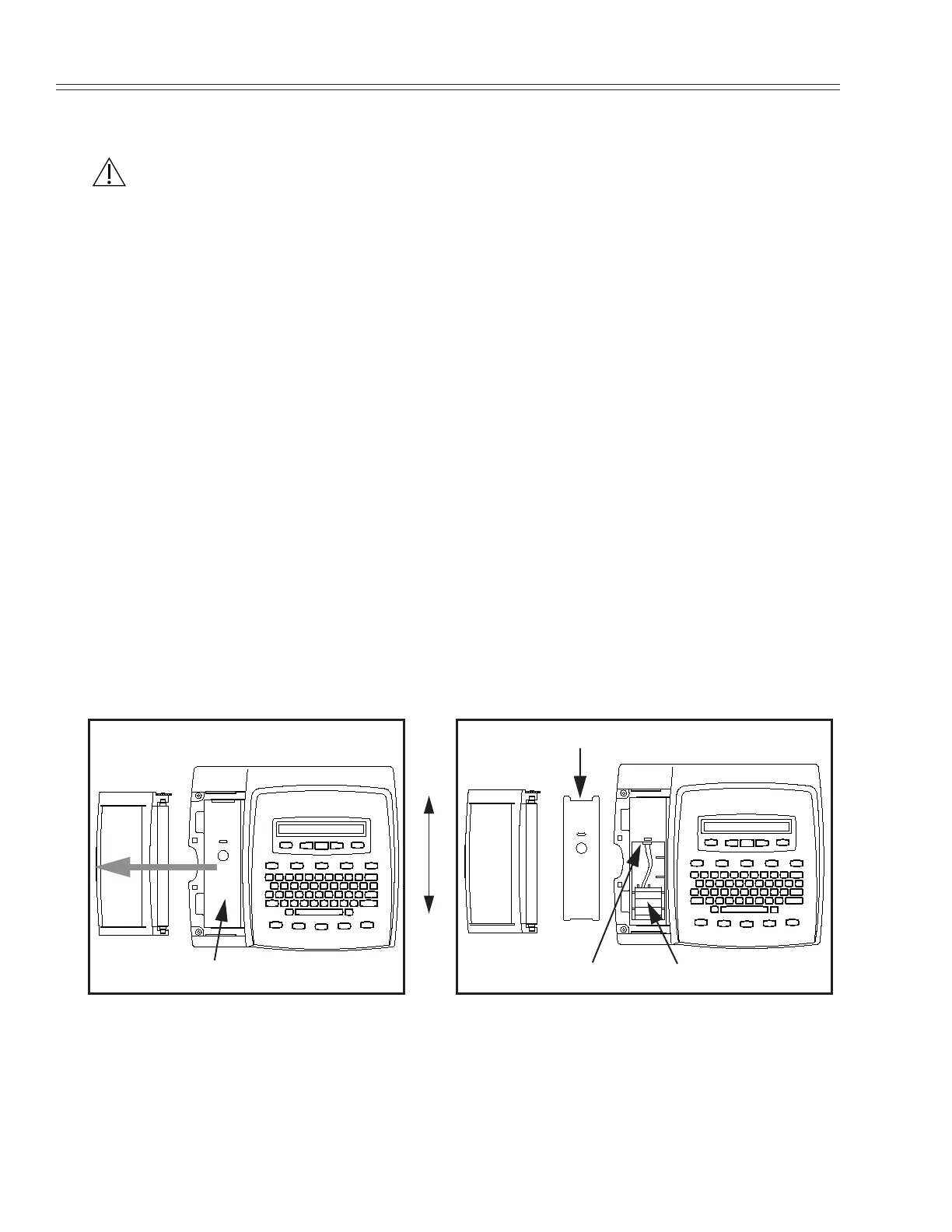
3. Remove metal plate by pushing it toward the back of the unit, and then
lifting.
4. Disconnect battery by grasping the connector and sliding it straight
out. DO NOT PULL ON WIRES!
5. Remove battery by pulling it toward the back of the unit and then
lifting it out.
6. Replace in reverse order.
Metal Plate
Back
Front
Battery PackConnector
Metal Plate


 To Next Page