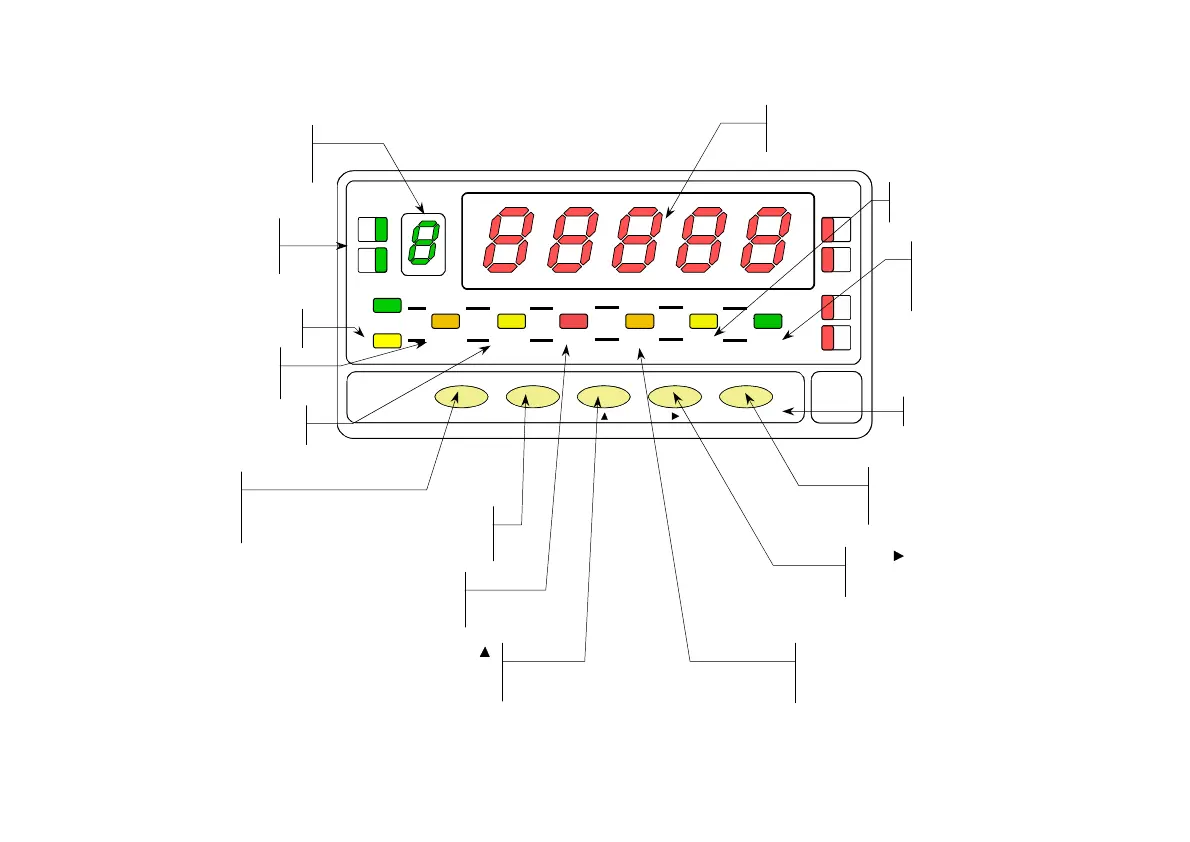
FRONT-PANEL FUNCTIONS IN PROG MODE
B
TARE
HOLD LIMI
MA
MIN DATA
DSP
INP2 FL
STOR
DSP1
INP1
1
4
3
TAR
RES E
LIMI
MAX/ MI N ENTE
ES
DATA
PROG
TEACH
PR
RU N
PROG LED
Indicates programmation mode
UXILIARY DISPLA
Indicates program module
MAIN DISPLA
Reads programming parameters
KEYBOARD IN PROG MODE
7
FLT LED
Indicates input filter programming.
ENTER
E
Accepts data.
Advances program setps
KEY
Moves de flashing digit to the right
DSP2 LED
Indicates Display2 programming
Indicates Display# programming
KEY
Increments the flashing
digit value
INP2 LED
Indicates Input2 programming
Indicates Input# programming
ESC KE
Returns to run mode at any program
step
TEACH KE
Reads the INP1, INP2,
INP# value
DSP1 LED
Indicates Display1 programming
INP1 LED
Indicates Input1 programming
and B LED's
Indicates program module
letter.
STORE LED
Indicates exit from de program
mode with data memory
storage.
27
his menu allows enabling and disabling the tare function and its reset.
MENU 2 - TARE
The initially programmed option appears on the display : [ UloCK = tare function
enabled, LoCK = tare function disabled ].
To switch between lock and unlock indications until desired option is
displayed.
ENTER
To save the option present on display and return to the run mode.
ESC
To exit from the programming mode without saving changes.
[27.2] Tare UloCk/LoC
B
TARE
HOLD LI M I T MA
MIN DATA
DSP2INP2 FL
STORE
DSP1
INP1
2
1
4
3
TARE
RESET LI M I T MAX/ M I N ENTE
ESC
DATA
PROG
TEACH
PR
RUN
The figure 27.1 shows the indication (tArE) corresponding to the tare menu. Press
ENTER
to acceed the configurations.
ENTER
To get access to the tare menu.
To Skip over this menu and pass to the next one.
ESC
To exit from the programming mode without saving changes.
[27.1] Tare menu
TARE
HOLD LI M I T MA
MIN DATA
DSP2INP2 FL
STORE
DSP1
INP1
1
4
3
TARE
RESET L I MI T M AX/ M I N ENTE
ES
DATA
PROG
TEACH
PR
RUN


 To Next Page