PICTURE FORMAT
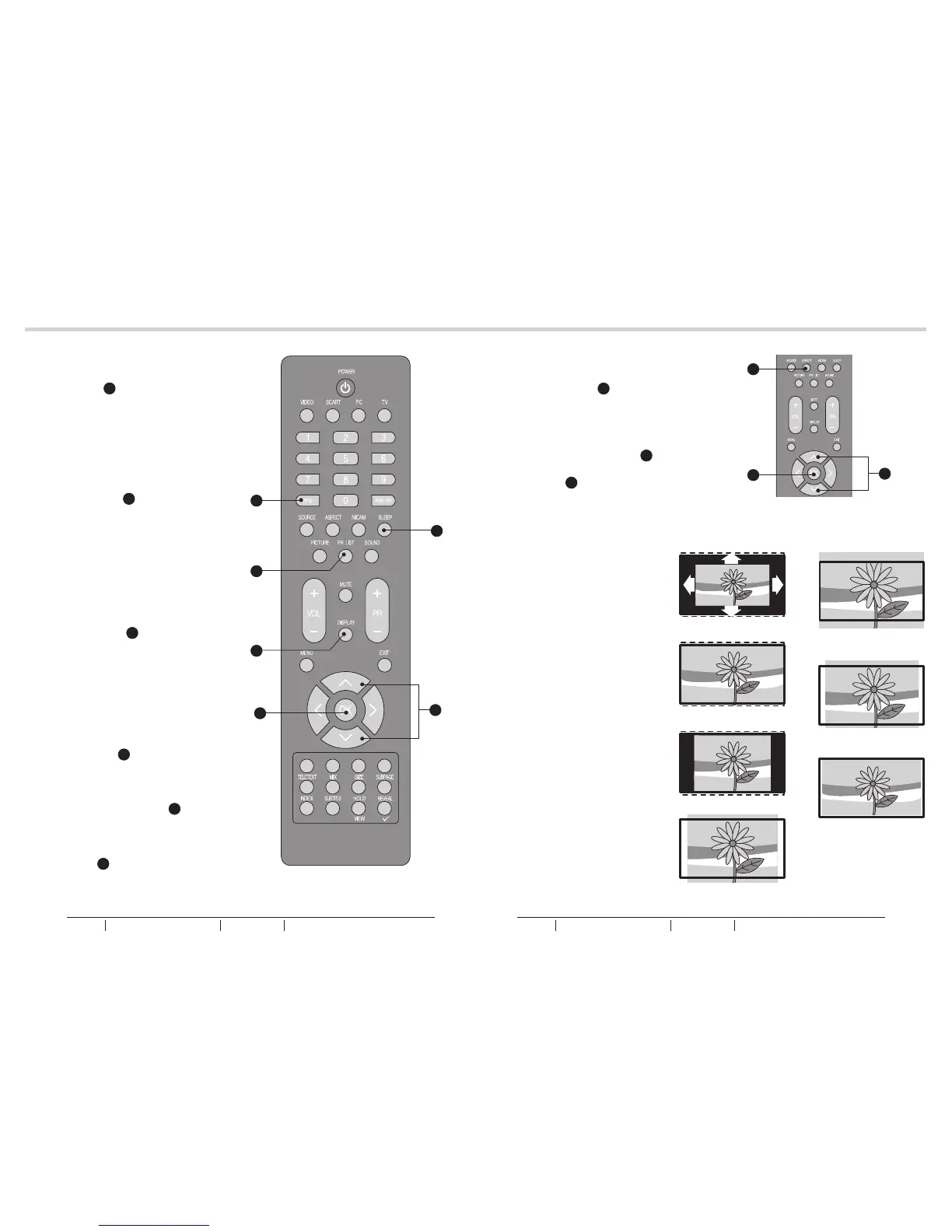
1. Press the ASPECT J on the
remote control to enter the
picture format menu.
See fig. 29.
2. Use the Up or Down Cursor Y
to select a picture format and
press the OK X to confirm your
choice.
See fig. 29.
- Automatic: DTV and HDMI
input will automatically display
the correct format, while ATV
and SCART will need to be set.
- Panorama: Removes the black
bars on the side of 4:3
broadcasts with minimal
distortion.
- 4:3: Displays the classic 4:3
format.
- Movie expand 14:9: Scales the
classic 4:3 format to 14:9.
- Movie expand 16:9: Scales the
classic 4:3 format to 16:9.
- 16:9 subtitle: Display 4:3
pictures using the full surface of
the screen leaving the subtitles
visible.
- Wide screen: Stretches the
classic 4:3 format to 16:9.
See fig. 30.
EPG
- Press EPG G to display electronic
program guide in TV mode.
See fig. 28.
PR LIST
- Press PR LIST O to display a
list of channels and input
sources.
See fig. 28.
DISPLAY
- Press DISPLAY T to display the
current signal status, including
input source/channel audio mode.
See fig. 28.
SLEEP
1. Press SLEEP M to turn the LCD
TV off after a preset time.
See fig. 28.
2. Use Up or Down Cursor Y to set
the time (5-180 minutes.)
See fig. 28.
3. Press OK X to confirm.
See fig. 28.
Panorama
Automatic
Movie expand 14:9
Movie expand 16:9
4:3
16:9 subtitle
Wide screen
20
21
BASIC OPERATIONBASIC OPERATION
fig. 28
fig. 29
fig. 30
X
M
G
O
T
X
J
Y
Y
BUSH HD Ready Digital LCDTV User Manual Customer Helpline 0845 604 0105BUSH HD Ready Digital LCDTV User Manual Customer Helpline 0845 604 0105



 To Next Page