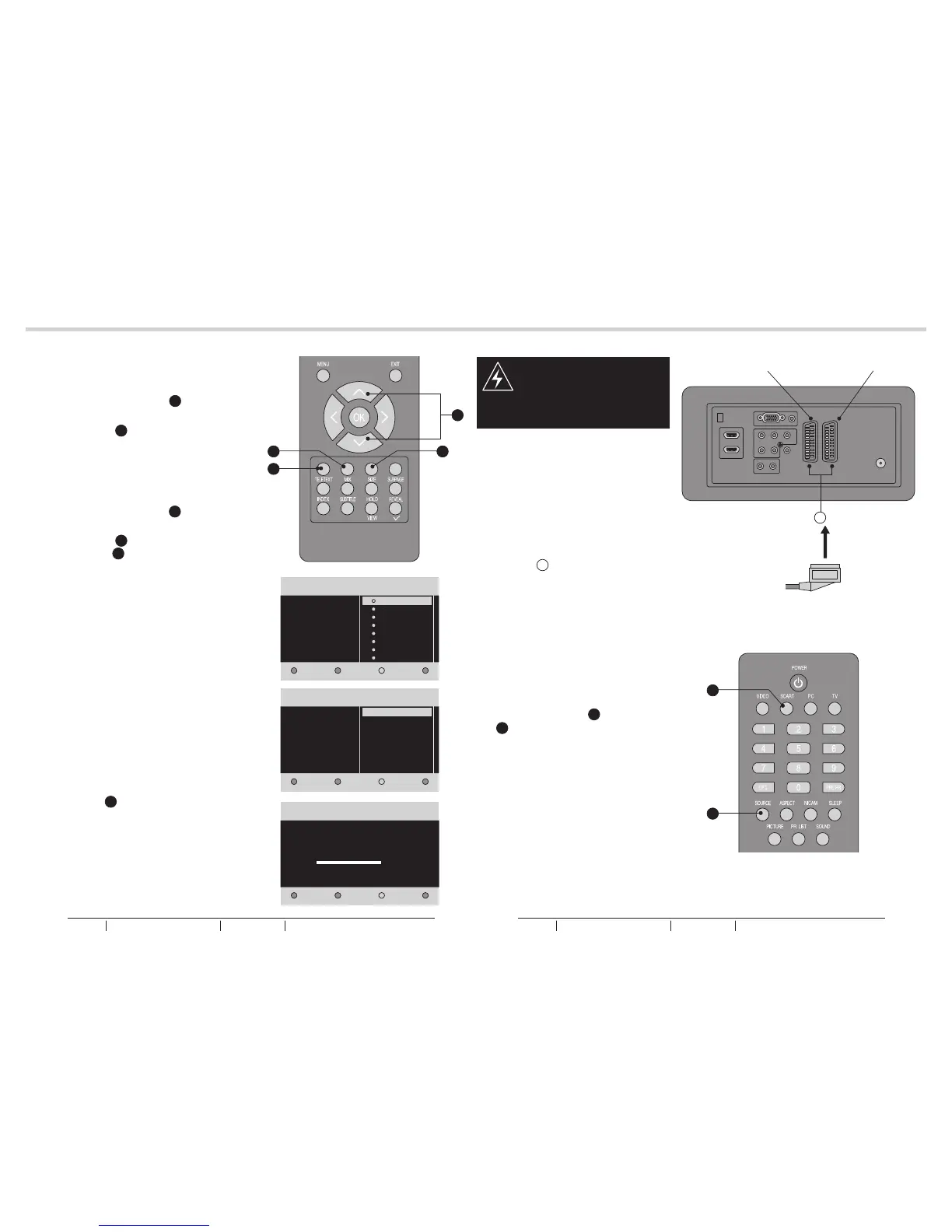
4. Use Up or Down Cursor Y to
select your country. Then press
Green Button a to continue or
press Yellow b to go back.
See fig. 13 and 15.
5. System searching may take few
minutes to complete.
See fig. 16.
6. A message will be displayed when
the search is complete. Press the
Red Button e to finish system
searching. The LCD TV will
automatically display the first
channel found automatically.
See fig. 13.
WARNING:
- Switch off the TV before
connecting any external device.
12
13
OTHER CONNECTIONSTUNING MENU OPTIONS
Q
fig. 17
SCART 2SCART1
fig. 13
fig. 14
fig. 15
fig. 16
SCART Lead
fig. 18
Next
TV Installation
Exit
System searching. Please wait...
Analog channels found: 0
Digital channels found: 0
3/3
SCART INPUT
1. Plug the scart lead from the
external device into TV SCART
Socket Q.
See fig. 17.
2. SCART 1 - Full SCART, which
transmits RGB, S-Video and CVBS
in and CVBS tuner out (Analog).
3. SCART 2 - Half SCART, which
transmits S-Video or CVBS in and
CVBS monitor out.
4. Press the SCART C or SOURCE
K to select the SCART 1 or
SCART 2.
See fig. 18.
- To connect external devices
such as DVD players, set top
boxes or games consoles.
3. Use Up or Down Cursor Y to
select your language. Then press
Green Button a to continue.
See fig. 13 and 14.
e
a
b
C
K
Y
Next
Language
TV Installation
Previous
English
Français
Italiano
Nederlands
Svenska
Dansk
Deutsch
Espanol
1/3
Next
Country
TV Installation
Previous
2/3
Gemary
Ireland
Czech Republic
Denmark
Finland
France
Austria
Belgium
BUSH HD Ready Digital LCDTV User Manual Customer Helpline 0845 604 0105BUSH HD Ready Digital LCDTV User Manual Customer Helpline 0845 604 0105



 To Next Page