NOTE: Make sure your local
voltage is 230V/240V~, 50Hz.
Z
Mains Socket
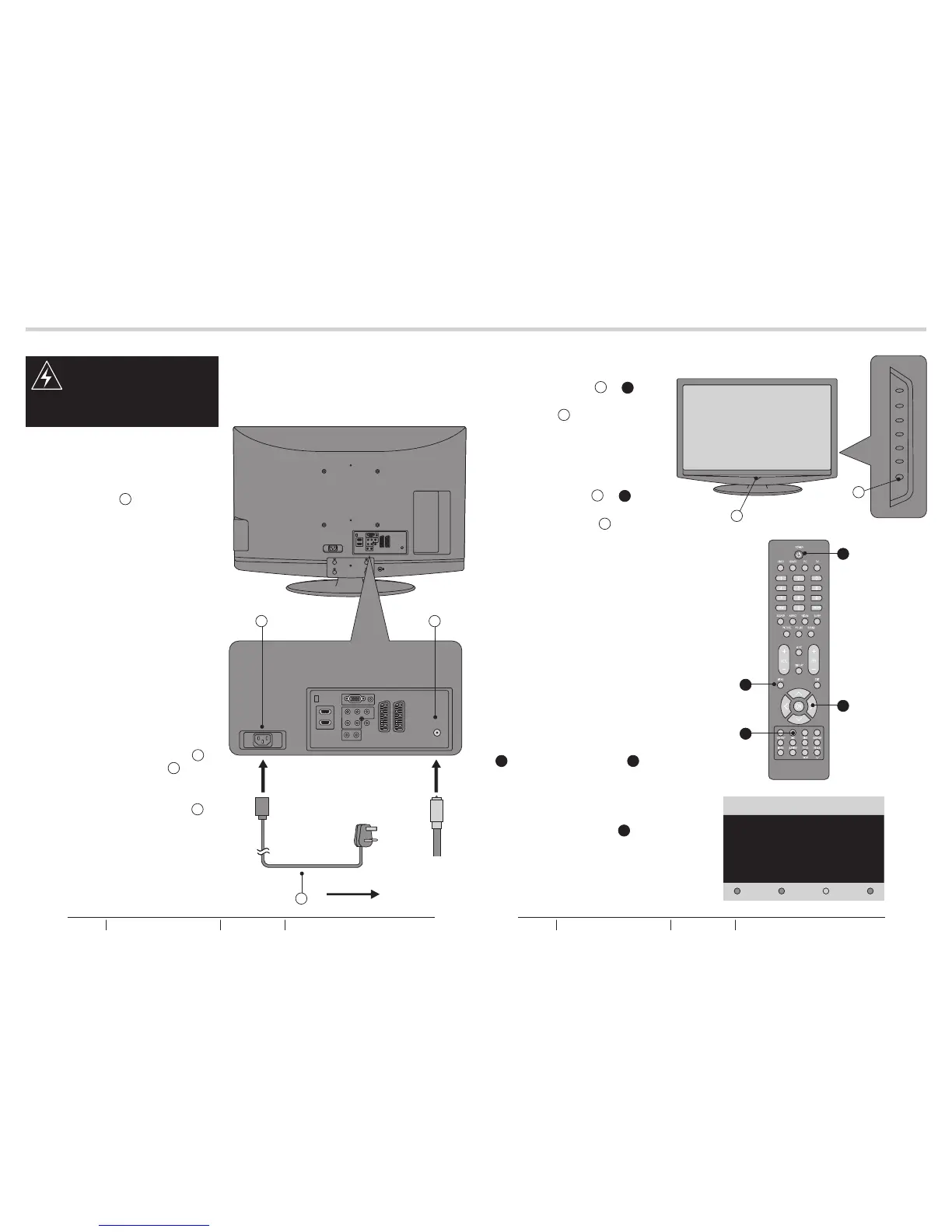
1. Connect the AC Power Cord Z
to the Power Connector X.
See fig. 9.
2. Connect the AC Power Cord Z
to the mains socket.
See fig. 9.
10
11
TUNING MENU OPTIONSANTENNA CONNECTION
P
1. Connect the Antenna Plug to the
Antenna Input P located at the
rear of the TV.
See fig. 9.
2. For optimum picture quality, adjust
antenna direction if needed.
3. To improve the picture quality in
a poor signal area, you may use
a signal amplifier (not included).
CONNECTING THE ANTENNA
Antenna Plug
fig. 9
X
J
C
fig. 10
fig. 11
fig. 12
Thank you for your purchase of this TV.
Please proceed with the following steps to set-up your TV.
Next
WARNING:
- Switch off the TV before
connecting any external device.
AC POWER CORD CONNECTION
A
TURN ON THE LCD-TV
1. When the POWER J or A is
pressed the TV will turn on and the
Power LED A on the front of the
TV will change from red to blue
See fig. 10 and 11.
2. When the LCD-TV is turned off
using the POWER J or A, the
LCD-TV will go into standby mode
and the Power LED A will turn
red.
See fig. 10 and 11.
FIRST TIME INSTALLATION
1. This display will appear on the
screen when the TV is turned on
for the first time.
See fig. 12.
NOTE: If you can not find this
screen, you may press MENU
U. Then use the Cursor Y to
select the TV menu.
See fig. 11.
2. Press the Green Button a to
proceed with the installation.
See fig. 11.
U
Y
a
BUSH HD Ready Digital LCDTV User Manual Customer Helpline 0845 604 0105BUSH HD Ready Digital LCDTV User Manual Customer Helpline 0845 604 0105



 To Next Page