Getting to know your TV
You’ll be up and running in no time
Getting to know your TV
15
or online at www.argos-support.co.uk If you still require further assistance, call one of our experts on 0330 024 0805. (Calls are charged at the standard rate of your network provider).
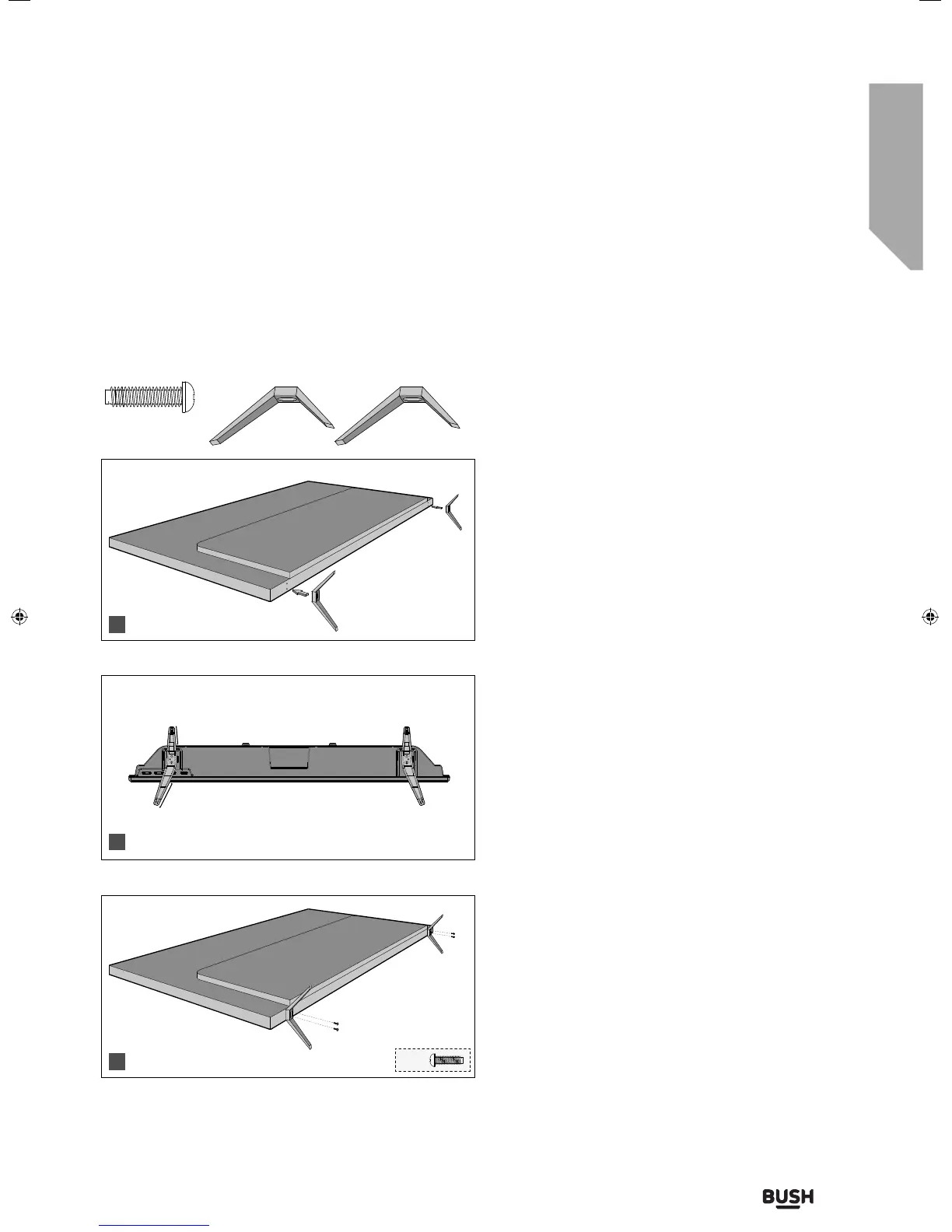
fig 1) Place the TV set on a flat and clean surface with
the panel facing downwards to avoid damage, then
fix the stand feet shown.
fig.2) When the stand feet are installed correctly the
stand feet will be longest at the front of the TV and
shortest at the back with the feet pointing away from
each other.
fig 3) When the stand feet are in the correct position,
secure the stand feet to the underside of the TV set
using the 4 screws provided.
4 x
1 x L (left)
Stand installation
To complete the stand installation you will require a cross head screw driver.
The stand installation pack comes with 4 screws and 2 x stand feet.
1 x R (right)
Back/Shortest
Front/Longest
1
2
3
4 x
3
4
1
2
User Guide - BUS-MAN-0027 BUSH 55-148F.indd 15User Guide - BUS-MAN-0027 BUSH 55-148F.indd 15 04/12/2015 15:16:4004/12/2015 15:16:40



 To Next Page