10
11
16
15
17
12
13
14
10
Getting to know your soundbar
You’ll be up and running in no time
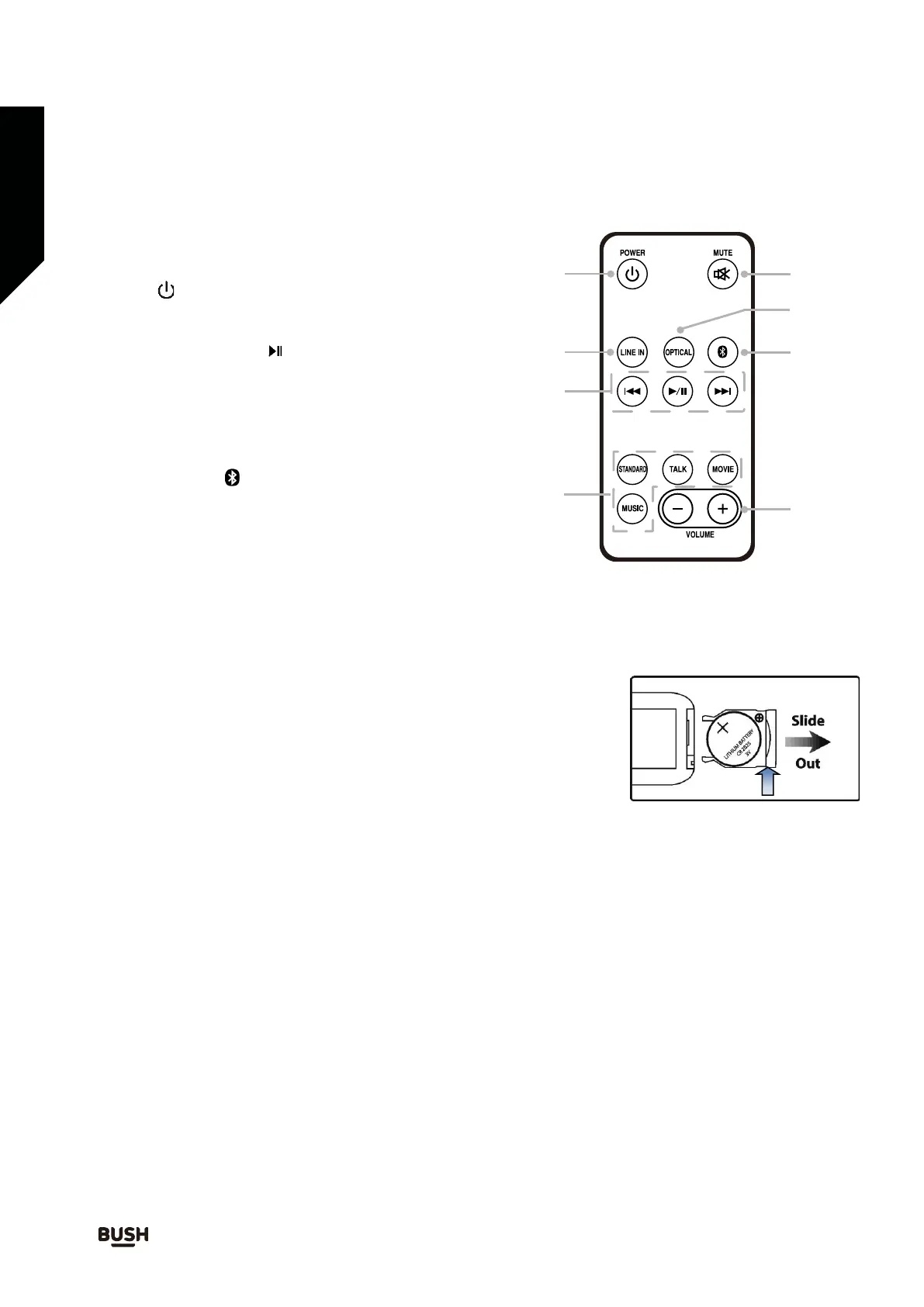
10. Power ( ) button
Remote control
11. Line in mode button
12. BT mode Previous ( ) button
Play / Pause ( ) button
Next ( ) button
13. EQ mode Standard button
Talk button
Movie button
Music button
14. Volume up (+) / down (-) buttons
15. Bluetooth mode ( ) button
16. Optical mode button
17. Mute button
Before using remote for the first time -
To replace the battery in the remote
pull out the clear isolation strip from the battery compartment.
Push the slider at the end of the remote control in the direction shown
by arrow 1 and then slide out the battery holder (fig. 1) Remove the
spent battery.
Insert 1 x CR2025 lithium battery in accordance with the diagram on the
rear of the remote. Take care to observe the correct polarity (+/-). Refit
the battery holder.
Do not expose the batteries or the installed batteries to excessive heat
(e.g. fire, sunshine or position close to radiators etc.).
Fig. 1
1
2
Push
1.
2.
3.
If you require any technical guidance or find that your product is not operating as intended, a simple solution can often be found in the Troubleshooting section of these instructions



 To Next Page