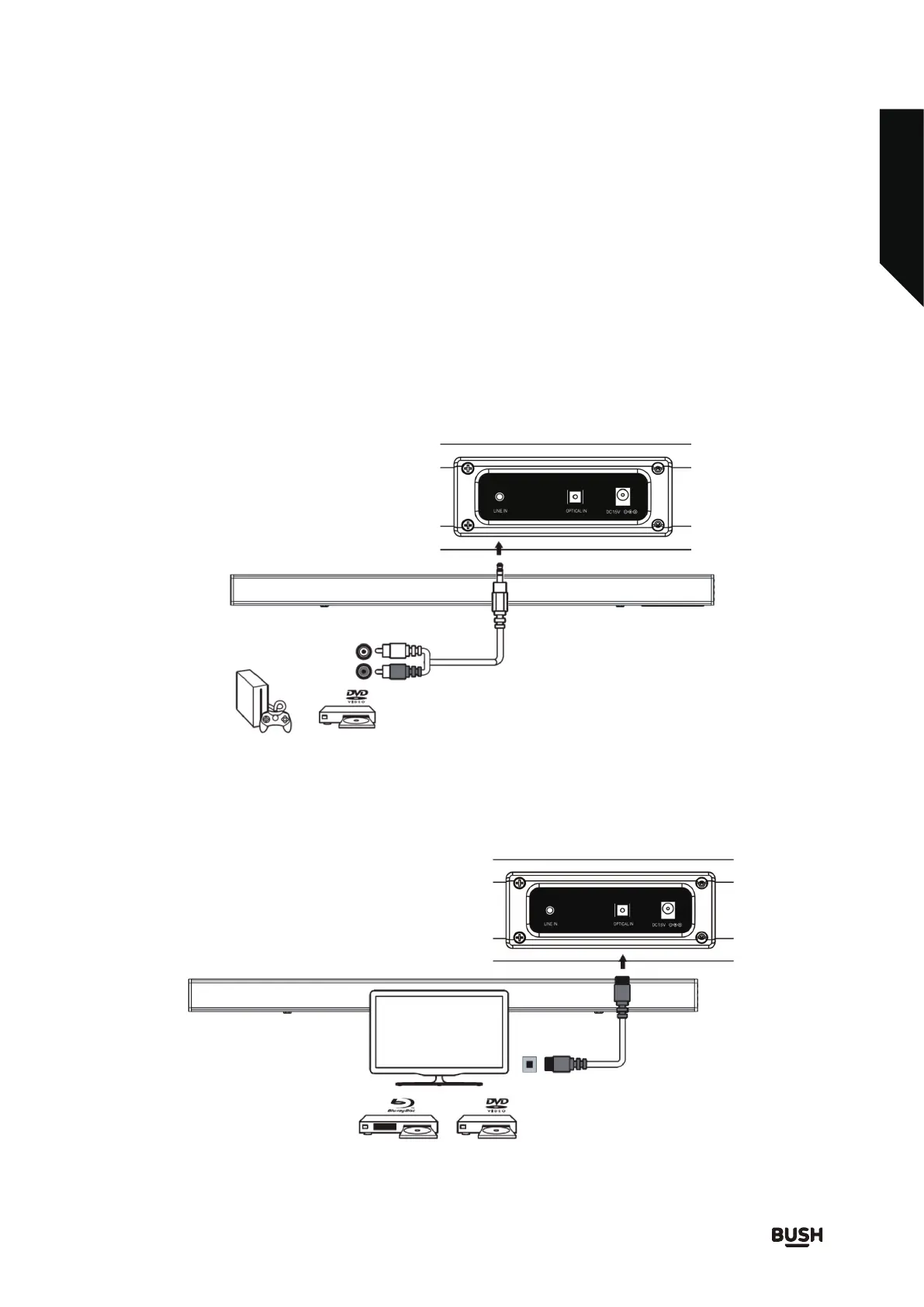
If you are connecting to a DVD player, games console, satellite box or TV which has RCA phono AUDIO OUT
sockets, then use Line in to twin phono lead (supplied) to connect to the AUDIO OUT sockets of the source
and the other end to the 3.5mm Line In sockets of the soundbar. Ensure red plugs are inserted into the red
sockets (fig.3).
2.
Place the soundbar in the desired location within easy reach of a mains plug
socket. If wall mounting the
soundbar,see wall mounting Page 1 7 .
11
3.
1.
Getting to know your soundbar
You’ll be up and running in no time
Connecting the soundbar
TV and audio equipment (e.g. DVD, MP3 players etc.) can be connected and amplified via the soundbar.
Fig. 3
Fig. 4
The soundbar can be connected via an OPTICAL connection to a TV, DVD or Blu-ray player using an optical
cable ( supplied ). Ensure any protective stoppers have been removed from the ends of the
optical cable
and the rear of the optical socket of
the soundbar. Connect one end of the cable to the
source optical
out socket and the other end to the optical socket at the rear of the soundbar. (fig.4)
Or by calling one of our experts on
0345 6040105
Follow the connecton guide below. DO NOT switch on the mains power until all other connections are
made.



 To Next Page