BAS520BT
6
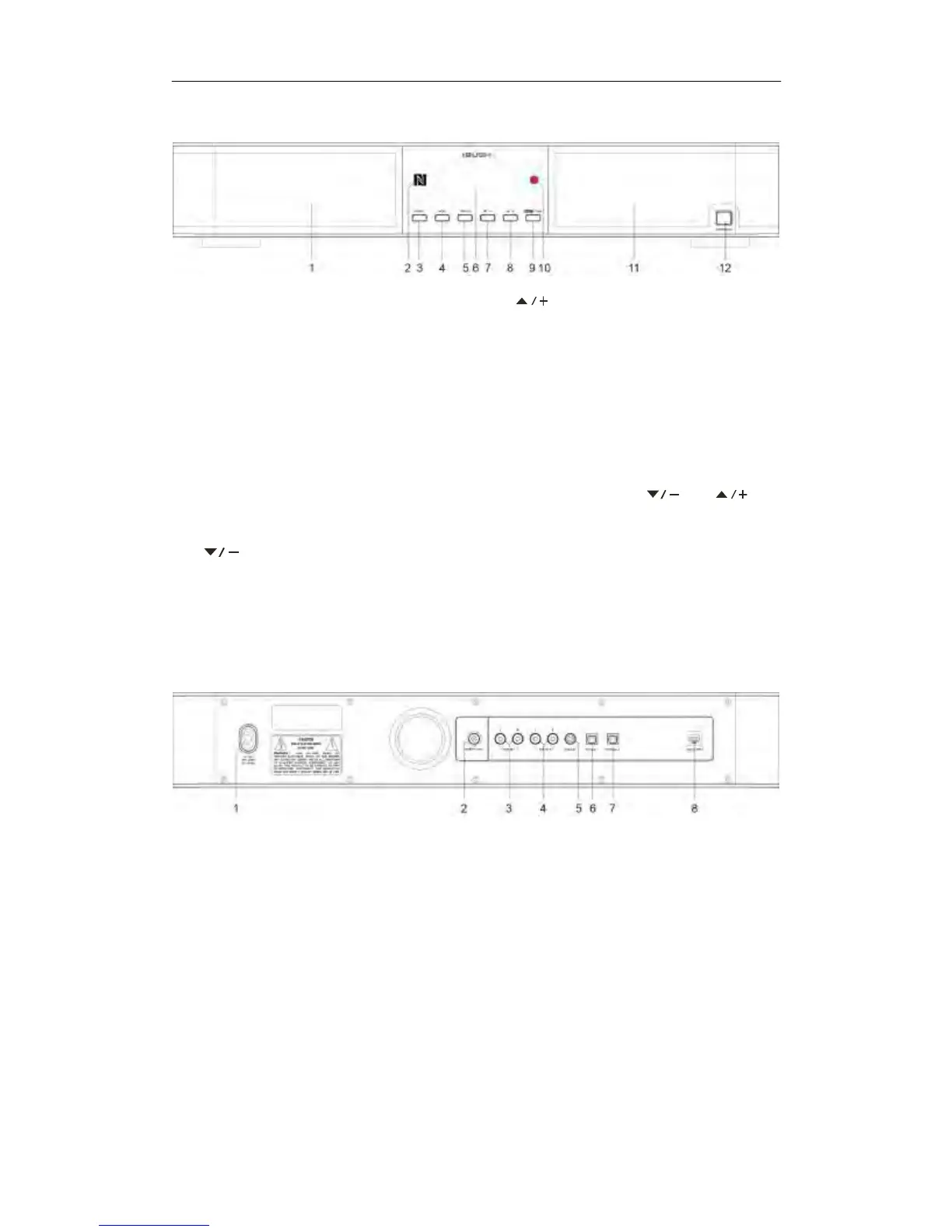
Front View
1. Left speaker grill
2. NFC for Bluetooth connection
3. SOURCE button
Press to switch among DAB+, FM,
Bluetooth, AUX IN1 Input, AUX IN 2
Input, Optical1 Input, Optical2 Input,
Coaxial Input modes.
4. MENU button
Press to display menu screen.
5. PRESET button
Press and hold to store preset station.
Press to recall stored preset station.
6. LCD display
7. button
Press to upwards browse options in
menu screen.
Press to decrease volume level when a
program/track is playing.
8. button
Press to upwards browse options in
menu screen.
Press to decrease volume level when a
program/track is playing.
9. SELECT button
Press to confirm selection when in menu
setting.
TUNE button
Press to shift volume adjusting function
to tuning function of and
buttons.
10. Remote control sensor
11. Right speaker grill
12. STANDBY/ON button
Press to switch unit on or standby.
Back View
1. AC IN socket
2. DAB/FM ANT. socket
3. AUX IN 1 socket
4. AUX IN 2 socket
5. COAXIAL socket
6. OPTICAL 1 socket
7. OPTICAL 2 socket
8. UPDATE PORT (Please leave this for
service professional!)



 To Next Page